Squarespace SEO description and product description: what to write in each
Par Oleksandr Shaniuk · fondateur de Sellura · Mis à jour le 1 novembre 2026
A Squarespace product has two descriptions, and search uses the second when you leave the first empty. The SEO description on the product's SEO tab takes up to 400 characters, Squarespace advises 50 to 300, and it says search engines cut descriptions off around 160. If you don't add one, search engines use the product description instead (Squarespace Help, updated 10 September 2026, read 1 November 2026).
- SEO description Squarespace advises
- 50–300
- characters, 400 at most
- Where search cuts it
- ~160
- Squarespace's own estimate
- Product description length
- none
- Squarespace publishes no cap
- If the SEO description is empty
- fallback
- the product description is used
So the first 160 characters of the product description are written for search either way. Squarespace publishes no length for the product description and asks for plain text when you paste. Below: which description shows where, the numbers for each, a plain-text template, one description scored before and after, and when a separate SEO description is worth writing.
Two descriptions, and which one search shows
The product description is the text in the product editor, shown on the product page. The SEO description is a separate field on the product's SEO tab, meant for search results. Squarespace's help says that if you don't add SEO descriptions, search engines use product descriptions for products, and excerpts for blog posts and events.
Neither is guaranteed to show as written. Squarespace's help says search engines decide what appears, and Google may pick other text from the page when it finds something more relevant to the search. What you control is that both candidates open with the product.
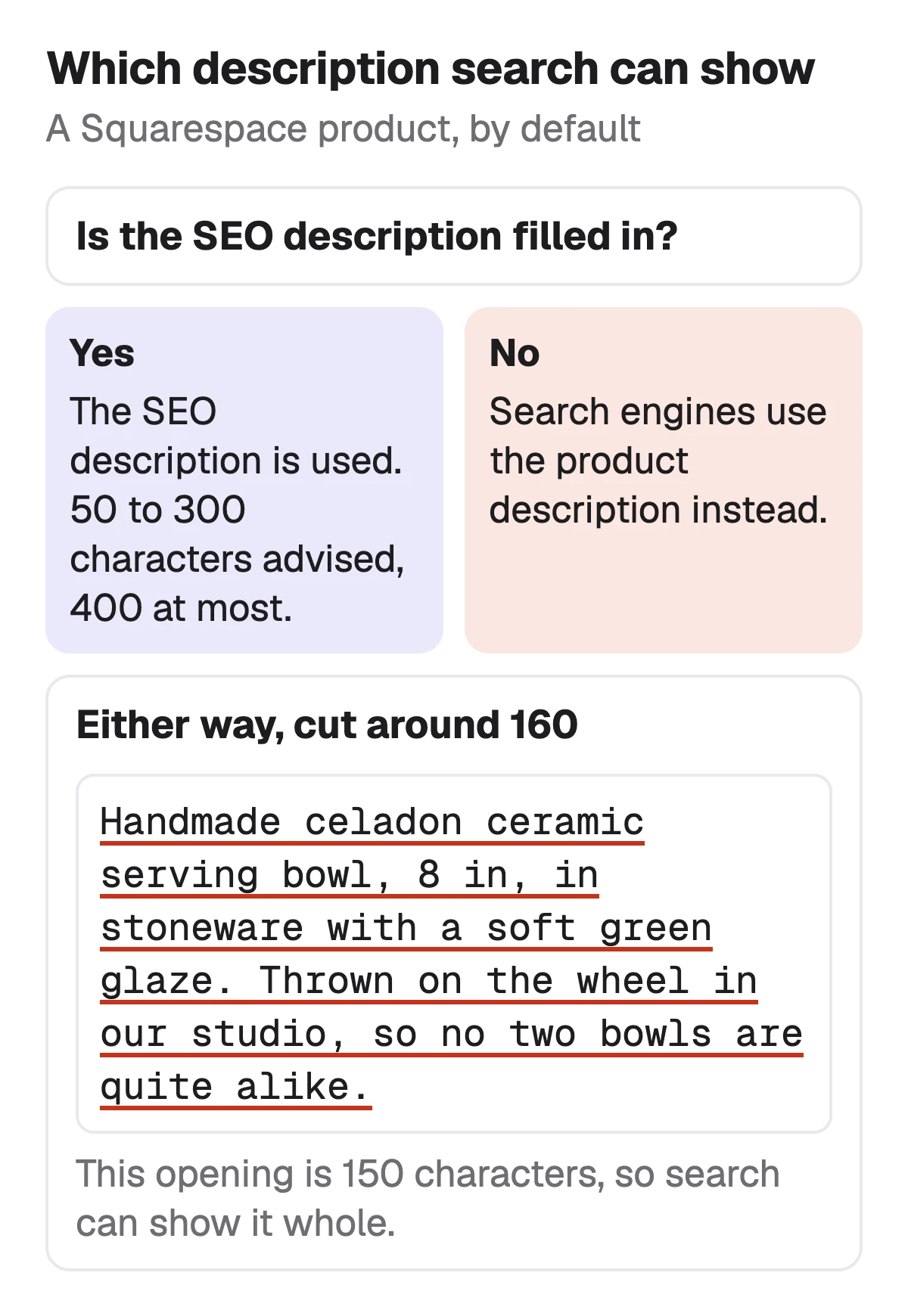
Sources: Squarespace Help: Adding SEO descriptions (50–300 advised, 400-character limit, cut around 160, product description used when empty; updated 10 September 2026), checked 1 November 2026 · Squarespace Help: Add products to your store (product names 200, tags 80, categories 25, plain text descriptions, Generate; updated 28 October 2026), checked 1 November 2026
The numbers for each description
All but one of these are Squarespace's. The exception is the description budget Sellura writes to, which is ours and marked as ours.
| SEO description | Product description | |
|---|---|---|
| Squarespace's cap | SEO description400 characters | Product descriptionnone published |
| Squarespace's advice | SEO description50 to 300 characters | Product descriptionplain text when you paste |
| Where search cuts it | SEO descriptionaround 160 characters | Product descriptionaround 160 characters, when it is used instead |
| Where it shows | SEO descriptionsearch results, when search engines use it | Product descriptionthe product page, and search when the SEO description is empty |
| What Sellura writes to | SEO descriptionthe description's first 160, to paste in | Product description5,000 characters, our budget |
Squarespace Help: Adding SEO descriptions (updated 10 September 2026) and Add products to your store (updated 28 October 2026), read 1 November 2026. The 5,000 is Google Merchant Center's description cap, borrowed because Squarespace syncs physical products to Merchant Center: caution of ours, not a Squarespace rule.
- Squarespace warns that going over the 400 could affect your ability to edit parts of your site, like the availability status and adding a logo.
- Use keywords in the SEO description, it says, but avoid keyword stuffing.
- On version 7.0 sites, a page description may show in search when there is no SEO description.
Sources: Squarespace Help: Adding SEO descriptions (50–300 advised, 400-character limit, cut around 160, product description used when empty; updated 10 September 2026), checked 1 November 2026 · Squarespace Help: Add products to your store (product names 200, tags 80, categories 25, plain text descriptions, Generate; updated 28 October 2026), checked 1 November 2026 · Squarespace Help: Display your products in Google Shopping (physical products sync to Google Merchant Center), checked 25 October 2026
Write the first 160 characters for search
Squarespace's keyword advice is to put the target keyword at the beginning of the first sentence on the page and to keep one focus keyword per page. In a product description that is the item in buyer words, then what sets it apart, then the fact a buyer checks before clicking, all inside about 160 characters so search shows it whole.
A description that opens with Welcome to our little shop spends the snippet on nothing. Treat the opening as the line you would want under your link in Google, and write the rest for the person who clicked.
- Lead with the focus phrase: Handmade speckled ceramic coffee mug, 12 oz.
- Then what makes this one different: white stoneware, a speckled glaze, made by hand.
- End the first sentence before about 160 characters.
- One focus phrase. Squarespace allows repeating it a few times in the body where it makes sense, never stacked into a list.
Check the SEO title that sits above it →
Sources: Squarespace Help: Keyword best practices (one focus keyword, titles 70 or fewer, no keyword stuffing; updated 14 August 2025), checked 1 November 2026 · Squarespace Help: Adding SEO descriptions (50–300 advised, 400-character limit, cut around 160, product description used when empty; updated 10 September 2026), checked 1 November 2026
A plain-text template for a Squarespace product
Squarespace asks for plain text when you paste a product description, so the template uses capitalised labels and simple dashes rather than Markdown or HTML. It reads the same whether you type it or paste it from a document.
The opening sentence
Under about 160 characters: the item with its focus phrase, what sets it apart, one fact a buyer checks.
SIZE
A short dash list: dimensions, capacity or fit.
MATERIAL
What it is made of and the finish, as on the label.
CARE
Exactly as you would tell a buyer, nothing you haven't tested.
A closing line
One plain sentence. No urgency: today and don't wait add nothing a buyer needs.
TipSquarespace's Generate button
Squarespace's product editor can suggest product details with AI once you add an image. Whatever drafts the text, check the opening against the 160 and the facts against the product before you save.
Squarespace SEO: every field Squarespace uses →
Source: Squarespace Help: Add products to your store (product names 200, tags 80, categories 25, plain text descriptions, Generate; updated 28 October 2026), checked 1 November 2026
One description, scored before and after
Both versions are for the same product with the same title, Handmade Ceramic Coffee Mug, Speckled Stoneware, 12 oz. We pasted each into the free Listing checker on Squarespace and changed only the description. The score is deterministic, so the same text always gets the same number.
| Before | After | |
|---|---|---|
| Opening | BeforeThis mug is so cute and perfect for your morning coffee! It makes a great gift for anyone in your life. | AfterHandmade speckled ceramic coffee mug, 12 oz, in white stoneware with a speckled glaze. Made by hand in our studio, so each one is a little different. |
| What search can show | BeforeNo item, material or size | AfterThe focus phrase, size, material and how it is made, in 149 characters |
| Description factor | Before17 / 25 | After24 / 25 |
| Listing checker score | Before79 / 100 | After86 / 100 |
Scored with Sellura's Listing checker on Squarespace, from pasted text, on 1 November 2026. The after version continues with SIZE, MATERIAL and CARE lists, as in the template. The other 14 points sit in the title factors, which this example leaves unchanged.
Check your own listing
Already selling on Squarespace? Score your product page
Copy the product name and description from your Squarespace product editor and paste them here for a 0–100 score and the top fixes, then rewrite it with your own words already filled in.
Free, no sign-up.
Free Listing checker: paste a Squarespace title and description →
When a separate SEO description is worth writing
If your product description already opens with a 160-character sentence that names the product, the fallback does the job and a second field is one more thing to keep in sync. Write a separate SEO description when the page has to open with something else, such as a made-to-order note, or when you want to say why someone should click, which Squarespace suggests: how the product solves a problem the searcher has.
Keep it inside Squarespace's 50 to 300, put the product inside the first 160, and don't copy the SEO title into it word for word. If old text still shows in Google after you edit, Squarespace suggests requesting a re-index in Google Search Console.
Squarespace product tags vs categories →
Source: Squarespace Help: Adding SEO descriptions (50–300 advised, 400-character limit, cut around 160, product description used when empty; updated 10 September 2026), checked 1 November 2026
What Sellura writes for a Squarespace product, and what it doesn't
Describe the product once, in a few words or with a photo, and Sellura returns a product name of about 70 characters that works as the SEO title, a plain-text description whose first 160 characters say what the product is, written so you can paste them into the SEO description too, 8 highlights for the description and 10 tags for your store's filters. The highlights, the tag count and the 5,000 budget are our numbers. It never adds a size, a material or a care instruction you didn't give.
The 0–100 score and the title preview are free on every generation, no card, and so are the Listing checker, the Squarespace title checker and the Squarespace fee calculator. A credit unlocks one finished listing: Starter is $15 a month for 25 credits or $150 a year, and Pro is $24 a month for 65 credits plus bulk, or $240 a year. Sellura doesn't connect to your Squarespace site, change your SEO settings, publish products or track where a page ranks, and it has no research database or ads analysis. It is not affiliated with Squarespace.
Write the Squarespace product, score and title free → · Plans and credits →
FAQ
How long should a Squarespace SEO description be?
What happens if I leave the SEO description empty?
Is there a character limit for a Squarespace product description?
Where do I add an SEO description to a Squarespace product?
Can I use HTML or Markdown in a Squarespace product description?
Can I check my Squarespace description for free?
Open every Squarespace product description with one sentence of under 160 characters that names the product, what sets it apart and the fact a buyer checks, because search uses it whenever the SEO description is empty. Write a separate SEO description only when the page has to open with something else, inside 50 to 300 characters. Then paste both into the free Listing checker, or let Sellura draft them with the score and the title preview free.
Ouvre le générateur pour Squarespace.