WooCommerce short description vs description: where each one goes and how to write both
Par Oleksandr Shaniuk · fondateur de Sellura · Mis à jour le 1 novembre 2026
The short description is the summary beside your product photos, and the description is the long text further down the page. WooCommerce's product editor documentation calls the short description a succinct summary of the long one that typically appears next to product imagery (read 1 November 2026). The two fields also travel to different places. WooCommerce's own structured-data code puts the short description into the product's markup for search engines and uses the long one only when the short one is empty, while the official Google for WooCommerce extension sends the long description to Google Merchant Center by default.
- Description fields on a product
- 2
- short description and description
- Length WooCommerce publishes
- None
- for either field, REST API and docs
- Google's description cap
- 5,000
- Merchant Center, where the description goes
- Short description we write
- 5 × 100
- points × characters, our numbers
So write both, each for its own reader: a short description of a few plain lines that stands on its own, and a description that opens with what the product is and who it is for, then the details a shopper checks. WooCommerce publishes no length for either field. Below: where each one shows, where each one is sent, one product written both ways, and the mistakes that put the wrong text in front of Google.
Where each description shows on the product page
In the classic product editor the description is the main box under the product name, and the short description has its own box lower down. On the page a shopper sees, the order is reversed: the short description sits up top beside the photos, near the price and the Add to cart button, and the description comes below, often in a tab of its own. Exactly where depends on your theme.
That position decides the job. The short description is read by someone deciding whether to scroll, so it has a few seconds. The description is read by someone who already cares and wants the measurements, the materials and what comes in the box.
| Short description | Description | |
|---|---|---|
| What WooCommerce calls it | Short descriptionA succinct summary of the long description | DescriptionThe detailed description of your product |
| Where a shopper sees it | Short descriptionBeside the product photos, typically | DescriptionBelow the photos, often in a tab |
| What it takes | Short descriptionText, and video embeds too | DescriptionText, images, video embeds, tables and HTML |
| Length WooCommerce publishes | Short descriptionNone | DescriptionNone |
| Sent by default to | Short descriptionThe product's structured data for search engines | DescriptionGoogle Merchant Center, through Google for WooCommerce |
From WooCommerce's product editor documentation and REST API, and WooCommerce core's structured-data code, all read 1 November 2026. Where each field appears on the page is set by your theme.
Sources: WooCommerce docs: Product editor settings (the short description is "a succinct summary of the long description", typically shown next to the product images), checked 1 November 2026 · WooCommerce REST API v3: Products (description and short_description are strings, no length published), checked 1 November 2026
Which description Google gets, and from where
Google can meet your product's text in two ways, and WooCommerce feeds each from a different field. The first is the structured data on the product page itself, the markup search engines read for a product's name, price and description. WooCommerce core's structured-data code, read on 1 November 2026, fills the description there with the short description, with HTML and shortcodes stripped out, and falls back to the long description only when the short one is empty. The same code writes no product markup at all for a product that has no price, no reviews and no rating.
The second is Google Merchant Center, the feed behind free listings on the Shopping tab and Shopping ads. The Google for WooCommerce extension syncs your products there, and its FAQ says the description it sends defaults to the long description, with the short one used only when a product has no long one. Switching that needs a code snippet the FAQ provides and says it does not support.
- On the page, for search engines: the short description first, the long one only if the short one is empty.
- In Merchant Center, through Google for WooCommerce: the long description first, the short one only if the long one is empty.
- No price, no reviews, no rating: WooCommerce writes no product markup, whichever description you wrote.
- Neither field is a meta description. WooCommerce core has no meta description field at all, and SEO plugins add one.
Google Shopping SEO: the title and description in your feed →
Sources: Google for WooCommerce FAQ (the description sent to Merchant Center defaults to the long description), checked 1 November 2026 · Google for WooCommerce (products sync to Google Merchant Center, free listings on the Shopping tab), checked 1 November 2026
How to write the short description
Write it as if it were the only text on the page, because for search engines it may be. Three to five short lines: what the product is, then the one or two things that make someone buy it, then the fact that most often stops a sale, such as size or what is included. Each line should say something the product name doesn't already say.
WooCommerce publishes no length, so the budget is ours: up to 5 points of up to 100 characters each. Keep it plain. Since the structured data takes the text with HTML stripped, a bulleted list still reads as separate lines, but a table or an embedded video adds nothing there.
- Open with the product in plain words, not with the brand story.
- One benefit or detail per line, each one new.
- Name the size, the quantity or what comes in the box if a shopper would ask.
- No price, sale or shipping words: WooCommerce has its own fields for those, and the text outlives the sale.
- Don't paste the first lines of the long description here. Two copies of one paragraph teach nobody anything.
Check your own listing
Already selling on WooCommerce? Score your product's name and description
Copy the product name and the description of one product from your WooCommerce product editor and paste them here for a 0–100 score and the top fixes, then rewrite it with your own words already filled in.
Free, no sign-up.
How to write the long description
The long description is the text that reaches Google Merchant Center if you connect your store, so Google's rules for a product description are the useful ones to write to. Google asks for the most important details in the first 160 to 500 characters, caps a description at 5,000 characters, and wants no price, sale, shipping, delivery dates, company name or links in it (Merchant Center Help, read 1 November 2026).
Start with what the product is and who it is for, in the first two sentences. Then the details a shopper checks, in the order they check them: size or measurements, materials, what is included, how to use it and care for it. WooCommerce publishes no length for this field either, and Sellura writes it inside Google's 5,000 so the same text goes to the feed whole.
- First 160 characters: the product and its key specification, since that is the part Google advises getting right.
- Then measurements, materials, what's in the box, use and care, as facts.
- No price, sale, discount or shipping promises: they belong in WooCommerce's own fields and break Google's description rules.
- No links to other pages or stores.
WooCommerce SEO: the name, the two descriptions and the tags →
Source: Google Merchant Center Help: Description (1–5,000 characters, most important details in the first 160–500, no price, shipping or links), checked 1 November 2026
One product, written both ways
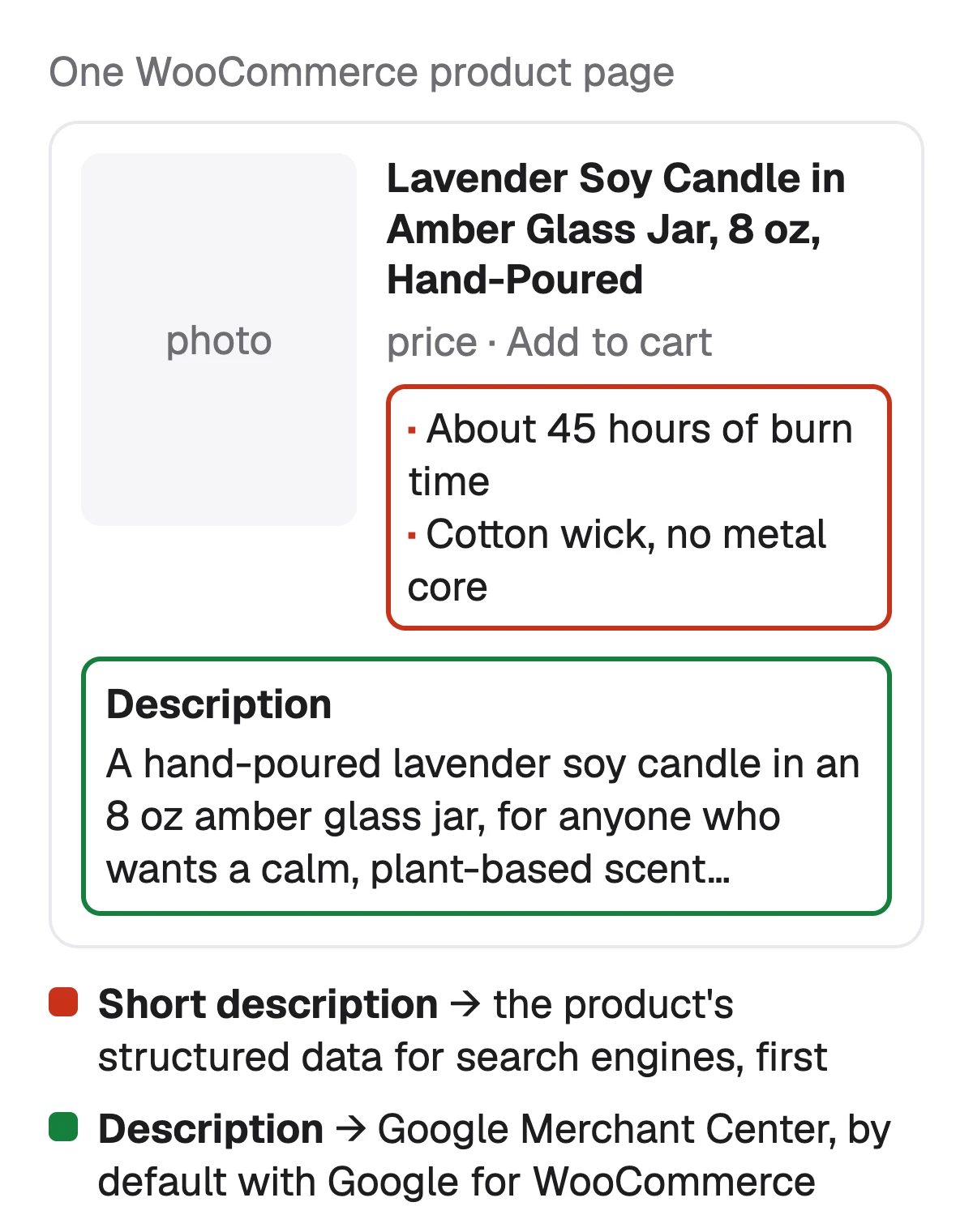
A pair we wrote for one candle to show the split, with the product name "Lavender Soy Candle in Amber Glass Jar, 8 oz, Hand-Poured". The short description has four lines, 117 characters between them, and each adds something the name doesn't have: the burn time, the wick, the ingredients, the jar.
The description that goes under it opens with the same product in a sentence and then gives the facts a buyer checks. Its opening 152 characters are written to stand alone, because that is what Google reads first in Merchant Center.
| Field | Text |
|---|---|
| Short description | TextAbout 45 hours of burn time · Cotton wick, no metal core · Lavender and soy wax only · Recyclable glass jar, label peels clean |
| Description, opening (152 characters) | TextA hand-poured lavender soy candle in an 8 oz amber glass jar, for anyone who wants a calm, plant-based scent in a bedroom or bath. Burns about 45 hours. |
| Description, then | TextSize: 8 oz of wax, jar 3 in wide and 3.5 in tall. Wax: soy. Scent: lavender. Wick: cotton. Care: trim the wick to 1/4 in before each burn. Questions about a scent? Send us a message. |
An example we wrote to show the split, not a real store's product. Every number in it is the example's own.
Five mistakes that put the wrong text in front of Google
Each of these comes from treating the two fields as one, or from forgetting where each one is sent.
- An empty short description: the structured data then takes the whole long description, stripped of its formatting.
- The same text in both fields: the page shows it twice, and neither field does its own job.
- A sale or a delivery promise in the long description: it goes to Merchant Center, where Google's description rules leave such text out.
- No price on the product: WooCommerce writes no product markup at all until the product has a price, a review or a rating.
- A list of keywords in the short description: it reads as a list to a shopper, and it says nothing about the product to anyone else.
How to sell on WooCommerce: setup, costs and the first product →
What Sellura writes for a WooCommerce product, and what it doesn't
Describe the product once, in a few words or with a photo, and Sellura writes both descriptions to their own jobs: up to 5 short description points of up to 100 characters, each saying something the name doesn't, and a plain-text description inside 5,000 characters whose first 160 say what the product is and who it is for. It also writes a product name of about 60 characters, inside the 70 we allow, and 10 product tags of up to 30 characters. All of these numbers are ours, since WooCommerce publishes none. It never adds a material, a measurement, a certification or a delivery time you didn't give.
Every generation comes back with a 0–100 score and the name preview, free and without a card. The score is deterministic: the same listing always gets the same number, and each weak factor comes with one fix written for that listing. A credit unlocks the finished listing: Starter is $15 a month for 25 credits or $150 a year, and Pro is $24 a month for 65 credits plus bulk, or $240 a year. Sellura doesn't install on WordPress, publish to your store, set your meta tags or track where a page ranks, has no research database or ads analysis, and is not affiliated with WooCommerce or WordPress.
Write the WooCommerce product, with the score and name free → · Plans and credits →
FAQ
What is the difference between the short description and the description in WooCommerce?
Where does the short description show in WooCommerce?
How long should a WooCommerce short description be?
Which description does Google use for a WooCommerce product?
Can I send the short description to Google Shopping instead?
Is the short description the meta description?
Write the short description first, as three to five lines that would stand on their own, because WooCommerce gives exactly that text to search engines in the product's markup. Then write the description for Google Merchant Center's rules: the product and who it is for in the first 160 characters, the facts after, no price or shipping text, inside 5,000 characters. Give the product a price so the markup is written at all. If you want both drafted for you, Sellura writes them to their own jobs: the score and the name preview are free, and a credit buys the finished listing.
Ouvre le générateur pour WooCommerce.