Shopee listing not showing? Find out which of four states it is in
Por Oleksandr Shaniuk · fundador de Sellura · Actualizado el 1 de noviembre de 2026
A Shopee listing that is missing from search is usually under review, deboosted, banned or deleted, and Seller Centre says which under My Products › Violation. Shopee deboosts a listing with a minor violation, such as the wrong category or a brand name spammed in the title, which lowers its search ranking until you fix it. It bans a listing it wants edited and deletes it if the deadline passes, and it deletes a severe one outright (Shopee's Singapore Seller Education Hub, listing violations page dated 14 August 2026, read 1 November 2026).
- Deboost takes effect
- ≤1 day
- and up to 1 day to lift after the fix
- Wrong category, before Shopee moves it
- 3 days
- then it is auto-corrected
- Listing limit after many penalty points
- 28 days
- temporarily reduced
- Checks for a Qualified listing
- 10
- name, description and images
Shopee's own checklist for listings missing from a shop adds causes at the account level: an unverified phone number, no pickup address or shipping channel set up, a reached listing limit, or listings limited because of penalty points. Below: the order to check things in, what each state means, how to fix a wrong category before Shopee does it for you, and the content gaps that keep a live listing low. Sellura writes Shopee listings in English for Singapore and the Philippines and is not affiliated with Shopee.
Check your own listing
Already listed on Shopee? Score your listing
Copy the product name and description from your Shopee listing and paste them here for a 0–100 score and the top fixes, then rewrite it with your own words already filled in.
Free, no sign-up.
Check it in this order
Start with the causes that hide every listing in a shop, because rewriting a product name fixes none of them. Then look at the listing's own state in Seller Centre, and only when it is live and clean, at its content. The steps below follow Shopee's own pages, Singapore edition; the Philippine Seller Centre has the same Violation tabs.
Is it missing from your own shop page?
Then check the account first. Shopee lists an unverified phone number (in Singapore, one with the +65 prefix), no pickup address or shipping channel enabled, a reached listing limit, and listings limited because of penalty points.
Is it under review?
A new or edited listing can sit in Shopee's review. The Banned tab shows a status of Banned or Reviewing for each listing it holds.
Open My Products › Violation
The Deboosted, Banned and Shopee Deleted tabs each give the violation reason, and the Banned tab adds a deadline and a suggestion.
Look at Account Health
The Listing Violations category there shows whether you have collected penalty points, which can cut your listing limit for 28 days.
Live and clean, but low?
Then it is a content problem, and the Content Quality grade in My Products tells you which fields Shopee thinks are thin.
Sources: Shopee Seller Education (SG): Why are my listings not showing in my shop? (dated 15-03-2021), checked 1 November 2026 · Shopee Seller Education (SG): Listing violations (deboosted, banned and deleted listings; dated 14-08-2026), checked 1 November 2026
Deboosted, banned or deleted: what each one means
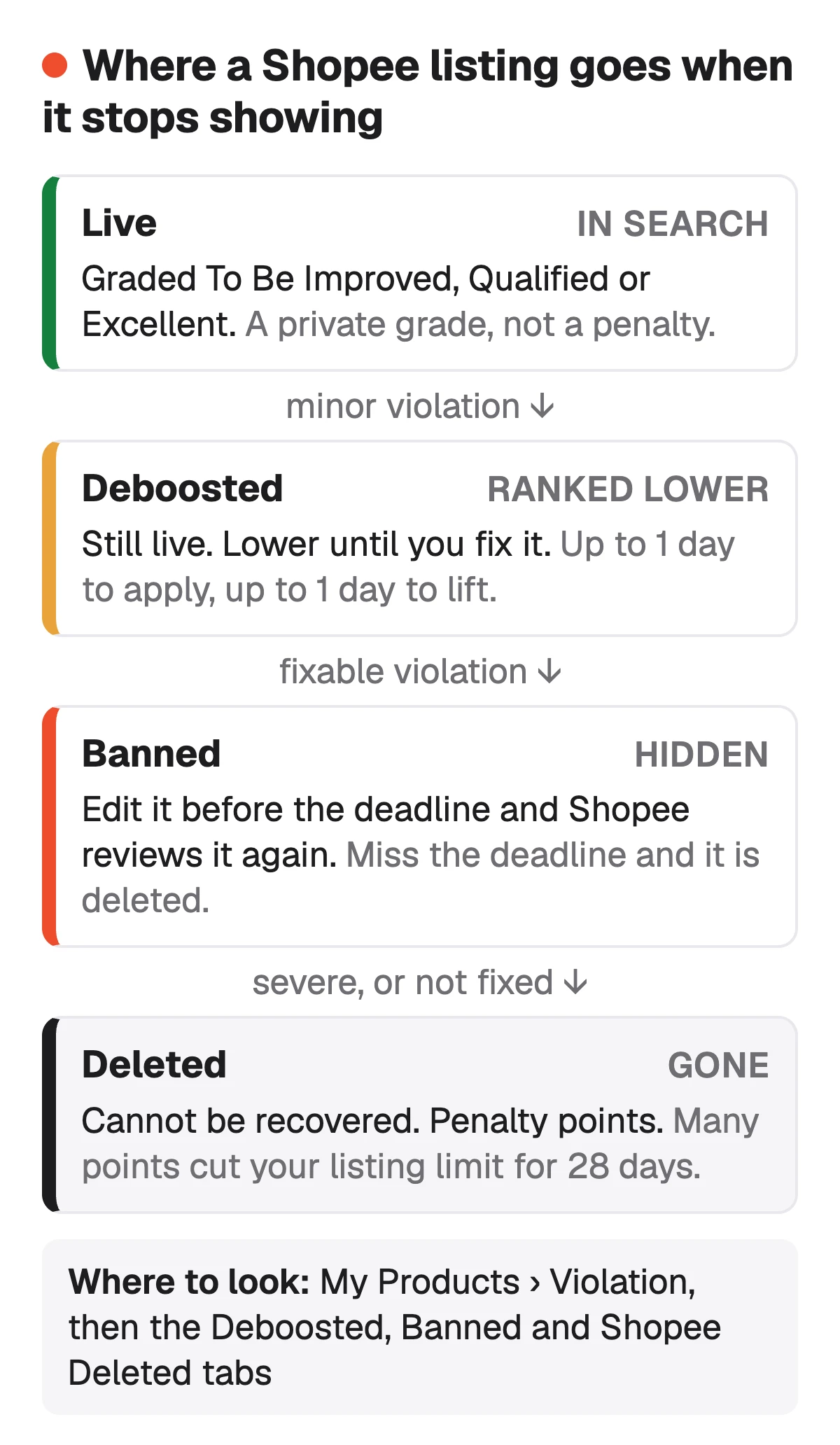
The three states are three levels of the same thing. A deboosted listing stays live and stays buyable, but Shopee lowers its search ranking until you fix the violation; the lower ranking can take up to a day to apply, and after the fix up to a day to lift. A banned listing is out of sight until you edit it and Shopee reviews it again. Delisting it does not stop the clock: if the deadline passes, Shopee deletes it.
A deleted listing cannot be recovered, and a listing Shopee deletes earns penalty points. Enough points for listing violations cut your listing limit for 28 days and can restrict the account further. Severe violations, such as a prohibited item, can freeze the account for good. Do not upload a deleted listing again unchanged: Shopee counts that as spam too.
| State | Shopee's example | What you see | What to do |
|---|---|---|---|
| Deboosted | Shopee's exampleWrong category, brand names spammed in the title | What you seeStill live, lower in search | What to doFix the reason in the Deboosted tab; it lifts within a day |
| Banned | Shopee's exampleInaccurate or misleading information, a missing licence document | What you seeHidden, with a deadline | What to doEdit it, or upload documents, before the deadline |
| Deleted | Shopee's exampleA prohibited item, or a ban left past its deadline | What you seeGone, with penalty points | What to doList it again only once the violation is gone |
From Shopee's Singapore Seller Education Hub, Listing violations, dated 14 August 2026 and read 1 November 2026. The examples are Shopee's; the last column is our summary of its instructions.
Sources: Shopee Seller Education (SG): Listing violations (deboost timing, deadlines, penalty points, 28-day listing limit), checked 1 November 2026 · Shopee Seller Education (PH): Listing Violations (violation reasons by policy; updated 25 May 2026), checked 1 November 2026
Wrong category: fix it before Shopee does
The commonest deboost is a category that does not match the listing. When Shopee decides a listing is in the wrong category, it deboosts it and moves it to the category it thinks is right within 3 days unless you act first. In the Deboosted tab, filter the violation reason by Wrong Category, then either adopt Shopee's suggestion or appeal with the category you want and a short reason.
If Shopee has already moved it, the auto-correction shows under Violation History, where you can confirm the new category or appeal. Shopee answers an appeal within 3 to 5 business days; a successful appeal removes the deboost. Do not edit the category while an appeal is open, because that cancels it.
- Adopt suggestion: the fastest way out of a wrong-category deboost.
- Appeal: only when you are sure your category is the right one, with a reason Shopee can check.
- A promotion tied to the old category drops off once the category changes, by you or by Shopee.
- Prevention: type a clear product name and add the photo first, and Shopee's form suggests its top 3 categories.
Source: Shopee Seller Education (SG): How do I rectify listings that were deboosted for being in the wrong category? (dated 26-11-2024), checked 1 November 2026
Spam: the product names that get a listing deboosted
Shopee counts a product name as spam when the same word, a word one letter apart or the same emoji appears more than three times, and it treats irrelevant search terms, exaggerated claims and comparisons with other products the same way. Spam listings can be deboosted, banned or deleted, and they earn penalty points. Here is a name that breaks the rule, run through our free title checker on 1 November 2026: HOT SALE!!! Power Bank 20000mAh Power Bank Fast Charging Power Bank Portable Power Bank (87 characters).
The checker flagged power and bank as repeated (four times each), hot sale as a promotional phrase and ! as a banned symbol. The version that follows Shopee's brand, model, specification, size order reads Xiaomi Redmi Power Bank 20000mAh 18W Fast Charge USB-C Black: 60 characters, inside the 25 to 100 Shopee recommends, and the checker found nothing to remove. Attributes get the same treatment: Shopee calls wrong attributes attribute spam.
Check a Shopee product name free → · Shopee product names: the formula and the banned words →
Sources: Shopee Seller Education (SG): Best practices for listing optimisation (spam in the title, exaggerated words; dated 06-07-2026), checked 1 November 2026 · Shopee Seller Education (SG): FAQs on spam listings (duplicate, keyword, attribute and price spam; dated 25-10-2022), checked 1 November 2026
Live but low: the Content Quality grade
A listing with no violation can still sit low. Shopee grades every live listing To Be Improved, Qualified or Excellent, privately, in the To Review Listing Detail tab of My Products, and lists the issues behind the grade. A listing under 90 days old has to pass 10 checks to count as Qualified, among them a name of more than 10 characters with a product or brand name in it and a description of at least 60 characters or one description image.
Shopee recommends more than that floor for a good listing. Fix the issues its Issue Filter names in this order, which is ours: the first ones decide which searches the listing can match at all.
- Wrong value: the listing is in the wrong category.
- Lack of key information: fewer than 3 attributes, no brand, no size chart on fashion, no video.
- Image: fewer than 3 images.
- Others: a product name outside the 25 to 100 characters Shopee recommends, or a description under 100 characters.
How to write a Shopee product description → · Paste a Shopee listing for a 0–100 score →
Sources: Shopee Seller Education (SG): Optimising your listings (Content Quality levels and Issue Filter; dated 04-09-2026), checked 1 November 2026 · Shopee Seller Education (SG): Best practices for listing optimisation (the 10 Qualified checks; dated 06-07-2026), checked 1 November 2026
What Sellura does here, and what it doesn't
Sellura cannot see your Seller Centre, so it cannot tell you whether a listing is deboosted, banned or under review: only the Violation tabs can. What it can do is the content part. Paste a product name and description into the box near the top of this page or the free Listing checker and you get a 0–100 score and the fixes worth making first, free and without an account. The score is deterministic: the same listing always gets the same number, and each weak factor comes with one fix written for that listing.
To write the listing again from a description of the item, the generator returns a product name in Shopee's brand, model, specification, size order with no banned symbol or promotional word, at least 3 attributes and a description of at least 100 characters, in English. The name preview and the score are free on every generation, no card. A credit unlocks the finished listing, and the first unlock is free on a new account; Starter is $15 a month for 25 credits ($150 a year) and Pro $24 a month for 65 credits plus bulk ($240 a year). Sellura doesn't open Shopee links, post to Shopee, track rankings or keep a keyword database.
Write the Shopee listing, score and name free → · Plans and credits →
FAQ
Why is my Shopee product not showing in search?
What does deboosted mean on Shopee?
How long does a Shopee deboost last?
Can I recover a listing Shopee deleted?
Does a better product name fix a Shopee listing that isn't showing?
Open My Products › Violation before you change a word: a deboost lifts within a day of the fix, a ban needs an edit before its deadline, and a wrong category is moved by Shopee within 3 days if you leave it. If the listing is live and clean, work through the Content Quality issues in order: category, attributes, images, then the name and the description. Paste the listing into Sellura's free checker for a 0–100 score and the fixes worth making first, and let the generator rewrite it to Shopee's rules: the score and name preview are free, and a credit unlocks the finished listing.
Abre el generador de Shopee.