How to sell on Whatnot: apply, list, go live and get paid
Por Oleksandr Shaniuk · fundador de Sellura · Actualizado el 1 de noviembre de 2026
To sell on Whatnot, you apply in the app, get seller access, schedule a first show and list what you will sell in it. Whatnot's help says many sellers get access within minutes of applying, and some applications get an extra review by email. Items sell two ways: in a live show, by auction or at a fixed Buy It Now price, or as Buy It Now listings in your Profile Shop, where buyers can buy at any time. You ship within two business days of a sale, and in the US your earnings usually become available within four hours of confirmed delivery (Whatnot's help centre, read 1 November 2026).
- Commission, new seller
- 8%
- most categories · coins 4%
- Processing, US
- 2.9% + $0.30
- on price, shipping and tax
- Ship within
- 2 days
- business days, to the drop-off scan
- Earnings available, US
- ≈4 hours
- after confirmed delivery
A new seller pays Whatnot 8% of the item price in most categories and 4% on coins, plus payment processing of 2.9% + $0.30 on the price, the shipping and the tax the buyer pays. A $60 sale leaves you $52.94 (our calculation, buyer paying $7.75 shipping). Below: who can apply, whether you can sell without going live, how to fill a listing, your first show, the fees, shipping and payouts.
How selling on Whatnot works: a show or your Profile Shop
Every item on Whatnot is a listing, and where the listing lives decides how it sells. Whatnot's help on listings names two places. The Profile Shop is the storefront on your profile, where buyers browse and buy Buy It Now items at any time, and Whatnot says these are sometimes called Marketplace listings. The Live Shop belongs to one show: buyers browse what you assigned to it before it starts and buy while you are live.
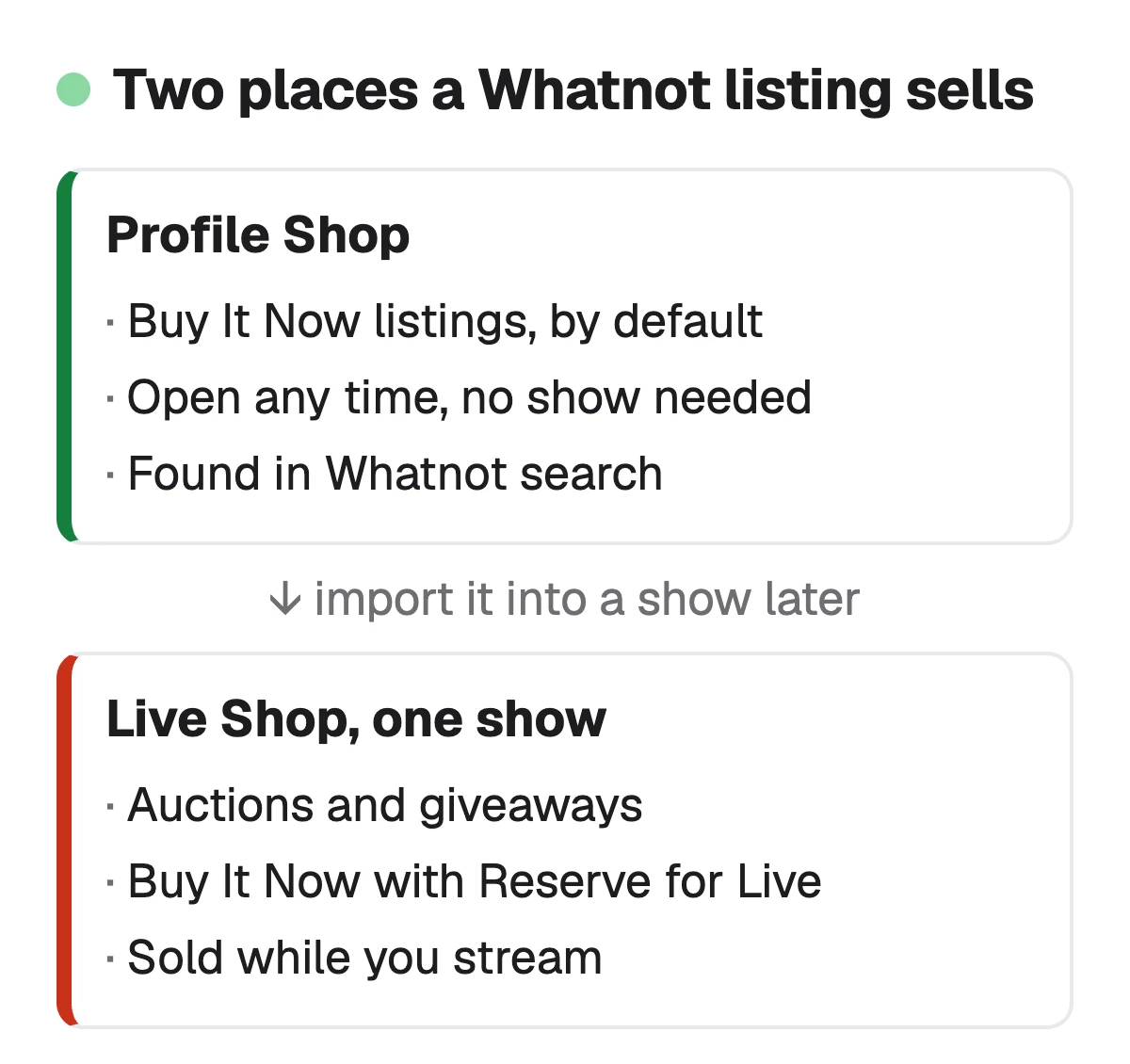
| Format | Profile Shop | Live Shop (one show) |
|---|---|---|
| Buy It Now | Profile ShopYes, by default | Live Shop (one show)Only if imported into the show |
| Buy It Now with Reserve for Live | Profile ShopNo | Live Shop (one show)Yes |
| Auction | Profile ShopNo | Live Shop (one show)Yes, by default |
| Giveaway | Profile ShopNo | Live Shop (one show)Yes, created from a show only |
From Whatnot's help, Create product listings (updated 22 October 2026), read 1 November 2026.
Sources: Whatnot Help: Create product listings (updated 22 October 2026), checked 1 November 2026 · Whatnot Help: How to start selling on Whatnot (updated 30 October 2026), checked 1 November 2026
Applying to sell, and why applications get turned down
Open the Whatnot app, tap + Sell, then Get Started. The application asks about your experience and plans, has you agree to the Community Guidelines, pick a primary seller category, and enter your full legal name as it appears on your government ID and the address you will ship from. You need to live in a country where Whatnot selling is supported and be at least 13, with a parent's or guardian's permission under 18. A few categories, such as Luxury Bags & Accessories and Wholesale, need a separate approval after that.
Before your first show you also verify your phone number, a payment method and a government-issued photo ID. If your application isn't approved, Whatnot's help names the usual reasons and lets most applicants reapply after 30 days.
- Missing or broken links to where you already sell, such as an eBay, Mercari or Poshmark profile or your own store.
- Inventory photos or videos that don't show enough items, or items of clear enough quality, to go live consistently.
- No explanation of why you want to sell on Whatnot. Whatnot asks applicants to fill in every field, the optional ones too.
- Products Whatnot doesn't support, or a country it doesn't support yet.
- Never eligible to reapply: photos or profiles that aren't yours, counterfeit products, or outstanding Trust & Safety violations.
Sources: Whatnot Help: Apply to sell on Whatnot (updated 30 September 2026), checked 1 November 2026 · Whatnot Help: Reasons seller applications aren't approved (updated 15 June 2026), checked 1 November 2026 · Whatnot Help: Why Whatnot Requires Seller Verification, checked 1 November 2026
Can you sell on Whatnot without going live?
Yes, once you are set up. A Buy It Now listing created without Reserve for Live sits in your Profile Shop, and Whatnot says buyers can browse and buy from it at any time, with search as the way they find it between shows. Auctions and giveaways are the formats that need a show.
The catch is the start. Whatnot's help on getting started says a newly approved seller follows an in-app checklist to schedule a first show, and unlocks full Seller Hub and seller tools access after completing that checklist and going live. It doesn't say which tools wait for that first show, so plan on going live once. You don't need to show your face: Whatnot says you can keep the camera on the items and talk viewers through them.
TipPractise first
Whatnot has a Rehearsal Mode and private shows for getting comfortable before you go live in public.
Whatnot SEO: Buy It Now listings buyers find between shows →
Sources: Whatnot Help: How to start selling on Whatnot (updated 30 October 2026), checked 1 November 2026 · Whatnot Help: Create product listings, checked 1 November 2026
How to list an item on Whatnot, field by field
Create listings from Seller Hub, in the app or on whatnot.com, under Create Product. Whatnot recommends filling the full product details, since a complete listing can be reused across shows, and its Listing Guidelines set the rules every one must meet: a photo of the actual item that shows all of it and its condition, no stock photos for a used or damaged item, a title and description that describe only that item, the right category, and no popular keywords unrelated to it.
Whatnot publishes no length for the title or the description. Its advice on the title is to make it clear and descriptive, and it says descriptive titles and relevant keywords can help buyers find the item in Whatnot search.
Category
The one that best matches the item. Whatnot charges a Buy It Now sale outside a show by the product's category.
Photos, and a video if your account has it
Clear photos of the actual item and its condition. Videos up to 30 seconds where available.
Title
Brand or maker first, then the item, then the set, model, size or year a buyer would search for. "Pokemon Scarlet & Violet 151 Booster Bundle, Sealed" is 51 characters.
Description and condition
Only this item: condition, flaws, measurements, what is included.
Quantity and variants
Several identical items go in one listing with a quantity, not in several listings.
Shipping profile
The packed weight, box included. Weigh it: an under-weighted parcel can come back to you.
Price
Buy It Now with a price, with offers on or off, or an auction with a starting bid, which is reserved for live.
Sources: Whatnot Help: Create product listings, checked 1 November 2026 · Whatnot Help: New seller guide to listing products (updated 10 October 2026), checked 1 November 2026 · Whatnot Help: Whatnot Listing Guidelines, checked 1 November 2026
Check your own listing
Already listed on Whatnot? Score your Buy It Now listing
Copy the title and description of one listing from Seller Hub and paste them here for a 0–100 score and the top fixes, then rewrite it with your own words already filled in.
Free, no sign-up.
Your first show
Schedule it from Seller Hub: a show name, a date and time, a category (a show appears only in the category you pick, so choose a primary one if you sell several kinds of item), and a primary selling format. Optional extras are a thumbnail or preview video in 9:16, 1080 × 1920 pixels recommended, tags, moderators and a repeat schedule. Whatnot asks that formats and tags be accurate.
Stock the show with listings before it starts so buyers can browse and pre-bid, share the link early, and add Show Notes so viewers know what to expect. Closing the app only pauses a show: end it from the menu when you are done.
Whatnot show titles: what to call a show, with examples →
Source: Whatnot Help: Schedule, edit, and start a show (updated 10 August 2026), checked 1 November 2026
How much Whatnot takes from a sale
Since 21 September 2026 Whatnot's commission has two inputs: your total sales over a four-week period, which set your tier, and the category. A new seller in the Standard tier, $0 to $14,999, pays 8% in sports, trading cards, fashion, other collectibles and the Other row, and 4% on coins. The rate falls as your sales grow, and the commission is on the item price only. Payment processing, 2.9% + $0.30 in the US, is charged on everything the buyer pays: the price, the shipping and the tax.
In eight categories, among them trading cards, sports singles and jewelry and watches, Whatnot charges no commission on the part of a price above $1,500. Whatnot calls it a promotion, so check the help article before you price around it.
| Item price | Whatnot takes | You keep | If it's coins |
|---|---|---|---|
| $10 | Whatnot takes$1.61 | You keep$8.39 | If it's coins$1.21 taken |
| $25 | Whatnot takes$3.25 | You keep$21.75 | If it's coins$2.25 taken |
| $60 | Whatnot takes$7.06 | You keep$52.94 | If it's coins$4.66 taken |
| $150 | Whatnot takes$16.87 | You keep$133.13 | If it's coins$10.87 taken |
Our calculation from Whatnot's US rates (help article updated 30 October 2026, read 1 November 2026), through the same fee functions as the Whatnot fee calculator: Standard tier, the buyer pays $7.75 shipping (Whatnot's USPS Ground Advantage rate for 1 to 5 lb), no sales tax. Shipping passes through to the label, so it isn't in "you keep".
Free Whatnot fee calculator, every tier and category →
Sources: Whatnot Help: Whatnot seller fees (updated 30 October 2026), checked 1 November 2026 · Whatnot Help: Reduced Commission on High-Value Orders, checked 1 November 2026
Shipping and getting paid
In the US, Whatnot makes a prepaid, tracked label for every order, and the buyer pays the shipping at checkout: $7.75 flat for a 1 to 5 lb parcel on USPS Ground Advantage, the default Whatnot recommends. Whatnot bundles a buyer's orders for you. You must ship within two business days of the sale, and an order counts as shipped at its first drop-off scan, so a Friday sale has to be scanned by the end of Tuesday.
In the US, Canada and Japan your earnings usually become available within four hours of confirmed delivery, and a payout reaches a US bank in one to two business days after you request it. Sellers in Whatnot's Early Payout program can get earnings when the label is generated instead.
Sources: Whatnot Help: Shipping for sellers in the US (updated 23 October 2026), checked 1 November 2026 · Whatnot Help: Shipping Policy for Sellers, checked 1 November 2026 · Whatnot Help: When you'll get paid for your sales (updated 23 October 2026), checked 1 November 2026
What Sellura does, and what it doesn't
Sellura writes the Buy It Now listing, the part that has to work in search between shows. Describe the item once and it returns a title of about 60 characters, the brand or maker first, then the item, then the set, model, size or edition, each once, and a plain-text description that refers only to that item, with the condition and flaws you gave. Whatnot publishes no title length, so 60 and the 80 we cap at are our numbers. Each listing comes back scored 0–100: the same text always gets the same number, and each weak factor comes with one concrete fix.
The score and the title preview are free on every generation, no card, and so are the listing checker and the Whatnot fee calculator. A credit unlocks the finished listing: Starter is $15 a month for 25 credits or $150 a year, and Pro is $24 a month for 65 credits plus bulk, or $240 a year. Sellura doesn't run shows, write show titles, post to Whatnot or track rankings, and is not affiliated with Whatnot.
Write the Whatnot listing, with the score and title free → · Whatnot vs eBay: what one sale leaves you on each →
FAQ
How do I become a seller on Whatnot?
Can I sell on Whatnot without going live?
How much does Whatnot take from sellers?
Why was my Whatnot seller application not approved?
How long do I have to ship on Whatnot?
When do Whatnot sellers get paid?
Apply in the app with links to where you already sell and photos of real inventory, verify your ID, then list a handful of items you know well, each with an accurate category, real photos and a descriptive title. Run one show to unlock the full tools, keep your Buy It Now listings in the Profile Shop for search between shows, ship within two business days and expect the money a few hours after delivery. Sellura writes those Buy It Now listings: the score and title preview are free, and a credit unlocks the finished listing.
Abre el generador de Whatnot.