BigCommerce meta descriptions: where the field is, what happens when it's empty, and what to write
Por Oleksandr Shaniuk · fundador de Sellura · Actualizado el 1 de noviembre de 2026
A BigCommerce product's meta description is set in the product editor's SEO section. Left empty, the page uses the metadata from your homepage's SEO fields, so every product without one shows the same store-wide text. That is from BigCommerce's SEO Fields help, read on 1 November 2026, which adds that Google may not use your meta description at all and may favour the product description instead. BigCommerce's advice is to fill in both: a meta description of a couple of sentences, with the keyword you are targeting at the beginning, written like an advertisement.
- Empty meta description
- Homepage's
- BigCommerce's fallback
- Field limit
- None set
- Help: "a couple sentences"
- Page title advice
- Under 60
- Keyword first, BigCommerce's
- Sellura writes
- 160 chars
- Our snippet budget
BigCommerce's help sets no length for the field; its glossary page on meta descriptions says search results show only the first 155 to 160. Sellura writes 160 characters, a budget of ours inside that. Below: where the field is for each kind of page, what happens when it is empty, how long to make it, a worked example, the page title next to it, and how to fill hundreds of products at once. Sellura is an independent tool and is not affiliated with BigCommerce.
Check your own listing
Already selling on BigCommerce? Score your product page
Copy the product name and description from your BigCommerce control panel or your store and paste them here for a 0–100 score and the top fixes, then rewrite it with your own words already filled in.
Free, no sign-up.
Where the meta description lives in BigCommerce
Every kind of page in a BigCommerce store has its own place for the page title, the meta description and keywords. BigCommerce's SEO Fields help lists them, and if you run more than one storefront, some of this metadata can be set per storefront channel.
| Page | Where the meta description is |
|---|---|
| Product page | Where the meta description isEdit or add a product, then SEO |
| Category page | Where the meta description isProducts, Product Categories, Edit, Search Engine Optimization section |
| Homepage | Where the meta description isSettings, Website, Search Engine Optimization section |
| Web content page | Where the meta description isStorefront, Web Pages, Edit, Advanced Options section |
| Blog post | Where the meta description isStorefront, Blog, Edit, SEO section |
From BigCommerce's Help Center, SEO Fields, read 1 November 2026. The control panel's menu names may differ slightly by version.
BigCommerce product SEO: the name, page title and keywords →
Source: BigCommerce Help Center: SEO Fields (where metadata fields are, by page type), checked 1 November 2026
What happens when you leave it empty
BigCommerce's answer is in the FAQ of its SEO Fields help: a page with empty SEO fields uses the metadata entered in the homepage SEO fields, and search engines may use any relevant, readable text on the page instead. Its developer reference says the same of a product: with no meta description, the store's default one is used. On a store with 300 products and no meta descriptions, that is one sentence about the store, 300 times.
Google often writes its own snippet anyway. BigCommerce's help says Google may not use your meta description and in some cases favours your product description over it. That is why the opening of the description matters as much as the field: whichever one Google picks, the first sentence should say what the product is.
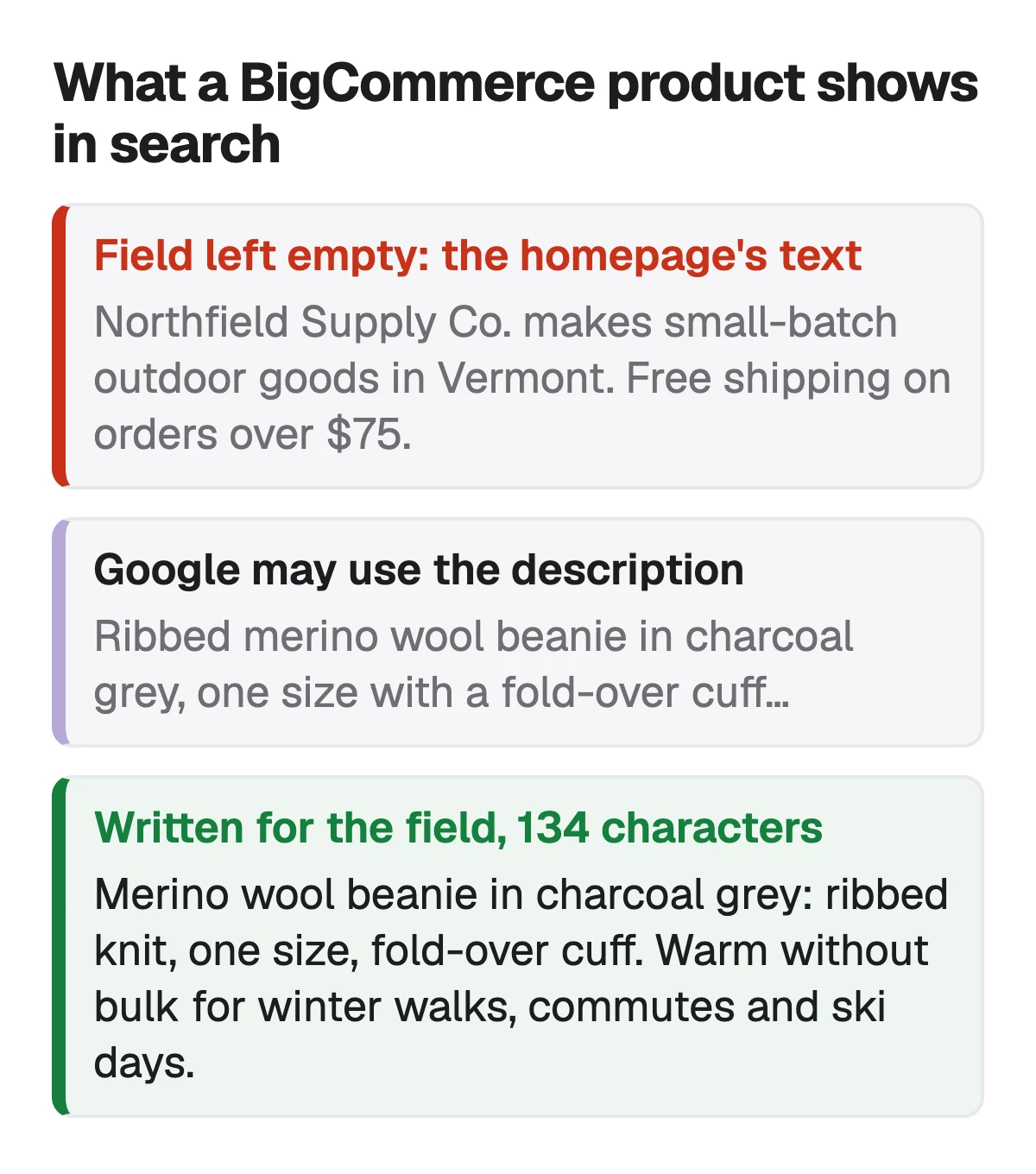
Sources: BigCommerce Help Center: SEO Fields (FAQ: empty SEO fields use the homepage metadata; Google may favour the product description), checked 1 November 2026 · BigCommerce Catalog API: Create Product (meta_description: the store's default is used when it is not set), checked 1 November 2026
How long a BigCommerce meta description should be
BigCommerce's Help Center gives no character count for the field. Its SEO Fields help says meta descriptions are usually only a couple of sentences long, and its developer reference sets no limit you would ever reach. The one number BigCommerce prints is on its glossary page about meta descriptions, which says search results show only the first 155 to 160 (it writes words; the context means characters). That is a note about what a results page shows, not a rule of the field.
Sellura writes 160 characters, two short sentences, and the number is ours, chosen to sit at the top of BigCommerce's 155 to 160: enough to name the product and the reason to click, with the point made before anything a results page might cut. Write longer if the sentence earns it; nothing in BigCommerce stops you.
Sources: BigCommerce Help Center: SEO Fields (meta descriptions are usually a couple of sentences), checked 1 November 2026 · BigCommerce Glossary: What is a meta description for online retailers? (results show the first 155 to 160), checked 1 November 2026
What to put in it: BigCommerce's advice, made concrete
BigCommerce's help asks for a meta description on every page, with any keyword you are targeting at the beginning, well composed, compelling and informative, and it says to think of it as an advertisement, since a good one raises the click-through rate. In practice: the product and its key detail first, then the reason to choose it.
| Version | What the search result says | Characters |
|---|---|---|
| Empty: the homepage's text | What the search result saysNorthfield Supply Co. makes small-batch outdoor goods in Vermont. Free shipping on orders over $75. | Characters99, and not about the beanie |
| The product name pasted in | What the search result saysRibbed Merino Wool Beanie, Charcoal Grey, One Size, Fold-Over Cuff, Unisex | Characters74, a list with no reason to click |
| Written for the field | What the search result saysMerino wool beanie in charcoal grey: ribbed knit, one size, fold-over cuff. Warm without bulk for winter walks, commutes and ski days. | Characters134, keyword first, then the reason |
Our example store and product. The structure follows BigCommerce's advice; the 160-character budget we write to is ours.
- Start with the phrase a shopper searches: merino wool beanie, not Introducing our.
- One concrete reason to click: the use, the fit, what it is made of.
- Unique per product. BigCommerce's help warns that duplicate text hurts SEO.
- Nothing the product page doesn't say.
Paste the name and description for a free 0–100 score →
Source: BigCommerce Help Center: SEO Fields (meta descriptions: keyword at the beginning, think of it as an advertisement), checked 1 November 2026
The page title above it: under 60, keyword first
The meta description sits under the page title in a search result, and BigCommerce's advice for the title is specific: unique on every page, preferably starting with a relevant keyword, and less than 60 characters. Its own example is "Blue T-Shirts at Discounted Prices for Sale | BunchOfTshirts". With no Page Title set, BigCommerce uses the product name, and the theme may add the store name after it, which our product SEO page covers in detail.
BigCommerce to Google Shopping: why the name and the page title are two jobs →
Source: BigCommerce Help Center: SEO Fields (page title: unique, keyword first, under 60 characters), checked 1 November 2026
Hundreds of products without one: the CSV route
BigCommerce's SEO Fields help says some SEO metadata can be entered in bulk, and that for products a CSV import can set keywords, page titles and meta descriptions. It adds one warning: be mindful of duplicate text. A spreadsheet makes it easy to fill a column with the same sentence, which is the homepage problem again under a different name.
- Export your products, write a meta description per row, import the file.
- Give each row its own first phrase: the product, not the category.
- Do the best-selling products by hand first. They are the ones searched for most.
Source: BigCommerce Help Center: SEO Fields (FAQ: entering SEO metadata in bulk by CSV import), checked 1 November 2026
Write the description's first sentence as a snippet too
Because Google may show the product description instead of the meta description, its first sentence is a second meta description. BigCommerce's help asks for descriptions that are easy to read, broken up with sub-headings, lists or images, and never copied between products. Open with what the product is and the phrase a shopper types, then the details.
BigCommerce search keywords: the field for your store's own search →
Source: BigCommerce Help Center: SEO Fields (product description best practices), checked 1 November 2026
What Sellura writes here, and what it doesn't
Pick BigCommerce and Sellura writes a description whose first sentence starts with the focus phrase and says what the product is, written to work as a search snippet of about 160 characters you can also paste into Meta Description. With it come a unique product name with the most searched phrase first, 10 search keywords for your store's search box and highlights. Each generation comes with a 0–100 score that is deterministic: the same listing always gets the same number, and every weak factor comes with one fix written for that listing.
The score and the name preview are free on every generation, with no card, and so is the Listing checker for pasted text. A credit unlocks one finished listing: Starter is $15 a month for 25 credits or $150 a year, and Pro is $24 a month for 65 credits plus bulk, or $240 a year. Sellura doesn't connect to your BigCommerce store or write into it, doesn't track rankings or click-through rates, and has no keyword research database.
Write the BigCommerce listing, score and name free → · Plans and credits →
FAQ
Where do I add a meta description in BigCommerce?
What happens if a BigCommerce product has no meta description?
How long should a BigCommerce meta description be?
Why does Google show my product description instead of my meta description?
Can I add meta descriptions to BigCommerce products in bulk?
Do BigCommerce meta keywords still matter?
Give every BigCommerce product its own meta description, because an empty one shows your homepage's text: two short sentences in the product's SEO section, the phrase a shopper searches first and one concrete reason to click, unique to that product. BigCommerce sets no length for the field and its glossary says results show the first 155 to 160; 160 characters is the budget we write to. Because Google may show the product description instead, open that with what the product is too, and keep the page title under 60 with the keyword first. For a big catalog, fill the field by CSV, one sentence per product. Describe a product to Sellura and the name preview and 0–100 score are free; a credit buys the finished listing.
Abre el generador de BigCommerce.