BigCommerce to Google Shopping: which product field becomes which feed attribute
Por Oleksandr Shaniuk · fundador de Sellura · Actualizado el 1 de noviembre de 2026
A BigCommerce store sends its products to Google Shopping through a channel app, most often BigCommerce's free Feedonomics Surface, and the app builds the Merchant Center feed from your product fields: Product Name becomes the title, Description the description, SKU the offer ID and Default Price the price. BigCommerce's Help Center publishes the whole mapping, and we read it on 1 November 2026. Two limits change on the way: a BigCommerce product name can be 250 characters, and Google truncates a title at 150 and shows up to 70.
- Product name → title
- 250 → 150
- BigCommerce's cap, then Google's
- Shown by Google
- 70 chars
- Shopping ads and free listings
- Description
- ≤ 5,000
- Google's cap; BigCommerce publishes none
- Feedonomics Surface
- 100,000 SKUs
- Free, by BigCommerce's help
Three fields you fill in for SEO don't travel at all: Page Title, Meta Description and Search keywords have no place in the mapping. So the product name has to work as the Google Shopping title, and the page title Google's web search shows is a separate job. Below: the mapping, the name and the description in Google's terms, identifiers and options, what Merchant Center asks of the store, and what Sellura writes. Sellura is an independent tool and is not affiliated with BigCommerce or Google.
Check your own listing
Already selling on BigCommerce? Score your product page
Copy the product name and description from your BigCommerce control panel or your store and paste them here for a 0–100 score and the top fixes, then rewrite it with your own words already filled in.
Free, no sign-up.
The mapping, field by field
BigCommerce's help on Google Shopping prints a table of Google's field names next to the BigCommerce product fields they come from. It also warns that not every Google field corresponds to a product field, and that depending on your connector app you may need to give the value yourself the first time you list a product. The rows that matter for the text and the identifiers:
| Google field | BigCommerce product field |
|---|---|
| offerId | BigCommerce product fieldSKU |
| title | BigCommerce product fieldProduct Name |
| description | BigCommerce product fieldDescription |
| productTypes | BigCommerce product fieldThe first top-level category the product is in |
| link | BigCommerce product fieldProduct URL, with your storefront domain |
| imageLink / additionalImageLinks | BigCommerce product fieldThe first image / every other image on the product |
| price / salePrice | BigCommerce product fieldDefault Price / Sale Price |
| brand, mpn, condition | BigCommerce product fieldBrand, Manufacturer Part Number (MPN), Condition |
| gtin | BigCommerce product fieldGlobal Trade Item Number (GTIN), or Product UPC/EAN when that is empty |
| color, sizes, gender, ageGroup | BigCommerce product fieldOption value names of matching options |
| material, pattern | BigCommerce product fieldA product option or a custom field |
| availability | BigCommerce product fieldStock level if you track inventory, otherwise always in_stock |
From BigCommerce's Help Center article on Google Shopping, read 1 November 2026. googleProductCategory has no product field: it is chosen from Google's own list. Not every connector app uses exactly this mapping.
BigCommerce product SEO: the name, page title and keywords →
Source: BigCommerce Help Center: Google Shopping (mapping Google Shopping fields to your products), checked 1 November 2026
Product Name becomes the title: 250 characters in, 150 out, 70 shown
BigCommerce's Catalog API allows a product name of up to 250 characters, unique in the store. Google's title attribute takes 150 and truncates the rest, and its page on text that is too long says Google displays up to 70 characters in Shopping ads and free listings. So a product name over 150 arrives cut, and one that names the product only after 70 arrives unreadable where it's shown.
There is a second pull on the same field. With no Page Title set, BigCommerce uses the product name as the page title in web search, and its SEO help advises page titles under 60 characters, while Google's title page asks you to use all 150. One field can't do both well, but BigCommerce has two: write the product name for Google Shopping, with the product named in the first 70 and specifications after, and type a Page Title under 60 in the product's SEO section for web search.
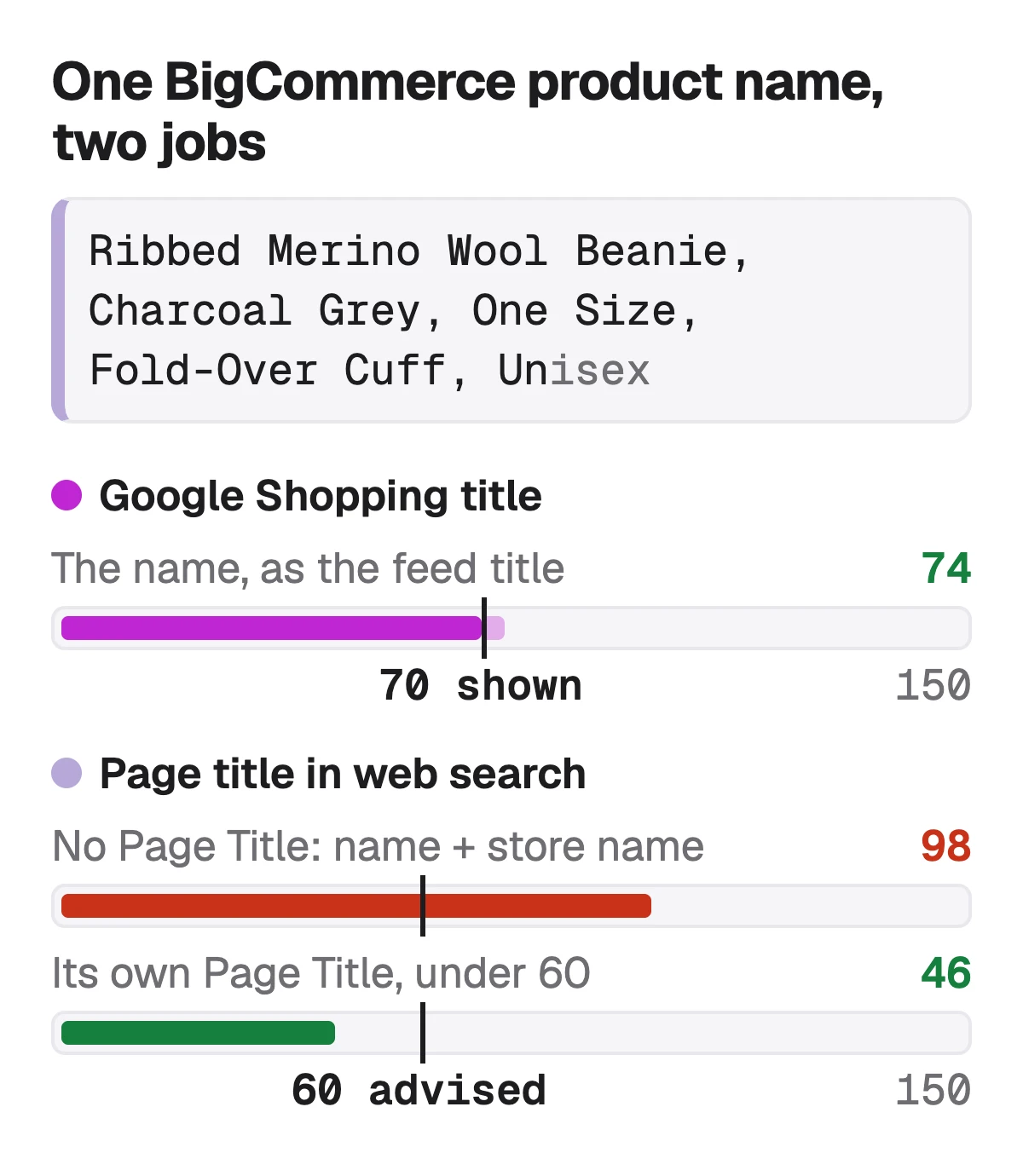
| Field | Example | Characters |
|---|---|---|
| Product Name (becomes the Google Shopping title) | ExampleRibbed Merino Wool Beanie, Charcoal Grey, One Size, Fold-Over Cuff, Unisex | Characters74: the product, colour and size inside 70 |
| What web search shows with no Page Title | ExampleThe name plus " - Northfield Supply Co." | Characters98: past BigCommerce's advised 60 |
| Page Title (SEO section, web search only) | ExampleMerino Wool Beanie, Charcoal Grey | Northfield | Characters46: under 60 |
Our example product and store. The store name after a hyphen is what BigCommerce's Cornerstone demo store adds to a product with no Page Title, which we saw on 26 October 2026; other themes may differ. The 60 is BigCommerce's advice, the 150 and 70 are Google's.
Check the name against Google's 150 and the 70 it shows →
Sources: BigCommerce Catalog API: Create Product (product name up to 250 characters, unique), checked 1 November 2026 · BigCommerce Help Center: SEO Fields (page titles under 60 characters, starting with a relevant keyword), checked 1 November 2026 · Google Merchant Center Help: How to fix: Text too long (150 accepted, up to 70 displayed), checked 1 November 2026
Description: one field, read by your shoppers and by Google
The BigCommerce description goes to Google's description attribute as it is. BigCommerce publishes no length for it and lets it carry HTML formatting; Google calls the description plain text with a cap of 5,000 characters, recommends around 500 to 1,000, and wants the key details in the first 160 to 500. We haven't checked whether each connector app strips the HTML, so keep the formatting simple.
BigCommerce's store-search help asks for dimensions and weight, materials and care, what's in the box, warranty and certifications, and where the product was made. That list fits Google too. What doesn't fit is the store furniture many descriptions end with: shipping times, return policies and links, which Google's description page rules out.
- First 160 characters: what the product is and its key specification, for Google and for a search snippet.
- Then the details BigCommerce and Google both ask for: size, material, use, care.
- Out: shipping, returns, links to size guides, other products, your store's story.
- Unique per product: BigCommerce's own advice is never to copy a description between products.
Google Shopping descriptions: 5,000 characters, 500 to 1,000 advised →
Sources: BigCommerce Help Center: Configuring Store Search (what a product description should include), checked 1 November 2026 · Google Merchant Center Help: Description [description] (1 to 5,000 characters; first 160 to 500; what not to include), checked 1 November 2026
GTIN, brand and identifier_exists
Google's product data specification requires brand for new products, except movies, books and musical recordings, and a GTIN where the product has one. In BigCommerce, gtin is filled from the Global Trade Item Number (GTIN) field, or from Product UPC/EAN when that is empty, and brand from the product's Brand.
For a handmade or own-brand product with no GTIN, BigCommerce's mapping sends identifierExists, which tells Google the product is missing a GTIN, UPC/EAN or brand value. Fill the Brand field with your own brand name if you have one, since Google requires it for new products either way.
Sources: BigCommerce Help Center: Google Shopping (gtin, brand and identifierExists), checked 1 November 2026 · Google Merchant Center Help: Product data specification (brand, gtin), checked 1 November 2026
Options and custom fields: colour, size, material
BigCommerce sends a variant's colour, size, gender and age group from the option value names of matching options, and BigCommerce's help says those four are required for products in Google's Apparel & Accessories category. Material and pattern can come from a product option or a custom field, and every variant shares the base product's internal ID as its item group.
- Name options plainly: an option value called Charcoal Grey reaches Google as the colour, one called Option 2 reaches it as nothing useful.
- Use a custom field named Material for a product without a material option.
- Google's title page asks for each variant's distinguishing detail, such as colour or size, in its title too.
TipTwo apps, two copies
BigCommerce's help warns that managing the Google feed with more than one app can create duplicate products in Merchant Center, because each app may identify a product differently, by SKU or by ID. Use one connector.
Source: BigCommerce Help Center: Google Shopping (options, custom fields, duplicate listings), checked 1 November 2026
What stays behind: Page Title, Meta Description and Search keywords
None of BigCommerce's three SEO fields is in the mapping. Page Title and Meta Description serve web search, the result a shopper sees when your product page itself ranks on Google. Search keywords serve your store's own search box. All three still matter, just not for Google Shopping, where only the name, the description and the data fields count.
BigCommerce meta descriptions: what happens when the field is empty → · BigCommerce search keywords: what the field does in store search →
Before you connect: what Merchant Center asks of a BigCommerce store
BigCommerce's help lists the Merchant Center requirements as they apply to a BigCommerce store. Feedonomics Surface is set up from Channels in the control panel, and other Google apps are in the App Marketplace. Free listings cost nothing; Google Ads campaigns are pay-per-click.
- A Google Merchant Center account.
- A Terms of Service page and a refund policy page on the storefront.
- A contact page with at least one way to reach you, such as a form, an email address or a phone number.
- A launched, active storefront and a secure checkout, which a Stencil storefront has.
- Products that comply with Google's Shopping policies.
How to sell on Google Shopping, step by step → · BigCommerce fee calculator: what an order costs since June 2026 →
Source: BigCommerce Help Center: Google Shopping (requirements and setup), checked 1 November 2026
What Sellura writes here, and what it doesn't
Pick BigCommerce and Sellura writes a unique product name with the item and its most searched phrase first, a description whose first sentence works as a snippet, 10 search keywords of up to 30 characters for your store's search box and highlights for the description or a custom field. Pick Google Shopping for the same product and it writes the feed's version: a title inside 150 with the product in the first 70, a plain-text description and 6 product highlights. Each generation comes with a 0–100 score that is deterministic, the same listing always getting the same number, and one fix per weak factor written for that listing.
The score and the title preview are free on every generation, with no card, and so are the title checkers and the Listing checker. A credit unlocks one finished listing: Starter is $15 a month for 25 credits or $150 a year, and Pro is $24 a month for 65 credits plus bulk, or $240 a year. Sellura doesn't connect to your BigCommerce store or to Merchant Center, doesn't sync feeds, run ads or track rankings, and has no keyword research database.
Write the BigCommerce listing, score and name free → · Plans and credits →
FAQ
How do I connect BigCommerce to Google Shopping?
Which BigCommerce field becomes the Google Shopping title?
Does the BigCommerce Page Title or Meta Description go to Google Shopping?
Where does the GTIN come from in a BigCommerce Google feed?
Is Google Shopping free for a BigCommerce store?
Why do my BigCommerce products show up twice in Merchant Center?
On BigCommerce the Google Shopping feed is built from your product fields, so write them for Google: a product name with the product named in its first 70 characters and under 150, a description of 500 to 1,000 characters about the product only, a GTIN or UPC/EAN where there is one, a Brand, and options named in plain words. Then give web search a Page Title under 60, because nothing in the SEO section reaches Google Shopping. Describe the product to Sellura and the title preview and 0–100 score are free for both the BigCommerce and the Google Shopping version; a credit buys the finished listing.
Abre el generador de BigCommerce.