Facebook Marketplace not selling? Find where buyers drop off, then fix that
Von Oleksandr Shaniuk · Gründer von Sellura · Aktualisiert 1. November 2026
When an item isn't selling on Facebook Marketplace, find where buyers stop first: no views means they aren't finding it, views without messages means the photo or the price loses them, and messages without a sale means the listing left questions open. Buyers find items by searching or browsing a category and can sort the results by Suggested, Distance or Date listed (Facebook Help Center, read 1 November 2026). So the words in your title, where the item is and how recent the listing looks all decide whether it is seen.
- New listings a month
- 20
- deleted ones still count; resets on the 1st
- Title in Facebook's form
- 99 characters
- where the form stops; Meta publishes no length
- Ways buyers sort results
- 3
- Suggested, Distance, Date listed
- Idle listings deleted after
- 2 years
- renewing or editing resets it
One rule changes the usual advice. Facebook now caps new listings at 20 a month, and a listing you delete still counts toward it. Deleting and relisting the same item spends that allowance; renewing or editing it doesn't. Below, each stage in turn, from Meta's own help pages.
Check your own listing
Already listed on Facebook Marketplace? Score your listing
Copy the title and description from your Facebook Marketplace listing and paste them here for a 0–100 score and the top fixes, then rewrite it with your own words already filled in.
Free, no sign-up.
Find the stage where buyers stop
Start with what you already know: whether anyone is messaging, and whatever view or click counts Facebook shows you for the listing. That is enough to place the problem. Few views and the listing is not being found, so the fix is in the title and in when and where it shows. Plenty of views and no messages, and buyers saw it and moved on, so the fix is the first photo and the price. Messages that go quiet mean the listing left a question the buyer had to ask.
Work on one stage at a time, starting with the earliest one that fails. A better photo does nothing for a listing nobody sees, and a sharper title does nothing for a price that is $40 over the one three listings down.
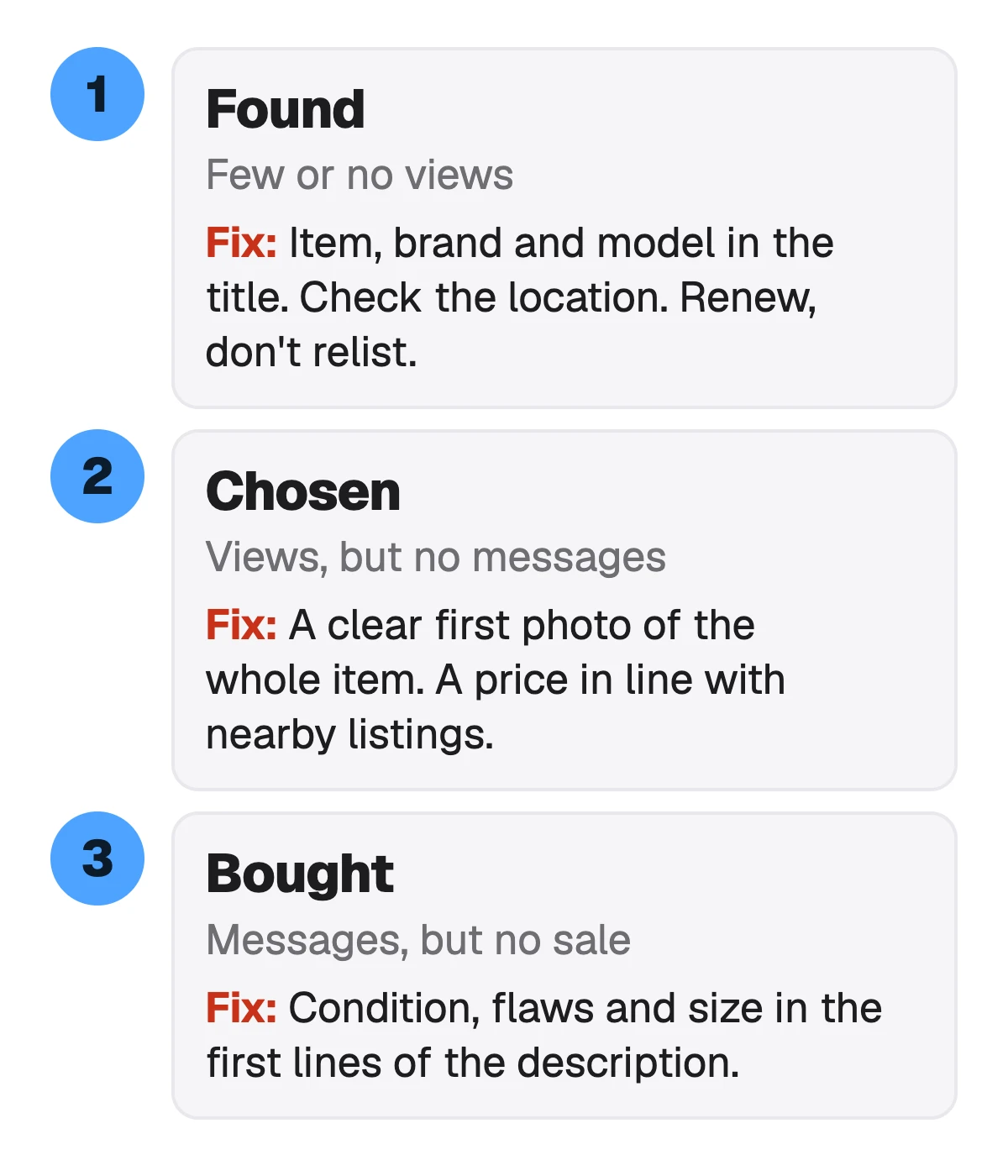
| What you see | Where it breaks | Check first |
|---|---|---|
| Few or no views | Where it breaksBuyers don't find it | Check firstTitle words, the listing's age, its location |
| Views, no messages | Where it breaksBuyers see it and pass | Check firstThe first photo, the price against nearby listings |
| Messages, no sale | Where it breaksBuyers have to ask | Check firstCondition, flaws, size and what's included in the description |
| Gone from Marketplace | Where it breaksThe listing was rejected | Check firstProfile status, then request a review |
Our diagnosis order. The search, sort and rejection behaviour is from Facebook's Help Center, read 1 November 2026.
No views: the title has to hold the words buyers type
Marketplace search matches what a buyer types, and buyers type the item, the brand and the model: "ikea kallax", "dewalt drill", "graco stroller". A title that reads "Shelf unit MUST GO!!" holds one of those words. Name the item first, then the brand, the model, the size and the colour, each once, in the words a buyer would use.
Meta publishes no title length for a personal listing. Facebook's listing form stopped a title at 99 characters when we tested it on 24 October 2026 (in a non-US account), and Meta's only length advice, written for catalog products, is under 65 so a title isn't cut off. We aim for 65 on Marketplace for the same reason: the grid tiles are small.
- Lead with the item and the brand: "IKEA Kallax 4x4 Shelf Unit", not "Great shelf for sale".
- Add the model, size and colour a buyer would search or filter by.
- Leave out price, location and urgency ("must go", "make an offer"): price and location have their own fields.
- No capitals for emphasis and no repeated words: Meta's catalog rules call that keyword stuffing.
Check a title against Facebook's 99-character form, free → · Facebook Marketplace SEO: title, description and local search →
Sources: Facebook Help Center: Sort by distance or new listings on Marketplace (search or browse a category; sort by Suggested, Distance or Date listed), checked 1 November 2026 · Meta Business Help Center: Product title specifications for catalogs (200 at most, under 65 recommended so titles aren't cut off, no keyword stuffing or all caps; catalog products, not personal listings), checked 1 November 2026
No views: distance and date listed
A buyer who sorts by Distance sees what is closest first, and one who sorts by Date listed sees what is newest. Neither is something a better title fixes. Check that the listing's location is where the item really is, and that you are offering the delivery you can manage: a buyer two towns away won't drive to collect a $15 lamp.
An older listing can be renewed. In Marketplace, go to Selling, then Your listings, and click Renew on the listing; editing any part of it works too. Facebook keeps a listing up as long as you are actively selling it and says it may delete one only after 2 years of inactivity, so there is no expiry date to beat. Renew is the button Facebook gives you for keeping a listing current; whether it lifts the listing in a Date listed sort, Meta doesn't say, so we don't either.
Sources: Facebook Help Center: Sort by distance or new listings on Marketplace (Distance; Date listed), checked 1 November 2026 · Facebook Help Center: How long do my Marketplace listings stay active? (inactive for 2 years may be deleted; Renew under Selling > Your listings; renewing or editing resets the clock), checked 1 November 2026
Don't delete and relist: the 20-a-month limit
Facebook caps the new Marketplace listings you can create in a calendar month: 20 in total, and 5 each in Vehicles, Auto Parts and Accessories, and Homes for Sale or Rent. Once you reach a limit you can't create new listings until the 1st of the next month, and every listing you create counts, even one you delete.
That turns the old trick of deleting a stale listing and posting it again into a cost. Five relists of the same chair spend a quarter of your month. Renew or edit the listing you have instead, and keep the new-listing allowance for new items.
Watch outA deleted listing still counts
Facebook's listing limits count every listing created that month, including ones you deleted. Relisting the same item over and over can lock you out of listing anything new until the 1st.
Source: Facebook Help Center: Facebook Marketplace listing limits (20 new listings a month in total, 5 in Vehicles, Auto Parts and Accessories, and Homes for Sale or Rent; deleted listings count; resets on the first day of the month), checked 1 November 2026
Views but no messages: the first photo and the price
Meta's own tips for sellers start with the photo: one that clearly shows the item and its condition, and several original photos rather than a picture from a company website. Facebook's form takes up to 10. The first is the tile a buyer scrolls past or taps, so it has to show the whole item in good light.
Then the price. Search the item yourself, sort by Distance, and look at what the nearest few are asking and how old those listings are. If yours sits well above them with no reason in the photo or the title, the views are buyers comparing and choosing someone else.
- First photo: the whole item, in daylight, on an uncluttered background.
- Then the flaws, close up: a buyer who sees the scratch in a photo doesn't message to ask about it.
- Used clothing and shoes as clean as possible, as Meta asks.
- Price against the nearest similar listings, not against what you paid.
Product photos on a clean background → · Facebook Marketplace fee calculator: shipped orders and local pickup →
Source: Facebook Help Center: Sell something on Facebook Marketplace, Tips for Sellers (a photo that clearly shows the item and its condition, multiple original photos, used clothing as clean as possible), checked 1 November 2026
Messages but no sale: what the description left open
"Is this still available?" followed by silence often means the buyer asked the first thing they could and the answer to the real question, size or condition, wasn't on the page. Meta's tip is a detailed description of the item and its condition, with any stains or tears described. Put that in the first lines, because those are what a buyer reads.
Say what the item is, its brand, model and measurements, its condition with the flaws, and what comes with it. Then agree the price and the exact pickup place in the chat, as Meta's tips say, before anyone sets off.
How to write a Facebook Marketplace description, with a template →
Source: Facebook Help Center: Sell something on Facebook Marketplace, Tips for Sellers (a detailed description of the item and its condition, stains or tears; agree the price and the exact pickup location), checked 1 November 2026
Gone from Marketplace: a rejected listing
A listing that has vanished from search may have been rejected. Facebook reviews listings when its systems detect a possible breach of the Commerce Policies or someone reports them, and rejects the ones that don't comply.
Go to your profile, open Profile status, choose Marketplace under Extra features, then Your listings, and click a listing under Needs attention to see why. If you think Facebook got it wrong, request a review from the same screen: Facebook restores the listing if it made a mistake, and the option goes after 180 days.
Source: Facebook Help Center: What to do if your Facebook Marketplace listing is rejected (reviews on detection or report, Profile status > Marketplace, request a review within 180 days), checked 1 November 2026
What Sellura does here, and what it doesn't
Sellura writes the words of a Facebook Marketplace listing from one description of the item: a title of about 65 characters inside the 99 Facebook's form takes, item and brand first with no price, location or urgency; up to 10 product tags of up to 30 characters (our numbers, under the form's limit of 20); and a plain-text description whose first two sentences give the item and its condition, inside a 2,000-character budget of ours. It writes condition and flaws only as you give them.
Free, no card: the title preview and a 0 to 100 score on every generation (15 before we ask you to make an account), the Facebook Marketplace title checker and fee calculator, and 2 Listing Grader checks on a pasted title and description. The score is deterministic: the same listing always gets the same number, and each weak factor comes with one fix. A credit unlocks one finished listing. Starter is $15 a month for 25 credits or $150 a year; Pro is $24 a month for 65 credits plus bulk, or $240 a year.
- It can't see your views, messages or listing limit: those live in your Facebook account, which Sellura has no access to.
- It doesn't set your price, renew or post the listing. You paste the text in.
- It has no keyword-volume database, no rank tracking and no ads analysis, and it is not affiliated with Meta or Facebook Marketplace.
Describe the item, see the Marketplace title and score free → · Plans and credits →
FAQ
Why is my Facebook Marketplace item not selling?
Why is my Facebook Marketplace listing not getting views?
Should I delete and relist on Facebook Marketplace?
How do I renew a Facebook Marketplace listing?
How long do Facebook Marketplace listings stay up?
What is the title character limit on Facebook Marketplace?
Read your listing's views and messages first and fix only the stage that fails. No views: put the item, brand and model in the title, check the location, and renew the listing instead of deleting it, because Facebook counts deleted listings against your 20 a month. Views but no messages: a clear first photo of the whole item and a price in line with the nearest listings. Messages but no sale: condition, flaws, size and what's included in the first lines of the description. Describe the item once to see the title and its score free before you spend a credit.
Öffnet den Generator für Facebook Marketplace.