Grailed listing not showing up? Find out which state it is in first
Von Oleksandr Shaniuk · Gründer von Sellura · Aktualisiert 1. November 2026
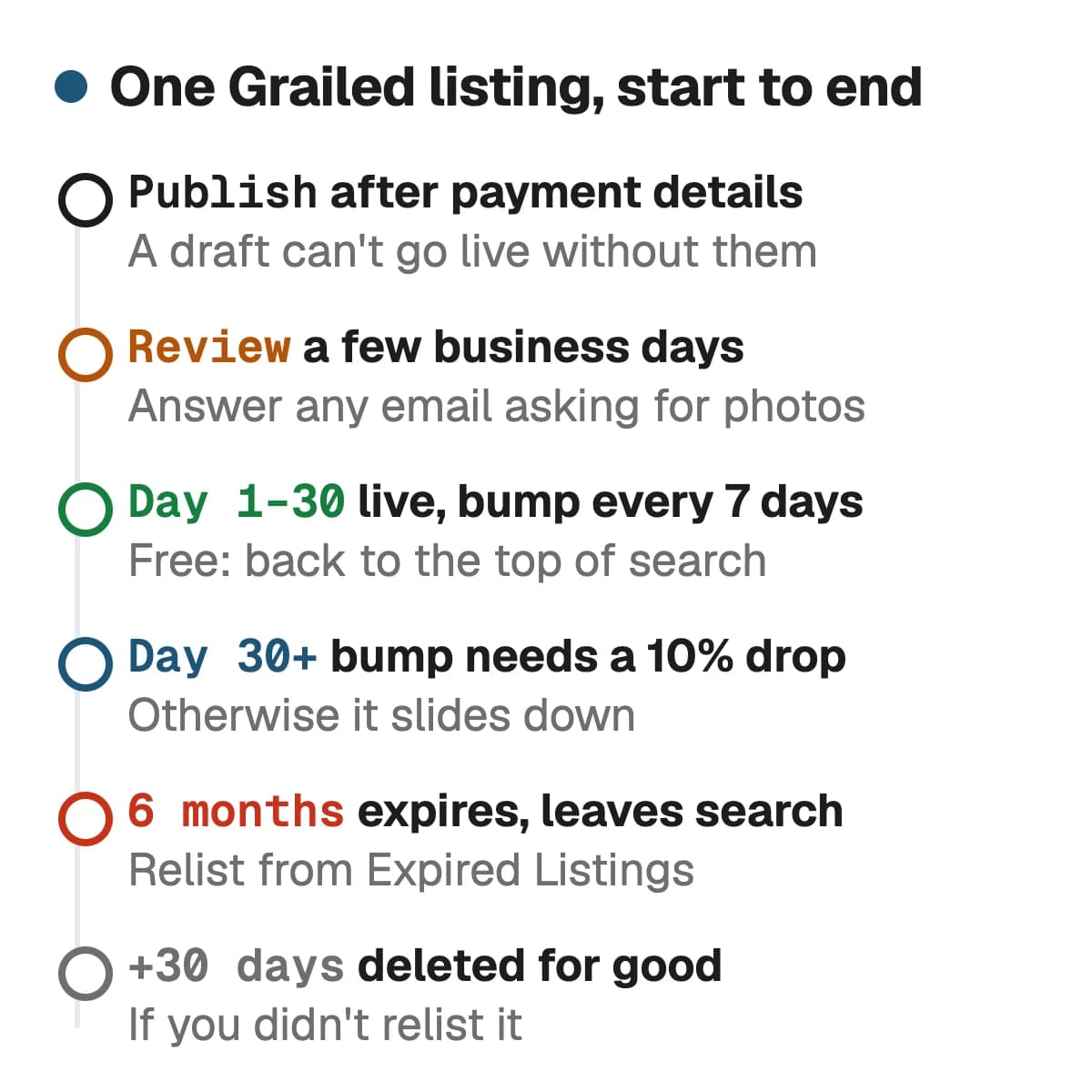
A new Grailed listing that doesn't show up is most often still in review. Grailed's help says its moderators may put a listing into a review queue, and a listing approved there can take a few business days to appear in the marketplace, so the first thing to check is your email for a request from the moderation team (help article updated 11 March 2026, read 1 November 2026). The other states Grailed documents are narrower: the listing expired after six months, it was deleted by moderation or as a duplicate, it was moved to a different department, or it is live but shown less because your Account Health is At Risk or Restricted.
- Review queue
- Few days
- business days, for an approved listing
- Listing expires
- 6 months
- relist within 30 days or it is deleted
- Bump
- Every 7 days
- first 30 days, then only with a 10% drop
- Visibility
- Account Health
- At Risk or Restricted is shown less
Grailed's help doesn't explain the app's wording such as "hidden and cannot be purchased" or "not sellable and searchable", so we don't guess at it here. What follows takes each state Grailed does describe, says where you can see it and what to do, in the order worth checking. Rewriting the title won't move a listing out of review, so find the state before you edit anything.
Check these in order
Each state below has a place in Grailed where you can see it, and each has a different fix. Work down the table: the first rows are the common ones for a new listing, the last rows are for a listing that used to be found and no longer is.
| State | How you can tell | What to do |
|---|---|---|
| Still a draft, or no payment account yet | How you can tellIt sits under Drafts. Grailed asks for payment details before your first listing can be published | What to doAdd the payment details, then open the draft and publish it |
| In the review queue | How you can tellPublished recently, not in search, and possibly an email from Grailed's moderation team | What to doWait a few business days and answer any email asking for more photos |
| Missing a required photo | How you can tellGrailed may ask for the photo before the item is posted | What to doAdd the brand tag, wash tag, stamp or serial number, and for sneakers the size tag, outsole and both sides of the tongue |
| Moved to another department | How you can tellLive, but under Grails, Hype, Sartorial or Core instead of where you put it | What to doNothing: Grailed's curation team moves listings by designer, price, condition and style |
| Expired | How you can tellSix months since you posted it, now in the Expired Listings tab of Seller Hub | What to doRelist it from that tab within 30 days, or it is deleted for good |
| Deleted | How you can tellGone from For Sale and from Expired Listings | What to doRead the reason below before you post it again: some can't be fixed by relisting |
| Live, but shown less | How you can tellIt is for sale, but your Account Health is At Risk or Restricted | What to doFix the metric the dashboard flags. Good and Excellent accounts are prioritized in search |
Our order, built from Grailed's help centre and its How to Sell Guide, read 1 November 2026. Grailed doesn't publish an order of its own.
Sources: Grailed Help: Why can't I see my new listing in the marketplace? (updated 11 March 2026), checked 1 November 2026 · Grailed Help: How do I sell an item? (payment details before your first listing), checked 1 November 2026 · Grailed Help: How do I edit my listing? (For Sale and Drafts), checked 1 November 2026
In review: why a new listing waits, and how to get it through
Grailed reviews listings before some of them go live, and it says so in two places. Its help on new listings says moderators may put a listing into a review queue and reserve the right to reject it for any reason, and an approved listing can take a few business days to be viewable. Its help on selling adds that an item which qualifies for digital authentication is reviewed by Grailed's authenticators before it is made available for sale, and they may write to you for more photos.
The quickest way through is to send what the reviewers would ask for before they ask. Grailed's Photo Standards guide lists required photos and says that if they are missing, its team may ask for them before the item is posted. It also says blurry photos can get a listing rejected. Check your inbox and spam folder too: a request you never answer keeps the listing out of the marketplace.
- Brand tag: required where the item has one.
- Wash or care tag: required where the item has one.
- Stamp, badge, patch or engraving: required on accessories and jewelry without tags.
- Serial number or date stamp: required where there is one, as on many bags and belts.
- Sneakers: the inner size tag, the outsole, and the front and back of the tongue, all required.
- Flaws: photos of any wear, damage or discoloration, so the condition is clear to the buyer.
Sources: Grailed How to Sell Guide: Photo Standards (required photos, blurry photos can be rejected), checked 1 November 2026 · Grailed Help: How does Grailed Verification work?, checked 1 November 2026
Gone from search: expired, deleted or a duplicate
A listing that was live and then vanished has most likely reached six months. Grailed's help on listing deletion, updated 14 October 2026, says a listing posted for six months expires: it is no longer for sale and is removed from search and browse. You can relist it from the Expired Listings tab in Seller Hub, and if you do nothing for 30 days it is deleted permanently.
Grailed also deletes listings for other reasons. Its Listing FAQ says it reserves the right to delete any listing, for the item's condition, quality, brand, the age of the listing or lack of desirability, and that custom items and items without a designer can be removed. Two more rules catch sellers who relist in a hurry: duplicate listings of indistinguishable items can be removed, and some designers aren't allowed at all.
- Expired at six months: relist from Expired Listings within 30 days.
- Several units of one item: post the next listing after the first one sells, not all at once.
- No designer, or a custom piece: Grailed can remove it. If the designer is missing from the dropdown, ask Grailed to add it, with a link to the designer's website or a retailer.
- Not allowed: Goros, unbranded fine jewelry and a list of watch brands including Rolex, Omega, Cartier and TAG Heuer, unless you are a pre-approved partner seller.
Sources: Grailed Help: Listing Deletion (updated 14 October 2026), checked 1 November 2026 · Grailed Help: Listing FAQ (deletions, duplicates, bumps, moved sections), checked 1 November 2026 · Grailed Help: What designers aren't allowed on Grailed?, checked 1 November 2026 · Grailed Help: How do I add a designer?, checked 1 November 2026
A Grailed listing's life, from publish to expiry
Even a listing in no trouble at all slides down search as newer ones arrive. Grailed's answer is the bump: it brings a listing to the top of search results and to the feeds of buyers who follow you. You can bump every 7 days during a listing's first 30 days. After that, a bump needs a price drop of at least 10%.
So the first month is when a listing is easiest to see, and after it each bump costs you a tenth of the price. Before you drop, run the new price through the fee calculator: under $120 Grailed takes 6% with a $1.99 minimum, and from $120 it takes 9% of the whole sale, so a drop from $125 to $112 takes $13 off the price but only $8.02 off what you keep: $108.90 against $100.88 (our calculation, US sale, seller onboarded with Stripe, no shipping charged).
Grailed fee calculator: what a price drop leaves you →
Sources: Grailed Help: Listing FAQ (bump every 7 days in the first 30 days, then with a 10% price drop), checked 1 November 2026 · Grailed Help: What are the fees? (6% under $120 with a $1.99 minimum, 9% from $120, updated 13 May 2026), checked 1 November 2026
Live but shown less: Account Health and offsite activity
Grailed ties visibility to the seller as well as the listing. Its Account Health article, updated 24 August 2026, rates an account Excellent, Good, At Risk or Restricted, from two parts measured over the last 90 days: Order Success, which is how many sales complete without a refund, and Policy Standing. Good and Excellent accounts have their listings prioritized in search, the home feed and curated collections. At Risk and Restricted accounts may have theirs deprioritized in the same places.
One policy hits visibility directly. Grailed calls it offsite activity: sharing contact details or social media handles, or pointing buyers to another platform, in a message, a listing or even a username. Grailed says it may reduce listing visibility, suspend the account or remove the user. So a line like "also on Depop" in a description can cost the whole shop reach.
- Describe the condition, size and measurements exactly. A buyer can return an item only when the listing got its authenticity, colour, condition, fabric or measurements wrong, and refunds count against Order Success.
- Take down a listing you can no longer sell.
- Keep shipping costs and ship-to regions current.
- Ship within 7 calendar days, or the sale is cancelled and the buyer refunded.
- Keep every name, handle, link and other marketplace out of the title, tags and description.
Sources: Grailed Help: Account Health (updated 24 August 2026), checked 1 November 2026 · Grailed Help: What is an offsite activity warning? (updated 29 April 2026), checked 1 November 2026 · Grailed Help: Does Grailed accept returns?, checked 1 November 2026
Live and seen, but nobody buys: the listing itself
Once the listing is live and your account is in good standing, what's left is the text and the photos. Grailed's own advice for a listing that hasn't sold is to improve the photos or the description first, and then consider dropping the price. Its How to Sell Guide asks for a title of three to six words, named the way the designer or retailer named the piece, with the designer left out because it has a field of its own.
The extra keywords go in the tags: up to 10, of up to 32 characters each, shown on the listing page and in search results. Grailed asks for styles, eras, materials, features, genres, seasons and motifs there, and says tags unrelated to the item, or other designers' names, may be removed. Paste your title and description below for a score and the fixes.
Sources: Grailed How to Sell Guide: Title & Description (3–6 words, designer in its own field), checked 1 November 2026 · Grailed How to Sell Guide: Listing Tags (10 tags of 32 characters), checked 1 November 2026
Check your own listing
Already listed on Grailed? Score your listing
Copy the title and description from your Grailed listing and paste them here for a 0–100 score and the top fixes, then rewrite it with your own words already filled in.
Free, no sign-up.
Grailed SEO: the 3–6 word title, 10 tags and the description → · How to sell on Grailed, from first listing to payout →
What Sellura does here, and what it doesn't
Sellura can't see your Grailed account, so it can't tell you whether a listing is in review, expired or deprioritized: the table above and your Seller Hub do that. What it fixes is the text, once the listing is live. Paste a title and description into the listing checker and it returns a 0–100 score. The score is deterministic: the same text always gets the same number, every point traces to a named factor, and each weak factor comes with one concrete fix, such as a title over six words or a tag that names a designer. It reads pasted text, not Grailed links, because grailed.com answers automated requests with a bot check.
To start from scratch, describe the piece once and Sellura writes a title of three to six words with the designer left out, up to 10 tags of up to 32 characters and a description that opens with the condition and the flaws you gave. The score and the title preview are free on every generation, no card. A credit unlocks the finished listing: Starter is $15 a month for 25 credits or $150 a year, and Pro is $24 a month for 65 credits plus bulk, or $240 a year. Sellura doesn't post to Grailed, track rankings or keep a keyword database, and is not affiliated with Grailed.
Write the Grailed listing, with the score and title free → · Plans and credits →
FAQ
Why is my Grailed listing not showing up?
How long does Grailed take to review a listing?
Do Grailed listings expire?
Why was my Grailed listing deleted?
How often can I bump a listing on Grailed?
Does Grailed hide listings from some sellers?
Before you rewrite anything, find the state: a draft, the review queue, a missing required photo, a moved department, expiry at six months, a deletion, or an account Grailed shows less. Answer the moderators' email, relist an expired piece within 30 days, keep every handle and other marketplace out of the text, and use the free bumps in the first 30 days. Once the listing is live and still not selling, paste its title and description into the free checker for a deterministic score and one fix per weak factor.