How to sell on Bonanza: open a booth, list, and know what it costs
Von Oleksandr Shaniuk · Gründer von Sellura · Aktualisiert 1. November 2026
To sell on Bonanza, you open a booth: an account, a booth title, your shipping costs, a PayPal account, and a card that pays a $14.99 set-up fee. Bonanza's help says it requires every seller to accept PayPal, takes Stripe as an option, and charges the non-refundable $14.99 the moment a new seller finishes setup. A listing needs only a title, a price and a category. It shows in your booth at once and can take 4 to 6 hours to reach Bonanza's site search, and it doesn't expire (Bonanza Help Center, read 1 November 2026).
- Set-up fee
- $14.99
- once, non-refundable
- Final value fee
- 11% minimum
- since 1 May 2025 · $0.50 minimum fee
- Transaction fee
- $0.25
- per sale, without a membership
- Free active listings
- 50
- then $0.03 each a month, $20 cap
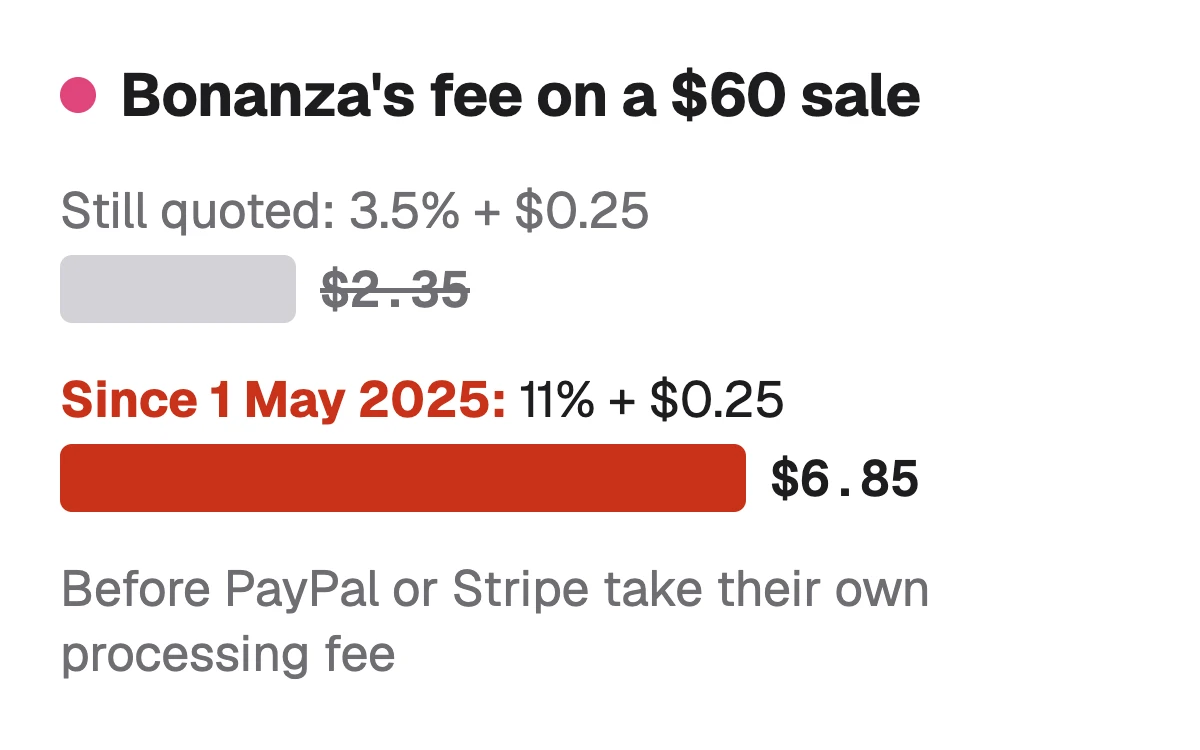
When an item sells, Bonanza takes a final value fee of at least 11% of the Final Offer Value, the price plus any shipping above $10, plus $0.25 if you have no membership. Many guides, and Bonanza's own A-Z selling guide, still quote a 3.5% base: that rate ended on 1 May 2025. A $60 sale now costs $6.85 in Bonanza fees, before PayPal or Stripe take their own cut. Below: setup, the listing, imports, fees, getting found and getting paid.
What you need before you open a booth
Bonanza calls a seller's shop a booth, and opening one takes five things. Two of them catch new sellers out: a PayPal account is required, so Bonanza can't take sellers where PayPal doesn't operate, and it names Israel and Japan, and the set-up fee is charged at once, before your first sale.
| You need | Why |
|---|---|
| An email and password, or a Facebook or Google login | WhyTo create the account, the username and the booth title |
| A PayPal account | WhyRequired: Bonanza asks every seller to accept PayPal. Stripe is optional |
| A credit or debit card | WhyIt verifies your identity, pays the $14.99 set-up fee, and stays on file for your monthly fees |
| Your shipping costs | WhyRequired at setup, with an optional separate ships-from address |
| Items Bonanza allows | WhyCheck the prohibited items list. Handmade and made-to-order pieces are welcome if you or your business made them |
From Bonanza's Help Center, read 1 November 2026: What are the Steps to Setting up a Booth? (updated 2 April 2024), All About Billing, Handmade and Made-to-Order Policy.
Sources: Bonanza Help: What are the Steps to Setting up a Booth?, checked 1 November 2026 · Bonanza Help: Handmade and Made-to-Order Policy, checked 1 November 2026 · Bonanza Help: What items are prohibited?, checked 1 November 2026
How to open a Bonanza booth, step by step
Bonanza's setup runs in six steps. If you already sell elsewhere, step three is the shortcut: importing then puts you at the head of Bonanza's import queue.
Click Sell on Bonanza, then Start Selling Now
At the top left of any page.
Set your email, password, username and booth title
Or sign in with Facebook or Google, and agree to the Terms of Use and Privacy Policy.
Import your items, if you sell elsewhere
From eBay, Etsy, Amazon, Shopify or a CSV file. Optional, and you can do it later.
Enter your name, address, phone and shipping costs
Shipping costs are required here.
Connect PayPal, and Stripe if you like
Then choose whether Bonanza advertises your items. Bonanza recommends it, and it changes your fee rate.
Add a card to verify your identity
The $14.99 set-up fee is charged now. The card's billing details must match your account settings exactly.
Sources: Bonanza Help: What are the Steps to Setting up a Booth?, checked 1 November 2026 · Bonanza Help: How do I add listings for sale in my booth?, checked 1 November 2026
How to list an item on Bonanza
Go to Selling, then Add or edit items, then Add a new item. Only the title, the price and the category are required, but Bonanza says the more fields you fill, the easier the item is to find, and that search engines it feeds listings to need particular traits. The title can run to 80 characters, and Bonanza's tips for it, updated 16 February 2024, are specific: put the item type near the beginning, with the brand and the gender up front and the colour at the end, add the brand and the manufacturer part number if you know them, and use the characters you have on real descriptive words.
Its tips also say what to leave out: all capitals, which Google Shopping won't accept, decorative punctuation, and fluff such as "new", "real" or "authentic", which belongs in the description and traits. Item traits are the category's own fields, such as brand, colour, condition and GTIN: buyers filter by them, and Bonanza passes them to Google Shopping.
Sources: Bonanza Help: Tips and Tricks for Writing the Perfect Item Title (updated 16 February 2024), checked 1 November 2026 · Bonanza Help: Item Traits, checked 1 November 2026 · Bonanza API: addFixedPriceItem (title up to 80 characters), checked 1 November 2026
Check your own listing
Already listed on Bonanza? Score your listing
Copy the title and description from your Bonanza listing and paste them here for a 0–100 score and the top fixes, then rewrite it with your own words already filled in.
Free, no sign-up.
Bonanza SEO: the 80-character title, item traits and the category →
Importing listings from eBay, Etsy, Amazon or Shopify
Bonanza imports from eBay, Etsy, Amazon, Shopify and a CSV file, from the Selling menu. The eBay importer is free, copies the title, description, price, shipping, pictures and usually the category, and finishes within a few hours, though a big import can take 24 to 48. Etsy works differently: you download a CSV from Etsy's Shop Manager and upload it, and Etsy's categories don't come across.
An imported item without a category lands in Incomplete Items and won't go live until you set one. Bonanza's batch editor sets categories in bulk. And since Bonanza doesn't permit duplicate listings, import each item once.
Bonanza vs eBay: what carries over from an eBay listing → · Bonanza vs Etsy: fees, what sells, and moving your listings →
Sources: Bonanza Help: All About the eBay Importer (updated 19 October 2024), checked 1 November 2026 · Bonanza Help: How to Import From Etsy (updated 8 October 2024), checked 1 November 2026 · Bonanza Help: Etsy Listings Incomplete?, checked 1 November 2026 · Bonanza API: Best practices (duplicate listings are not permitted), checked 1 November 2026
How much Bonanza takes from a sale
Bonanza's pricing article, updated 2 June 2025, sets the fee on the Final Offer Value: what the buyer paid for the item plus any part of the shipping charge above $10. Its own example is a $15 item with $12 of shipping, a Final Offer Value of $17. Since 1 May 2025 the final value fee is at least 11% of that, never less than $0.50, with a flat 1.5% on any part above $4,000, plus a $0.25 transaction fee on every sale for a seller without a membership. If you opt into advertising, your chosen rate from 11% to 30% replaces the 11%.
There is a listing charge too, and no listing fee in the usual sense: the first 50 active listings are free, then each one costs $0.03 a month, at most $20 a month. And Bonanza's fee leaves out payment processing, because buyers pay you directly through PayPal, Stripe or Amazon Pay, which charge their own fees.
| Item price | Bonanza fees | You keep, before processing | With a membership |
|---|---|---|---|
| $10 | Bonanza fees$1.35 | You keep, before processing$8.65 | With a membership$1.10 in fees |
| $25 | Bonanza fees$3.00 | You keep, before processing$22.00 | With a membership$2.75 in fees |
| $60 | Bonanza fees$6.85 | You keep, before processing$53.15 | With a membership$6.60 in fees |
| $150 | Bonanza fees$16.75 | You keep, before processing$133.25 | With a membership$16.50 in fees |
| $500 | Bonanza fees$55.25 | You keep, before processing$444.75 | With a membership$55.00 in fees |
Our calculation from Bonanza's pricing article (updated 2 June 2025, read 1 November 2026), through the same fee functions as the Bonanza fee calculator: 11% base rate, no advertising, no shipping charged. Payment processing by PayPal, Stripe or Amazon Pay is not included. A membership removes the $0.25.
Myth"Bonanza charges 3.5%"
Bonanza's own A-Z Guide to Selling, last updated June 2024, still calls 3.5% the base rate, and many guides repeat it. Its pricing article says the final value fee rose to a minimum of 11% on 1 May 2025. On a $60 sale that is $6.85 instead of $2.35.
Free Bonanza fee calculator, with shipping and advertising →
Sources: Bonanza Help: Bonanza Pricing (updated 2 June 2025), checked 1 November 2026 · Bonanza Help: The A-Z Guide to Selling on Bonanza (updated 3 June 2024, still quoting 3.5%), checked 1 November 2026 · Bonanza Help: Bonanza's Transaction Fee, checked 1 November 2026
How buyers find a Bonanza listing
Two ways. Bonanza's own site search picks up a new item within 4 to 6 hours of your booth going live. Beyond it, Bonanza's advertising program sends listings to Google Shopping, its affiliate network and, at the higher levels, eBay, and Bonanza pays for the clicks: you pay only your chosen rate when an item sells. Its help on how Bonanza works, updated 1 December 2025, lists the rates as 11%, 13%, 19% and 30%, and says higher rates bring more buyer visits from Google Shopping and other sources.
Google won't take every item. Bonanza says new, branded items may need a brand and a GTIN, and that a title in capitals or with promotional punctuation can be disapproved. A sale you bring in yourself, through your own referral link, earns 100% of its final value fee back as Bonanza Ads credit.
- Fill the item traits for the category: buyers filter by them and Google Shopping reads them.
- Log in at least every few months: Bonanza closes a booth after 6 months without activity.
- Listings don't expire on Bonanza. They stay until they sell, are reserved or are deleted.
Sources: Bonanza Help: How Bonanza Works (updated 1 December 2025), checked 1 November 2026 · Bonanza Help: Bonanza Advertising FAQ, checked 1 November 2026 · Bonanza Help: What are Bonanza's various limits, and why do they exist?, checked 1 November 2026
From a sale to the money: payment, offers and shipping
Bonanza doesn't hold your money. Its help says buyers pay sellers directly through PayPal, Amazon Pay or Stripe, and an order is ready to ship once its status reads Payment Complete. Bonanza advises against shipping before then. An accepted offer is a binding agreement: the buyer has 7 days to pay, and if they don't you can mark it unpaid, which relists the item.
You set your own shipping time, the most business days between purchase and dispatch, for the whole booth or per item. US sellers can buy USPS, UPS and FedEx labels inside Bonanza, and Bonanza marks the order shipped and adds the tracking for you.
Sources: Bonanza Help: I made a sale! Now what?, checked 1 November 2026 · Bonanza Help: What do I do when I receive an offer?, checked 1 November 2026 · Bonanza Help: How Do I Specify How Long it Takes My Items to Ship?, checked 1 November 2026 · Bonanza Help: Shipping on Bonanza and Bonanza Shipping Labels, checked 1 November 2026
Is selling on Bonanza worth it?
It is cheap to try if you already sell elsewhere: the importers are free, the first 50 listings cost nothing a month, and listings never expire. It is no longer the cheap marketplace older guides describe. At 11% plus $0.25 and your processor's fee, Bonanza now costs more per sale than Etsy at most prices we ran, so treat it as an extra channel for stock you already have listed, not a cheaper home for it.
What Sellura does, and what it doesn't
Sellura writes the Bonanza listing in Bonanza's shape. Describe the item once and it returns a title of about 75 characters, inside Bonanza's 80, with the item first and then the brand, model, size, colour and material, each once, item traits as short name and value lines using only the details you gave, a plain-text description that opens with what the item is and its condition, and search phrases to work into the title and traits, since Bonanza has no tags field. Each listing comes back scored 0–100: the same text always gets the same number, and each weak factor comes with one concrete fix.
The score and the title preview are free on every generation, no card, and so are the listing checker and the Bonanza fee calculator. A credit unlocks the finished listing: Starter is $15 a month for 25 credits or $150 a year, and Pro is $24 a month for 65 credits plus bulk, or $240 a year. Sellura doesn't open booths, import or post listings to Bonanza, or track rankings, has no keyword database, and is not affiliated with Bonanza.
Write the Bonanza listing, with the score and title free → · Plans and credits →
FAQ
How do I start selling on Bonanza?
How much does it cost to sell on Bonanza?
Is Bonanza's fee 3.5%?
Do I need PayPal to sell on Bonanza?
Do Bonanza listings expire?
Can I import my eBay or Etsy listings to Bonanza?
Have PayPal and a card ready, open the booth, and import what you already sell rather than retyping it. Fill the title with the item type and brand up front, set the category and the item traits, and price for 11% plus $0.25 and your processor's fee, not the 3.5% old guides quote. Sellura writes the Bonanza title, traits and description: the score and title preview are free, and a credit unlocks the finished listing.
Öffnet den Generator für Bonanza.