Whatnot show titles: what to call a show so the right buyers tap it
Von Oleksandr Shaniuk · Gründer von Sellura · Aktualisiert 1. November 2026
A good Whatnot show title says what is in the show and how it sells, in the words a buyer would search for. Whatnot's own help asks a new seller for a descriptive title that tells shoppers what you're selling, and its search finds a show by name, so "2024 Topps Chrome Hobby Breaks, Random Teams" does more work than "Friday Night Rips" (help centre, read 1 November 2026). The title never travels alone: buyers meet it beside the thumbnail in a feed, in the category you picked, and in the link preview when you share the show.
- Show name length
- Not published
- Whatnot sets no number
- Thumbnail
- 9:16
- 1080 × 1920 px recommended
- Primary brand tag
- 1 per show
- more added from your listings
- Category
- 1 primary
- a show appears only in it
Whatnot publishes no length for a show name and doesn't say that its feeds read the title at all: its help on discoverability ranks shows by what each buyer watches, follows and buys, and by the seller's record. So the formula below is ours, built for search and for the half-second a buyer gives a thumbnail. Then the examples, the rules Whatnot does publish, and why the listings inside the show matter as much as its name.
Where a Whatnot show title appears
You enter the show name when you schedule the show in Seller Hub, beside the date, the time, the category and the primary selling format. After that it appears in more places than the show itself, and in most of them it shares the space with your thumbnail, so the two should say the same thing.
| Where | What sits beside it |
|---|---|
| The For You, Following and category feeds | What sits beside itYour thumbnail or preview video, in vertical feeds of shows |
| Whatnot search, which finds a seller or a show by name | What sits beside itItem, category and brand results for the same words |
| The link preview when you share the show | What sits beside itYour username and the thumbnail |
| Your Weekly Orders Report, as the Livestream Title | What sits beside itEach order sold in that show |
From Whatnot's help centre, read 1 November 2026: the articles on scheduling a show, finding shows, sharing a show and the Seller Weekly Orders Report.
Sources: Whatnot Help: Schedule, edit, and start a show (updated 10 August 2026), checked 1 November 2026 · Whatnot Help: Find shows, sellers, and items on Whatnot (updated 8 October 2026), checked 1 November 2026 · Whatnot Help: Share your show as a seller, checked 1 November 2026 · Whatnot Help: Seller Weekly Orders Report, checked 1 November 2026
A formula for the title: what, how, and one reason to tap
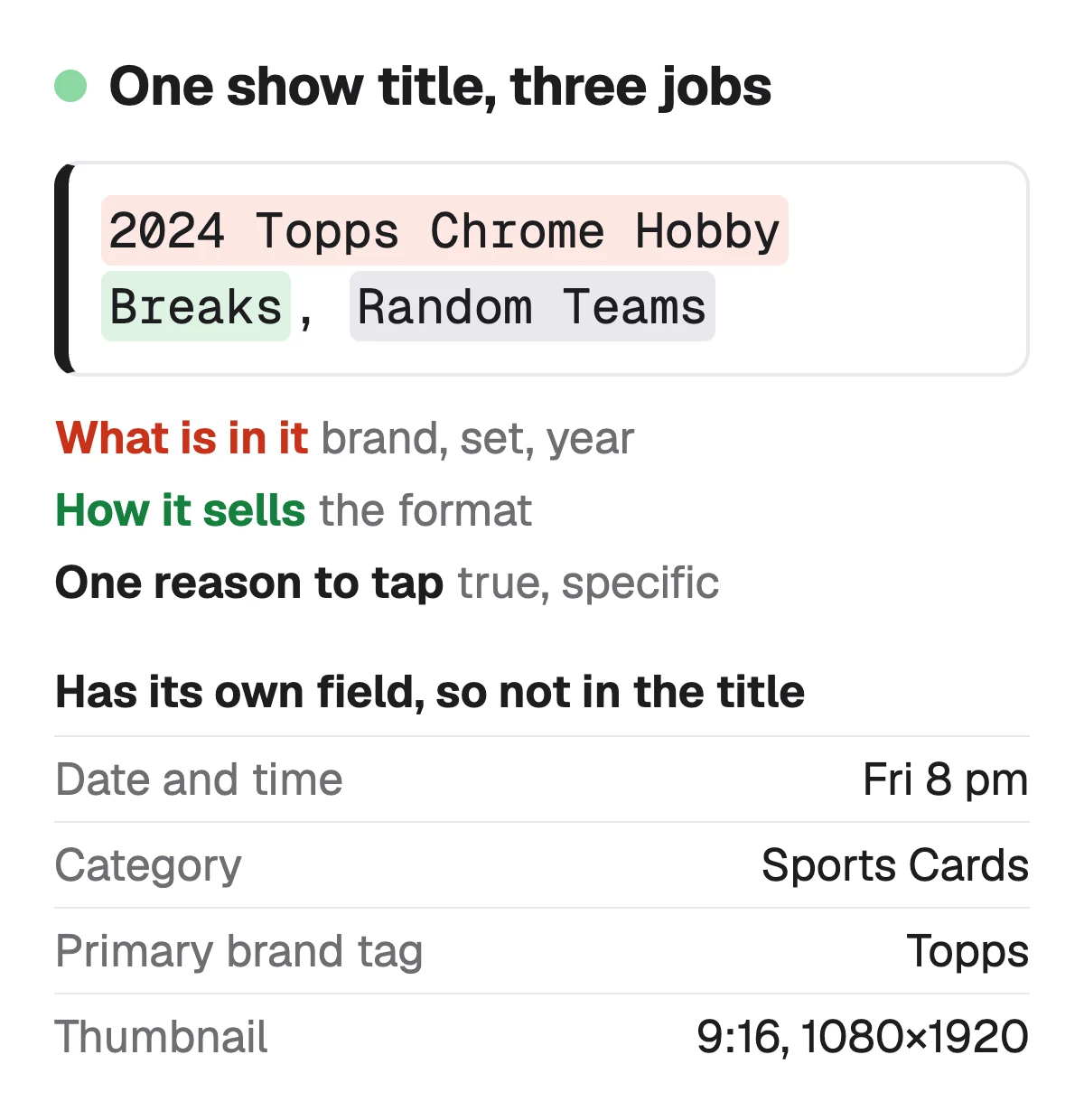
Our formula has three parts, in this order. First what is in the show, named the way a buyer searches for it: the brand, the set or line, the year or the era. Then how it sells, if the format is part of the appeal: breaks, singles, auctions, a restock. Last, one honest reason to tap now, such as the sizes you carry or the condition you grade to.
Leave out what Whatnot already shows. The date and time have their own fields, the category is picked, and your username sits on the card. Words like "insane", "crazy" or "must see" name nothing a buyer searches for, and a value claim has to be true: Whatnot's Community Guidelines say sellers must represent an item's price or value accurately, and it may ask for receipts.
Source: Whatnot Help: Whatnot Community Guidelines (updated 22 October 2026), checked 1 November 2026
Whatnot show title ideas, by category
Each example below follows the formula, and each one is ours: Whatnot publishes no list of good titles. Swap in your own stock and keep only what is true of the show you are about to run.
| Category | Example title | Why it works |
|---|---|---|
| Sports cards | Example title2024 Topps Chrome Hobby Breaks, Random Teams | Why it worksProduct, year and format, the words a break buyer searches |
| Trading card games | Example titlePokemon 151 and Prismatic Singles, $1 Starts | Why it worksTwo sets by name, and a starting bid you will actually honour |
| Sneakers | Example titleJordan 1 and Dunk Low Restock, Sizes 8 to 13 | Why it worksModels plus the sizes, the first thing a sneaker buyer filters by |
| Vintage clothing | Example title90s Band Tees and Vintage Levi's, Measured Live | Why it worksEra, items and a promise the show keeps on camera |
| Coins | Example titleMorgan Silver Dollars, Graded and Raw | Why it worksThe series, and both conditions a collector looks for |
| Toys and collectibles | Example titleFunko Pop Vaulted and Exclusives, Box Condition Shown | Why it worksThe line, the kind of piece, and how you show condition |
Our examples. Brand and set names belong to their owners, and a title should name only what the show actually holds.
What Whatnot's rules say about shows
Whatnot's rules on show naming are about accuracy rather than wording. Its scheduling help says selling formats and tags must be accurate, and its Community Guidelines list deceptive manipulation of discovery or ranking, such as intentionally mistagging content or excessively rescheduling shows, among the things it acts on.
- Category: a show appears only in the category you pick, so choose a primary one if you sell several kinds of item. Picking an inaccurate category to get a lower commission rate breaks the Community Guidelines.
- Primary brand tag: one per show, in select categories. Whatnot says an inaccurate one can lead to actions that affect your selling status.
- Thumbnail: optional, vertical 9:16, 1080 × 1920 pixels recommended. Without one, Whatnot uses your profile photo.
- Breaks: the rules of any card break must be in Show Notes or in the break's listings, including what counts as base or bulk cards.
- Value: any price or value you state, in the title or on stream, has to be accurate.
Sources: Whatnot Help: Schedule, edit, and start a show, checked 1 November 2026 · Whatnot Help: Add a primary brand tag to your show (updated 4 August 2026), checked 1 November 2026 · Whatnot Help: Card Breaks Policy (updated 22 June 2026), checked 1 November 2026 · Whatnot Help: Whatnot Community Guidelines, checked 1 November 2026
The listings inside the show matter as much as its name
Whatnot reads your listings when it decides where a show appears. Its brand tag help says that beyond the one primary brand you pick, it tags more brands to the show automatically from the brand data in the show's product listings, so buyers who search or browse those brands can find the show. Its discoverability help lists listing quality among the signals it uses, and its scheduling tips say to stock the show with listings in advance so buyers can browse and place pre-bids before you go live.
So the work behind a good title is a set of listings with the brand, the item and the model, set or size in each title. A Buy It Now listing you don't reserve for live also stays in your Profile Shop, where it can sell after the show ends. Paste one listing's title and description to check it against Whatnot's rules.
Sources: Whatnot Help: Add a primary brand tag to your show, checked 1 November 2026 · Whatnot Help: Understand how discoverability works on Whatnot (updated 4 August 2026), checked 1 November 2026 · Whatnot Help: Create product listings, checked 1 November 2026
Check your own listing
Already listed on Whatnot? Score your Buy It Now listing
Copy the title and description of one listing from Seller Hub and paste them here for a 0–100 score and the top fixes, then rewrite it with your own words already filled in.
Free, no sign-up.
Whatnot SEO: Buy It Now listings buyers find between shows →
What Sellura does here, and what it doesn't
Sellura doesn't write show titles, and there is no show-title generator on this site. What it writes is the listings that go into a show and stay in your Profile Shop after it. Describe an item once and Sellura returns a Buy It Now title of about 60 characters with the brand or maker first, then the item, then the set, model, size or edition, each once, and a plain-text description that refers only to that item. Whatnot publishes no title length, so 60 and the 80 we cap at are our numbers.
Each listing comes back scored 0–100, and the score is deterministic: the same text always gets the same number, and each weak factor comes with one concrete fix. The score and the title preview are free on every generation, no card, and so are the title checker and the Whatnot fee calculator. A credit unlocks the finished listing: Starter is $15 a month for 25 credits or $150 a year, and Pro is $24 a month for 65 credits plus bulk, or $240 a year. Sellura doesn't run or post shows, track rankings or keep a keyword database, and is not affiliated with Whatnot.
Write the show's listings, with the score and title free → · Free Whatnot fee calculator, every tier and category →
FAQ
What should I name my Whatnot show?
How long can a Whatnot show title be?
Do Whatnot show titles affect discoverability?
What are good Whatnot show tags?
Is there a Whatnot show title generator?
Name the show for what is in it and how it sells, in a buyer's search words, and add one true reason to tap: "2024 Topps Chrome Hobby Breaks, Random Teams", not "Friday Night Rips". Leave the date and category to their fields, pick an accurate category and brand tag, and match the thumbnail to the title. Then stock the show with listings that name the brand and the item, because Whatnot tags brands from them. Sellura writes those listings: the score and title preview are free, and a credit unlocks the finished listing.
Öffnet den Generator für Whatnot.