Google Shopping product descriptions: 5,000 characters, and why Google asks for 500 to 1,000
Von Oleksandr Shaniuk · Gründer von Sellura · Aktualisiert 1. November 2026
A Google Shopping product description can be up to 5,000 characters of plain text, and Google recommends about 500 to 1,000. Both numbers are Google's own, on two Merchant Center Help pages we read on 1 November 2026: the description attribute page sets 1 to 5,000 characters, and the page on fixing text that is too long recommends around 500 to 1,000 and says Google shows only a limited part of a description in Shopping ads and free listings. The most important details, such as size, material, intended age range or special features, go in the first 160 to 500 characters, because a shopper has to click to read the rest.
- Description cap
- 5,000 chars
- Merchant Center product data specification
- Google recommends
- 500–1,000
- Its page on text that is too long
- Key details
- First 160–500
- Shoppers click to read the rest
- Format
- Plain text
- No links, no promotions
What Google keeps out matters as much as the length: no price or shipping, no links, no comparisons with other products, nothing about your company or its policies, and no capitals for emphasis. One rule is new to most sellers: a description written with generative AI goes in structured_description, not description. Paste your title and description into the box below for a free check, then work down the sections.
Check your own listing
Already in Merchant Center? Score your product's title and description
Copy the title and description of one product from your Merchant Center feed or your store and paste them here for a 0–100 score and the top fixes, then rewrite it with your own words already filled in.
Free, no sign-up.
How long a Google Shopping description can be, and how long to make it
Google gives three numbers for the description, all on its own help pages. The product data specification and the description attribute page set the cap at 1 to 5,000 characters, plain text. The description page asks for the most important details in the first 160 to 500 characters. And the page on fixing text that is too long recommends around 500 to 1,000 characters, because Google displays only a limited number of characters in Shopping ads and free listings.
So 5,000 is room, not a target. A description of 500 to 1,000 characters has room for size, material, use and care, and keeps the decisive facts where a shopper sees them before clicking. Past 5,000, Google truncates the description and lists the product as having text that is too long under Products, Needs attention, in Merchant Center.
| Google Merchant Center Help page | What it says |
|---|---|
| Product data specification | What it saysDescription: plain text, max 5,000 characters, required for every product |
| Description [description] and structured description | What it says1 to 5,000 characters; the most important details in the first 160 to 500 |
| How to fix: Text too long | What it saysAround 500 to 1,000 characters recommended; only part is shown in Shopping ads and free listings |
| Over the cap | What it saysTruncated when shown on Google, and flagged under Products, Needs attention |
Read on Google Merchant Center Help on 1 November 2026. Google's help pages carry no revision date, so the date is the day we read them, not the day a rule began.
Check the title against Google's 150 characters and the 70 it shows →
Sources: Google Merchant Center Help: Product data specification (description, max 5,000 characters), checked 1 November 2026 · Google Merchant Center Help: Description [description] and structured description [structured_description], checked 1 November 2026 · Google Merchant Center Help: How to fix: Text too long (500 to 1,000 characters recommended), checked 1 November 2026
What goes in the first 160 to 500 characters
Google's description page lists what to include: the product's most relevant features and visual attributes. It names size, material, intended age range, special features and technical specifications, then shape, pattern, texture and design, and variants such as colour or flavour. For a customised product it asks you to describe the options, and for a bundle or multipack, the whole bundle.
The order inside the first 500 is ours, not Google's: one sentence that says what the product is with its key specification, then size and material, then how it is used. A shopper who reads only the opening, and Google matching a search to it, both get the facts that decide the click.
- First sentence: the product type in a shopper's words, plus the specification that decides the purchase.
- Then the details Google names: size, material, intended age range, special features.
- Then use and care, and for variants the one line that differs, such as the ink colour of a pen.
- Not the title again: the description says what the title had no room for.
One description, built to Google's numbers
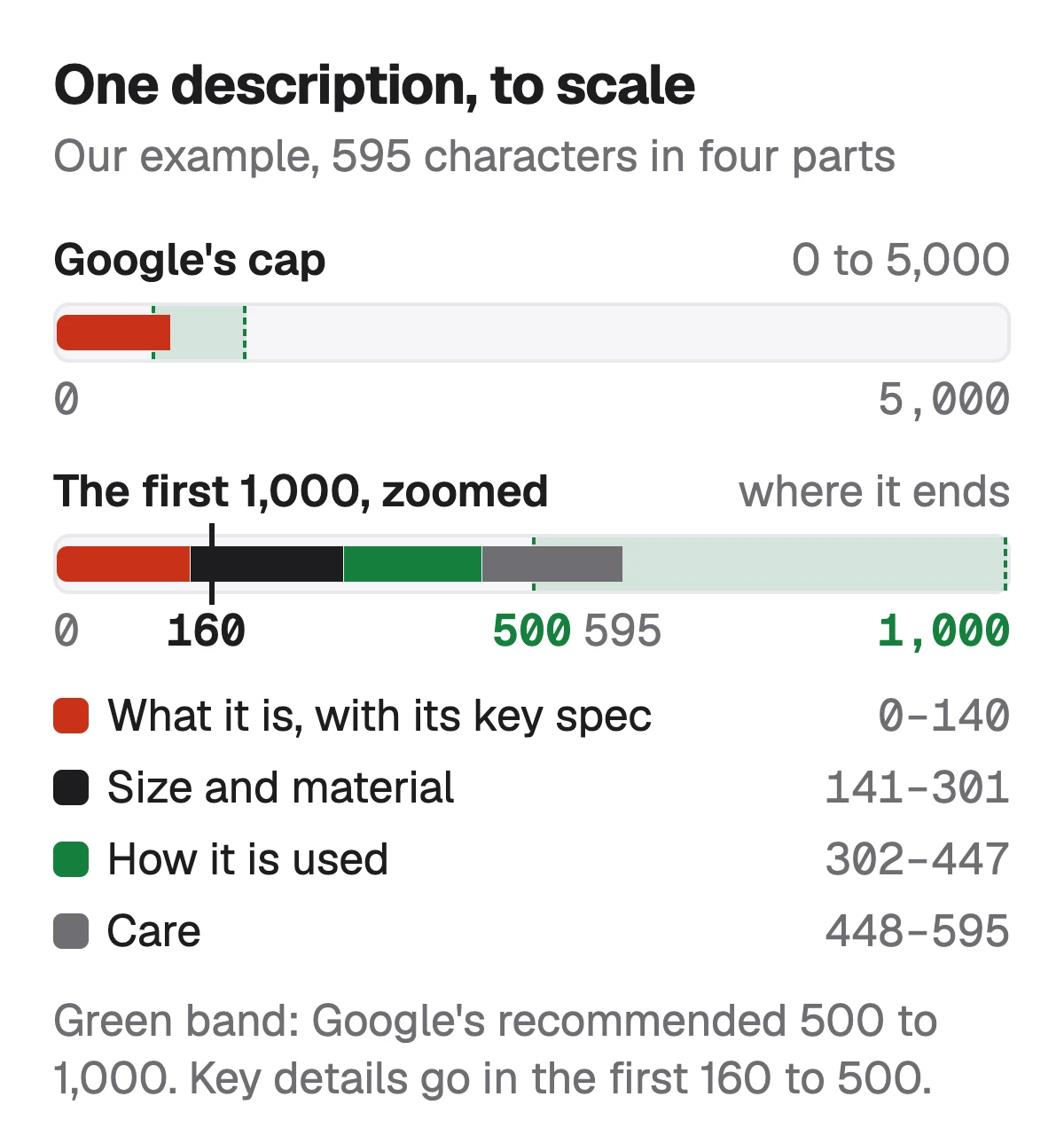
Here is a description for an example product, a stoneware coffee dripper, written to the order above. It is 595 characters in four short parts, inside Google's recommended 500 to 1,000, and its first sentence ends at 140, inside the 160 where Google asks the most important details to start.
| Part | Text | Ends at |
|---|---|---|
| What it is | TextCeramic pour over coffee dripper in speckled white stoneware, for 1 to 2 cups, with a base that sits on most mugs and fits #2 paper filters. | Ends at140 |
| Size and material | TextSize and material: 11 cm tall and 13 cm across the rim, glazed stoneware inside and out, with three drainage holes and ridged walls that let the filter breathe. | Ends at301 |
| How it is used | TextHow it is used: set the dripper on a mug or carafe, fold a #2 filter into it, add 15 to 20 g of ground coffee and pour hot water in slow circles. | Ends at447 |
| Care | TextCare: dishwasher safe on the top rack. Each piece is thrown by hand, so the speckles and the glaze line vary a little from one dripper to the next. | Ends at595 |
Our example product and our order, not a Google rule. Character counts include the space between parts. No price, shipping, store name or link appears anywhere in it, which is what Google's rules ask.
What Google keeps out of a description
Google's description page is specific about what does not belong, and most of it has a home elsewhere in the feed or in Merchant Center's settings. Its title page says breaking these rules can get a product disapproved, and the same rules are listed for the description.
- Only this product: no details about other products, accessories or compatible items.
- No comparisons with other products.
- No category paths: Google has google_product_category and product_type for that.
- No links to your store or other websites: the landing page goes in link.
- No promotional text: no price, sale dates or shipping. Those go in price, sale_price and the shipping settings.
- Nothing about your company: not its name, its history or its policies.
- No capitals for emphasis, and no symbols or characters used to draw the eye.
Watch outStore descriptions often break two of these at once
A description copied from a store page tends to end with shipping times and a return policy, and sometimes a link to a size guide. All three are out of bounds for Google. Keep them on your product page and in Merchant Center's shipping and return settings.
Sources: Google Merchant Center Help: Description [description] (what not to include), checked 1 November 2026 · Google Merchant Center Help: Title [title] (disapproval for promotional text and gimmicks), checked 1 November 2026
Written with AI? Google wants it in structured_description
Google's description page says all descriptions created using generative AI must be sent in the structured_description attribute, with digital_source_type set to trained_algorithmic_media and the text in content. A description you wrote yourself stays in description. If a product has both, Google uses only description, so an older text left there is the one shoppers see.
Sellura writes with AI, so a description pasted from it into a Merchant Center feed falls under this rule. We haven't checked how each store app or feed tool sends structured_description. Look for the field in yours, or in a supplemental feed, before you paste.
- Same limit: 5,000 characters in content, as in description.
- Same rules: only this product, no links, no promotions.
- In a text feed it reads trained_algorithmic_media:"your description".
How to sell on Google Shopping: the setup, step by step →
Source: Google Merchant Center Help: Description and structured description (descriptions created with generative AI), checked 1 November 2026
Product highlights: the points the description doesn't have to carry
Merchant Center has a separate attribute for short feature points, product_highlight. Google's page on it sets 1 to 150 characters per highlight, with a minimum of 2, a recommended 4 to 6 and a maximum of 100, and asks for points about the product's main features that don't repeat the title or description. It also says not to list keywords or search terms in them.
That frees the description to read as prose. The specifications a shopper scans, such as capacity or what is in the box, can go in highlights, and the description explains use, material and care.
Source: Google Merchant Center Help: Product highlight [product_highlight] (1 to 150 characters each; minimum 2, recommended 4 to 6), checked 1 November 2026
What Sellura writes here, and what it doesn't
Describe the product once and Sellura returns a plain-text Google Shopping description whose first 160 characters say what the product is and its key specification, then size, material, use and care, with no price, shipping, store name or link. With it come a title inside Google's 150 characters with the product named in the first 70, 6 product highlights of up to 150 characters, and 8 search phrases to work into the text. The 8 phrases are ours: Google has no keyword field. Each generation comes with a 0–100 score that is deterministic, the same listing always getting the same number, and one fix per weak factor written for that listing.
The score and the title preview are free on every generation, with no card, and so are the Google Shopping title checker and the Listing checker. A credit unlocks one finished listing: Starter is $15 a month for 25 credits or $150 a year, and Pro is $24 a month for 65 credits plus bulk, or $240 a year. Sellura doesn't connect to Merchant Center, submit feeds, run Shopping ads or track rankings, and it has no keyword research database.
Write the Google Shopping listing, score and title free → · Plans and credits →
FAQ
What is the character limit for a Google Shopping description?
How long should a Google Shopping product description be?
Can I use HTML or bullet points in a Google Shopping description?
Can I put shipping or return information in the description?
Where do AI-written descriptions go in a Merchant Center feed?
Is the Google Shopping description the same as my store's product description?
Write the Google Shopping description to Google's own numbers: around 500 to 1,000 characters of plain text, well inside the 5,000 cap, with the product and its key specification in the first 160 and the details Google names, size, material, use, in the first 500. Leave out price, shipping, policies, links and comparisons, put the scannable specifications in 4 to 6 product highlights, and send AI-written text in structured_description. To check what you have, paste it into the box above, or describe the product to Sellura: the title preview and the 0–100 score are free, and a credit buys the finished listing.
Öffnet den Generator für Google Shopping.