How to sell on Google Shopping: Merchant Center, free listings and the feed, step by step
Von Oleksandr Shaniuk · Gründer von Sellura · Aktualisiert 1. November 2026
To sell on Google Shopping you need your own online store, a free Google Merchant Center account and a product feed. Google can then show your products as free listings, at no cost, and a shopper who clicks buys on your site, not on Google. That is from Google's Merchant Center Help, read on 1 November 2026: free listings can appear on Search, Images, Lens, YouTube, Gemini and the Shopping tab, the feature is turned on by default in most cases, and customers are sent to your online site to complete the purchase. Shopping ads are the paid part, and Google Ads charges only when someone clicks.
- Free listings
- $0
- On by default in most cases
- Required for every product
- 7 attributes
- id, title, description, link and 3 more
- Title
- 150 chars
- Google shows up to 70
- Shopping ads
- Per click
- Optional, through Google Ads
So Google Shopping is not a marketplace you open a shop on, the way you would on Etsy or eBay. It is a channel for a store you already run, on Shopify, BigCommerce, WooCommerce, Wix, Squarespace or your own code. Below: the setup in the order Merchant Center asks for it, the product data every item needs, what it costs, and how to write the title and description Google shows. Sellura is an independent tool and is not affiliated with Google.
What Google Shopping is, and what it isn't
Google Shopping is the product data you send to Google Merchant Center: one entry per product, with its title, description, image, price and availability. Google uses that data to show your products in its free listings and, if you pay for them, in Shopping ads. Google's free listings page says it doesn't guarantee your products will be shown, and that it relies on the data you provide to match them with what shoppers search for.
Everything after the click is yours. There is no Google checkout to set up, no Google storefront and no seller rating on Google for this. That is why the first requirement is a working store with real product pages, and why most of the work is in the feed's text.
- A marketplace (Etsy, eBay, Amazon): you list on its site, it takes the order and a fee per sale.
- Google Shopping: you list on Google, the order happens on your site, and Google's help describes no fee per sale.
- Where the products appear: Search, Images, Lens, YouTube, Gemini and the Shopping tab, by Google's free listings page.
Google Shopping SEO: the title, description and highlights in the feed → · Selling from BigCommerce: which field becomes which attribute →
Source: Google Merchant Center Help: Free listings for products (where they appear, no cost, purchase on your site), checked 1 November 2026
The setup, in the order Merchant Center asks for it
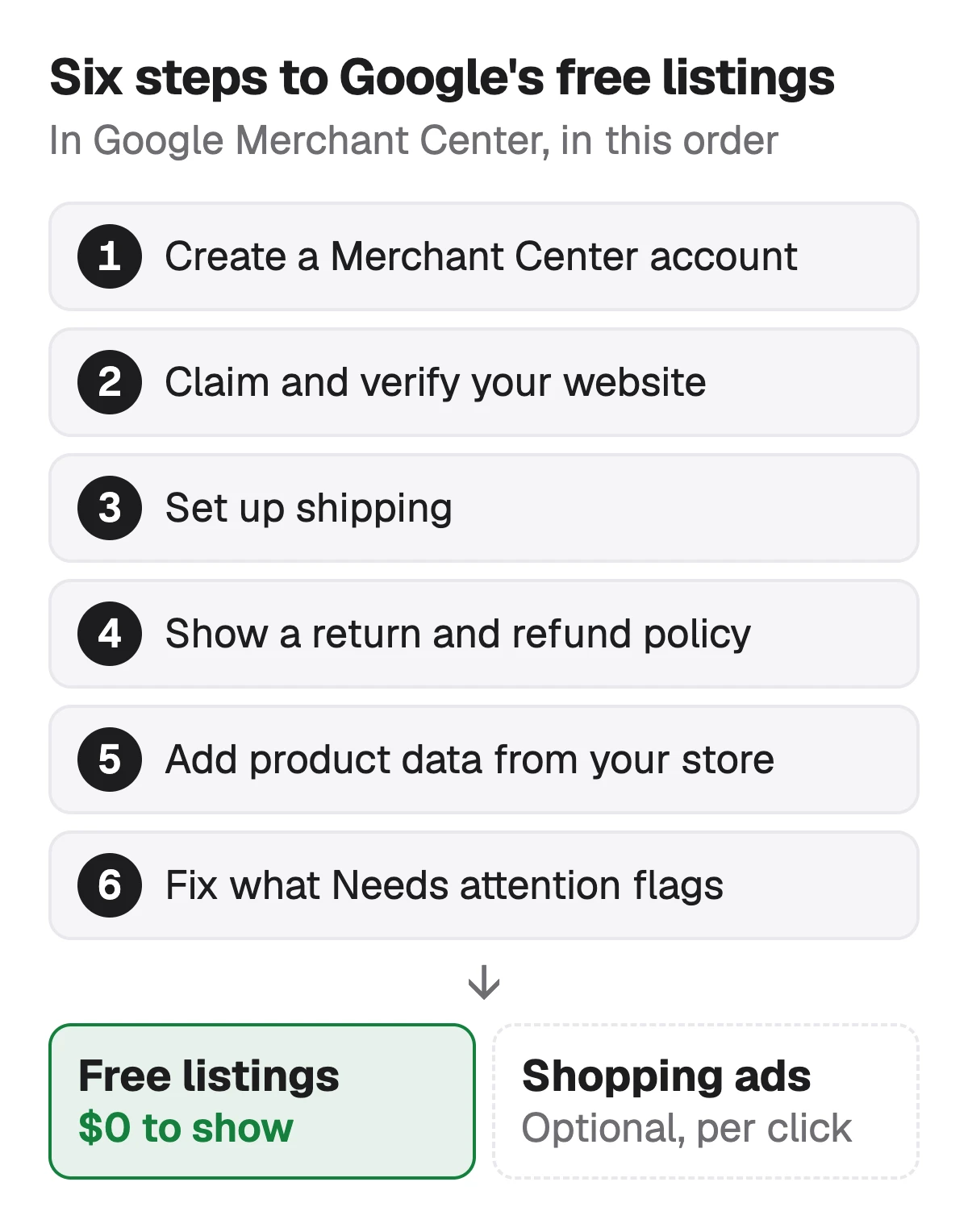
Google's help on setup issues lists what an account needs before its products can show in ads and free listings, and its free listings page adds shipping and returns. In the order you meet them:
Create a Merchant Center account
Sign in with a Google account and add your business information. Google asks for a business name that complies with its policies.
Claim and verify your website
Merchant Center needs to know the store is yours. If your store platform has a Google app, check whether it does this step for you when you connect it.
Set up shipping
Add shipping settings in Merchant Center, or shipping costs in the product data. Google's free listings page says this is required in some countries.
Show a clear return and refund policy
On your website, and if you like in Merchant Center too, where Google reviews it and marks it Verified, Pending or Rejected. Keep the two consistent.
Add your product data
Through your store's Google app, a feed file, or the Merchant Center API. Each product needs the seven required attributes below.
Fix what Merchant Center flags
Products with problems, such as text that is too long, appear under Products, Needs attention. Fix them at the source, in your store, so the next sync doesn't bring them back.
Sources: Google Merchant Center Help: Setup issues (business name, website claim, product data, landing page, return policy), checked 1 November 2026 · Google Merchant Center Help: Set up your return policies for Shopping ads and free listings, checked 1 November 2026 · Google Merchant Center Help: Free listings for products (shipping and return information), checked 1 November 2026
The product data Google requires for every product
Google's product data specification marks seven attributes as required for all products. A few more depend on the product: brand for new products, except movies, books and musical recordings, a GTIN where the product has one, and condition for used or refurbished items. Your store app fills most of them from fields you already have; the title and description are the ones you write.
| Attribute | What it is | Google's limit |
|---|---|---|
| id | What it isYour unique ID for the product, often the SKU | Google's limit50 characters |
| title (or structured_title) | What it isThe product's name as Google shows it | Google's limit150 characters; up to 70 shown |
| description (or structured_description) | What it isPlain text about this product only | Google's limit5,000 characters; 500 to 1,000 recommended |
| link | What it isThe product page on your store | Google's limitNone published |
| image_link | What it isThe main image, plus up to 10 more in additional_image_link | Google's limitNone published for the link |
| availability | What it isIn stock, out of stock, preorder or backorder | Google's limitFixed values |
| price | What it isThe price on your product page | Google's limitNone published |
From Google's Merchant Center product data specification and its page on fixing text that is too long, read on 1 November 2026. The landing page must match the product, and Google's setup page lists that as a requirement too.
Check a title against Google's 150 characters and the 70 it shows →
Sources: Google Merchant Center Help: Product data specification (required attributes and limits), checked 1 November 2026 · Google Merchant Center Help: How to fix: Text too long (70 characters shown, 500 to 1,000 recommended), checked 1 November 2026
How much it costs to sell on Google Shopping
Free listings cost nothing: Google's free listings page says your products can appear at no cost on Google, and the purchase happens on your site. Google's help describes no fee on the sale itself. Shopping ads are optional and run through Google Ads, which charges only when someone clicks an ad. Google publishes no price per click, because it depends on your bids and your campaign.
What a sale actually costs you is set by the store you sell from: its plan, any fee it takes per order, and the payment processor's fee. On BigCommerce, for example, an order paid through an open payment provider pays a fee to BigCommerce on top of card processing since 1 June 2026.
| Part | What Google charges |
|---|---|
| Free listings | What Google chargesNothing |
| A sale through a free listing | What Google chargesNo fee described: the order is on your site |
| Shopping ads | What Google chargesPer click, at a price set by your bids; no published rate |
| Your store and payments | What Google chargesNot Google's: your platform's plan and fees, and the card processor's |
From Google's free listings help and the Google Ads help on Shopping ads, read on 1 November 2026.
BigCommerce fee calculator: the per-order fee since June 2026 → · Shopify fee calculator: what a Shopify order costs →
Sources: Google Merchant Center Help: Free listings for products (no cost), checked 1 November 2026 · Google Ads Help: About Shopping ads (charged only when someone clicks), checked 1 November 2026
Which store you sell from changes the setup, not the rules
Most stores reach Merchant Center through their platform's own Google app, which claims the website, builds the feed from your product fields and keeps it in sync. On BigCommerce that is usually Feedonomics Surface, a free app BigCommerce's help says lists up to 100,000 SKUs. Shopify, WooCommerce, Wix and Squarespace have their own connectors.
The connector changes how the data gets there, not what Google accepts. Google's limits and exclusions apply to whatever the app sends, so a store description with shipping times or a size-guide link in it reaches Google with them. We haven't checked how each app sends structured_title and structured_description for AI-written text, so check yours.
BigCommerce to Google Shopping: the field mapping → · Shopify product SEO: the store page Google ranks →
Source: BigCommerce Help Center: Google Shopping (Feedonomics Surface, up to 100,000 SKUs), checked 1 November 2026
Write the two fields Google shows
Once the account is set up, the title and the description are what decide whether a shopper clicks. Google's title page says to use all 150 characters, and its text-too-long page says it shows up to 70, so name the product completely in the first 70. The description gets around 500 to 1,000 characters, key details in the first 160 to 500.
- Title: product type and the deciding detail first, specifications after. No price, sale, shipping or store name, and no capitals for emphasis.
- Description: only this product, plain text, no links or policies.
- Product highlights: 4 to 6 points of up to 150 characters, Google's recommendation.
- AI-written text: structured_title and structured_description, marked trained_algorithmic_media.
Google Shopping descriptions: what goes in the first 500 →
Source: Google Merchant Center Help: Title [title] and structured title (use all 150 characters; no promotional text), checked 1 November 2026
Approved, but not showing?
An approved product is eligible, not promised a place: Google's free listings page says the status doesn't guarantee your products will be shown. Before you look for a penalty, check the plain causes in Merchant Center.
- Needs attention: a disapproved or limited product is listed there, with the reason.
- The landing page: it has to match the product in the feed, by Google's setup page.
- The text: a title that names the product only after 70 characters, or a description of shipping terms, gives Google little to match a search to.
- Free listings switched off: they are on by default in most cases, but check the setting.
What Sellura does here, and what it doesn't
Describe the product once and Sellura writes the text the feed needs: a title inside Google's 150 characters with the product in the first 70, a plain-text description whose first 160 characters say what it is, 6 product highlights of up to 150 characters, and 8 search phrases to work into the text, which are ours since Google has no keyword field. Each generation comes with a 0–100 score that is deterministic: the same listing always gets the same number, and every weak factor comes with one fix written for that listing.
The score and the title preview are free on every generation, with no card, and so are the Google Shopping title checker and the Listing checker. A credit unlocks one finished listing: Starter is $15 a month for 25 credits or $150 a year, and Pro is $24 a month for 65 credits plus bulk, or $240 a year. Sellura doesn't create Merchant Center accounts, submit feeds, run Shopping ads, track rankings or keep a keyword research database.
Write the Google Shopping text, score and title free → · Plans and credits →
FAQ
How do I start selling on Google Shopping?
How much does it cost to sell on Google Shopping?
Can I sell on Google Shopping without a website?
Is Google Shopping a marketplace like Amazon?
What product information does Google Shopping require?
Why are my Google Shopping products approved but not showing?
Selling on Google Shopping means sending your own store's products to Google Merchant Center: create the account, claim your website, set up shipping and a return policy, and connect your store's Google app so every product carries the seven required attributes. Free listings cost nothing and the sale stays on your site; Shopping ads are an optional extra, paid per click. Then put the work where Google shows it: a title with the product named in the first 70 of its 150 characters, and a description of 500 to 1,000 characters about the product only. Describe the product to Sellura and the title preview and 0–100 score are free; a credit buys the finished text.
Öffnet den Generator für Google Shopping.