Squarespace product tags vs categories: what each one does in your store
Von Oleksandr Shaniuk · Gründer von Sellura · Aktualisiert 1. November 2026
On Squarespace, categories build your store page's navigation and tags drive its filters. Neither is described by Squarespace as a search signal. Its help says the main use of categories is a store navigation customers browse, and the main use of tags is a custom store page filter, for seasonal or temporary groupings like new, last chance or spring sale. A category takes up to 25 characters and a tag up to 80 (Squarespace Help, updated 22 and 28 October 2026, read 1 November 2026).
- Category name
- 25
- characters, up to 1,000 categories
- Tag
- 80
- characters, count not published
- Store page filters
- 10
- on pages of 200 products or fewer
- Tags in one filter
- 50
- a tag can sit in only one
Filters have their own rules: on version 7.1 sites only, up to 10 filters, on store pages of 200 products or fewer, with up to 50 tags in a custom tag filter and each tag in only one filter. Below: what categories do, how tag filters work, a tag and category vocabulary for one store, and where the words a buyer searches for belong instead.
Tags vs categories, side by side
Squarespace's help puts it simply: use categories to organize products by subject or type, and be selective with how many you create. Use tags more liberally, for anything a visitor might find useful to filter by. The table below is everything its two help articles on the subject say, in one place.
| Categories | Tags | |
|---|---|---|
| Main use | CategoriesStore page navigation customers browse | TagsCustom store page filters |
| Good for | CategoriesProduct type: Mugs, Bowls, Plates | TagsTraits and moments: speckled, new, spring sale |
| Length | Categories25 characters | Tags80 characters |
| How many | CategoriesUp to 1,000, in up to three levels (7.1) | TagsNo count published |
| Shown on the store page | CategoriesAs the category navigation, at the top or in a sidebar | TagsThrough filters you set up, not by themselves |
| Own page and URL | CategoriesYes, a filtered category page with its own URL slug | TagsNo page of their own |
| Also used by | CategoriesRelated products on product pages, Archive and Tag Cloud blocks | TagsSummary blocks, Archive and Tag Cloud blocks |
Squarespace Help: Organize your store page with categories and tags (updated 22 October 2026), Categories and tags (30 September 2026) and Add products to your store (28 October 2026), read 1 November 2026.
Sources: Squarespace Help: Organize your store page with categories and tags (category navigation, up to 1,000 categories in three levels, up to 10 filters, 50 tags a filter, store pages of 200 products or fewer; updated 22 October 2026), checked 1 November 2026 · Squarespace Help: Categories and tags (categories by subject or type, tags used more liberally; one at a time, not in bulk; updated 30 September 2026), checked 1 November 2026 · Squarespace Help: Add products to your store (product names 200, tags 80, categories 25, plain text descriptions, Generate; updated 28 October 2026), checked 1 November 2026
Categories: the navigation shoppers browse
Adding categories to products automatically creates a category navigation on the store page, at the top or in a sidebar. On version 7.1 you can have up to 1,000 categories and subcategories, nested up to three levels, and reorder them by dragging. The top category shows as All unless you rename it.
Each category also gets a filtered page with its own URL slug, which you can switch off, hide from the navigation or add to your site's main navigation. It is a page of its own, so name it the way a shopper would, Coffee Mugs rather than Collection 3, inside the 25 characters.
- Product type in plain words: Mugs, Bowls, Plates, Vases.
- A subcategory only when the parent gets crowded: Mugs, then Espresso Cups.
- Seasonal categories can be hidden from the navigation when the season ends.
- Related products on a product page are drawn from its category.
Squarespace SEO: the SEO title, the SEO description and the site title →
Source: Squarespace Help: Organize your store page with categories and tags (category navigation, up to 1,000 categories in three levels, up to 10 filters, 50 tags a filter, store pages of 200 products or fewer; updated 22 October 2026), checked 1 November 2026
Tags: the filters, and their rules
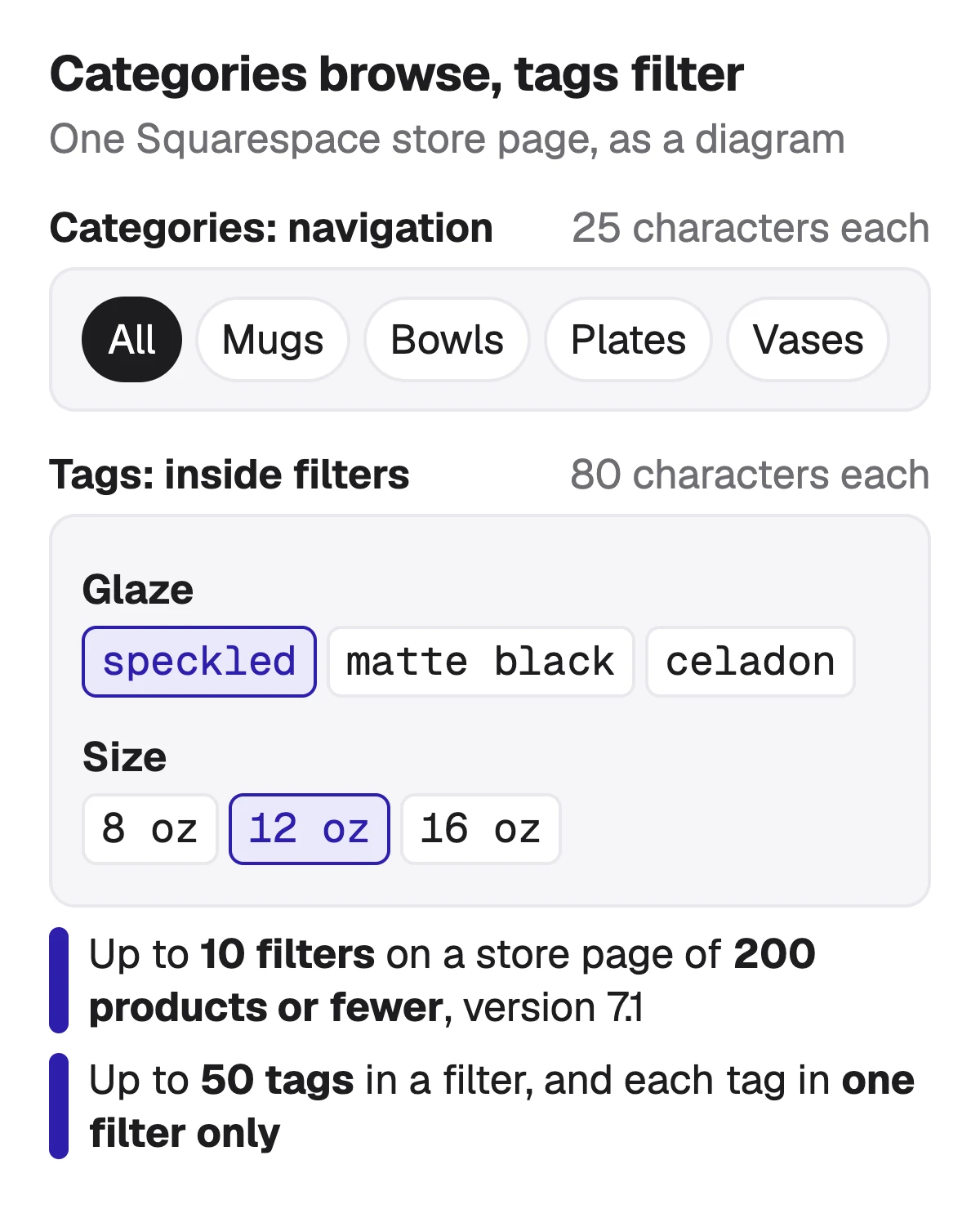
A tag does nothing on the store page until you put it in a filter. In the store page section's Filters, a custom tag filter gets a label customers see and a set of tags, and products without those tags are hidden while it is applied. You can also add filters for price range, availability and hiding sold-out products.
The limits are tighter than the tag field suggests. Filters are on version 7.1 only, on store pages of 200 products or fewer, up to 10 a page. A custom tag filter holds up to 50 tags, and a tag can be assigned to only one filter. If you later rename, merge or delete a tag, you have to edit the filter and add the updated tag again.
Source: Squarespace Help: Organize your store page with categories and tags (category navigation, up to 1,000 categories in three levels, up to 10 filters, 50 tags a filter, store pages of 200 products or fewer; updated 22 October 2026), checked 1 November 2026
A tag and category vocabulary for one store
Here is one small pottery store of 40 products, set up the way Squarespace's help describes: categories for what the product is, tags for the traits and moments a shopper filters by. Every tag below would sit in exactly one filter, which is Squarespace's rule, so the filter label tells the shopper what kind of choice it is.
| Kind | Label shoppers see | Values |
|---|---|---|
| Category navigation | Label shoppers seeAll | ValuesMugs · Bowls · Plates · Vases |
| Tag filter | Label shoppers seeGlaze | Valuesspeckled · matte black · celadon · white |
| Tag filter | Label shoppers seeSize | Values8 oz · 12 oz · 16 oz |
| Tag filter | Label shoppers seeCollection | Valuesnew · last chance · holiday |
| Built-in filter | Label shoppers seePrice | Valuesprice range |
| Built-in filter | Label shoppers seeAvailability | Valueshide sold out |
Our example store, built on the rules in Squarespace's help: category names under 25 characters, one filter per tag, and well under the 50 tags a filter allows.
- Keep each tag to the word a shopper would click, not a search phrase: speckled, not speckled ceramic coffee mug for her.
- Use the same spelling every time. Squarespace adds tags one at a time, not in bulk, so typos multiply.
- Tags for moments, like new or holiday, are the use Squarespace itself gives as its example.
Where the words a buyer searches for go instead
Squarespace's help on adding products says tags can be used as filters, and its keyword advice says nothing of tags as a ranking field. The places it does name for keywords are titles, the first sentence on the page, descriptions and URL slugs. On Etsy a tag is matched against shoppers' searches. On Squarespace a tag helps a shopper who is already on your store page.
So the search phrase belongs in the product's SEO title, at the front, the first sentence of the product description, the SEO description if you write one, and the URL slug. Put speckled ceramic coffee mug there, and speckled in a Glaze filter.
- SEO title: up to 100 characters, 70 or fewer advised, with your site title added after it by default.
- First sentence of the description: the focus phrase at the start, Squarespace advises.
- SEO description: 50 to 300 characters advised, cut around 160 in search.
- URL slug: descriptive, with the page's focus keyword, in letters, numbers and hyphens.
Free Squarespace SEO title checker → · Squarespace SEO description and product description →
Sources: Squarespace Help: Keyword best practices (one focus keyword, titles 70 or fewer, no keyword stuffing; updated 14 August 2025), checked 1 November 2026 · Squarespace Help: Editing page titles (SEO title 100 characters, 70 or fewer advised; updated 13 February 2026), checked 1 November 2026 · Squarespace Help: Adding SEO descriptions (50–300 advised, 400-character limit, cut around 160, product description used when empty; updated 10 September 2026), checked 1 November 2026
What Sellura writes for Squarespace, and what it doesn't
Sellura returns 10 tags of up to 40 characters with each Squarespace listing, short plain phrases for the type, material, style or occasion, ready to sort into your filters. Both numbers are ours: Squarespace publishes no tag count, and 40 sits well inside its 80. The same generation writes the product name to work as the SEO title and a plain-text description whose first 160 characters are written for search. It doesn't create categories or filters on your store.
The 0–100 score and the title preview are free on every generation, no card, and so are the Listing checker, the Squarespace title checker and the Squarespace fee calculator. A credit unlocks one finished listing: Starter is $15 a month for 25 credits or $150 a year, and Pro is $24 a month for 65 credits plus bulk, or $240 a year. Sellura doesn't connect to your Squarespace site, change your SEO settings, publish products or track where a page ranks, and it has no research database or ads analysis. It is not affiliated with Squarespace.
Write the Squarespace product, score and title free → · Plans and credits →
FAQ
What is the difference between tags and categories on Squarespace?
Do Squarespace product tags help SEO?
How many tags can a Squarespace product have?
How do I add filters to a Squarespace store page?
How many categories can a Squarespace store have?
Give a Squarespace store a few plain categories for what you sell and a small set of tags for what shoppers filter by, each tag in one filter, and keep both short. Then put the phrase a buyer searches for where Squarespace reads it: the SEO title, the first sentence of the description and the URL slug. Sellura writes the title, the description and 10 filter-ready tags together, with the score and the title preview free.
Öffnet den Generator für Squarespace.