Temu product image size: the carousel, apparel, size chart and video, in Temu's own numbers
Von Oleksandr Shaniuk · Gründer von Sellura · Aktualisiert 1. November 2026
A Temu listing needs 3 to 10 carousel images. For most items they are square, 1:1, at least 800 × 800 px. For apparel they are 3:4, at least 1340 × 1785 px. Every image is JPEG or PNG and at most 3 MB. That is Temu's own Product Listing Instructions for US local sellers (last updated 20 October 2025, read 1 November 2026). Whether your item counts as apparel is decided by its category, not by you, so pick the most specific category first and shoot to the ratio it asks for.
- Carousel, most items
- 1:1
- at least 800 × 800 px, 3 to 10 images
- Carousel, apparel
- 3:4
- at least 1340 × 1785 px
- File size, every image
- 3 MB
- JPEG, JPG or PNG
- Product video
- 60 s
- one, from 720p, up to 100 MB
Around the carousel sit the other materials: up to 50 detail images of at least 480 px, one product video of up to 60 seconds, a detail video of up to 180 seconds, and a size chart image where the category needs one. The table below has all of them, then which picture shoppers see first, the size chart, the videos, and what Temu does not publish.
Every image and video Temu takes, in one table
Temu sorts listing media into three groups: the carousel shoppers swipe through, the detailed presentation further down the page, and safety documents. Each has its own numbers.
| Material | Count | Ratio and minimum size | File |
|---|---|---|---|
| Carousel, non-apparel | Count3 to 10 | Ratio and minimum size1:1, at least 800 × 800 px | FileJPEG or PNG, up to 3 MB |
| Carousel, apparel | Count3 to 10 | Ratio and minimum size3:4, at least 1340 × 1785 px | FileJPEG or PNG, up to 3 MB |
| Detail images | CountUp to 50 | Ratio and minimum sizeAt least 480 × 480 px, no taller than 1:3 | FileJPEG or PNG, up to 3 MB |
| Size chart image | Count1, where the category needs a size chart | Ratio and minimum sizeAt least 800 × 800 px, no taller than 1:3 | FileJPEG or PNG, up to 3 MB |
| Product video | CountUp to 1 | Ratio and minimum sizeAny ratio, up to 60 seconds, from 720p | FileUp to 100 MB, MP4, MOV and other common formats |
| Detail video | CountNot stated | Ratio and minimum size1:1, 4:3 or 16:9, up to 180 seconds, from 720p | FileUp to 300 MB |
| Product actual images (safety) | Count1 to 6, where the category asks | Ratio and minimum sizeNot stated | FileJPEG or PNG, up to 3 MB |
Temu Partner Platform (US): Product Listing Instructions, section 2.2 and 2.5, last updated 20 October 2025, read 1 November 2026. "No taller than 1:3" is Temu's "Aspect Ratio: ≥1:3", width to height.
Source: Temu Partner Platform (US): Product Listing Instructions, 2.2 Upload Product Carousel Images/Detail Images/Videos/Certificates (updated 20 Oct 2025), checked 1 November 2026
Square or 3:4: the category decides
Temu does not ask you which ratio you want. Each category carries a type, apparel or non-apparel, and Temu's guide says that type "will effect at the image required shape". So a T-shirt needs tall 3:4 images at 1340 × 1785 px or more, and a phone case needs squares of 800 × 800 px or more, and a square shirt photo will not pass.
Choose the most specific category Temu offers before you shoot or crop. Temu's guide tells sellers to keep drilling down to the leaf category, and the ratio follows from it.
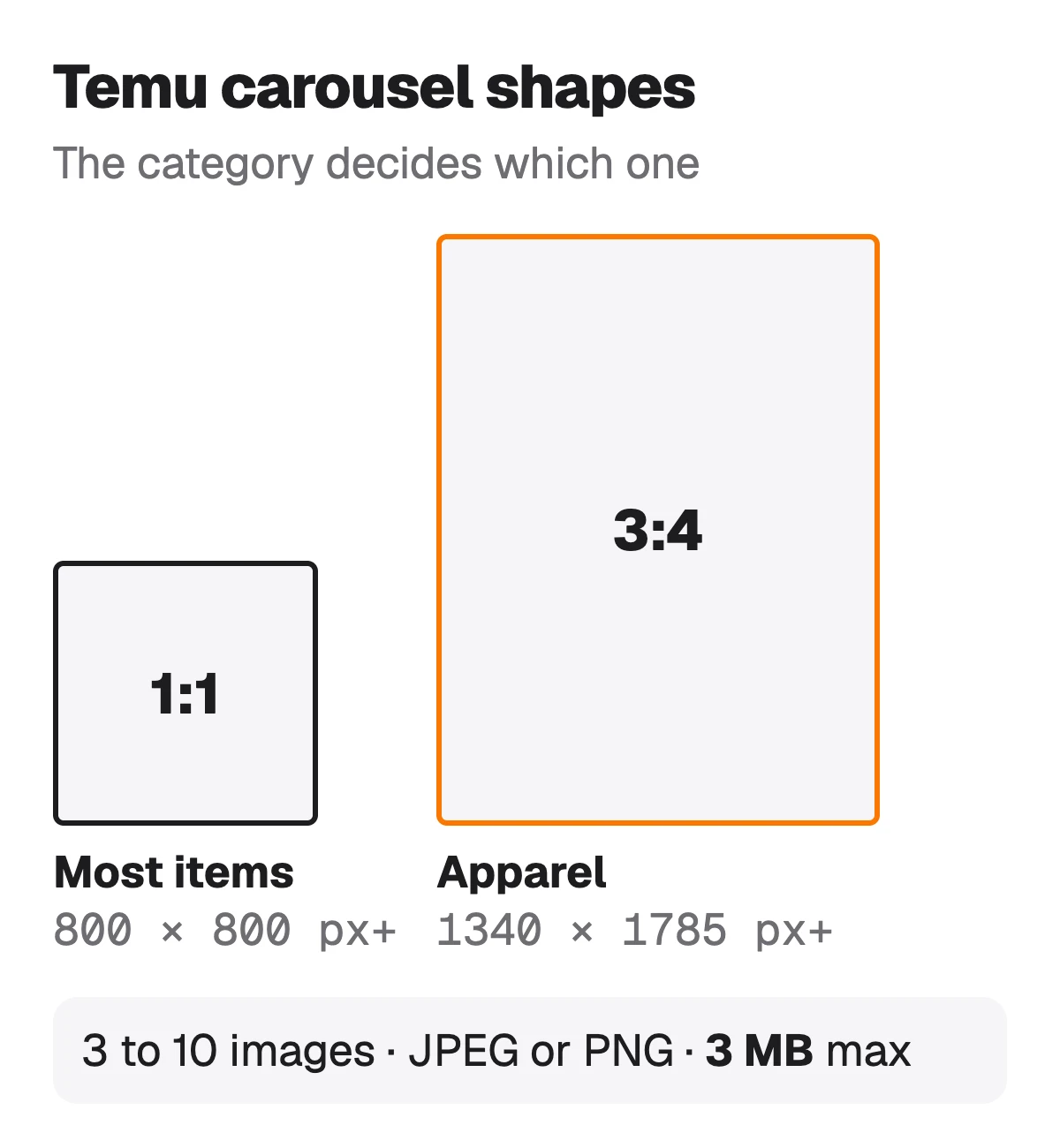
- Non-apparel: square, at least 800 × 800 px.
- Apparel: 3:4, at least 1340 × 1785 px, more than twice the pixels of the square minimum.
- Both: 3 to 10 images, JPEG or PNG, 3 MB at most each. Export a large photo at a quality that lands under the cap.
Source: Temu Partner Platform (US): Product Listing Instructions, Category Query (catType: apparel 0, non-apparel 1, decides the image shape), checked 1 November 2026
Which picture shoppers see first
Temu builds the listing's carousel from your variants. Its guide says it takes "the first image of the first SKU as the first image" and adds each variant's images after it, and it uses the first image of every variant as that variant's preview. For apparel the same happens per colour.
- Put the clearest shot of the whole item first in the first variant: it is the listing's first image.
- Make the first image of every other variant show that variant, since it becomes the preview a shopper taps.
- Keep the item the same in the photo, the name and the variant: a colour or quantity that doesn't match is the mistake shoppers complain about first.
Temu product names: what goes next to the first image →
Source: Temu Partner Platform (US): Product Listing Instructions, SKU Carousel Images notes (SPU carousel and SKU preview image), checked 1 November 2026
The size chart image
Some categories need a size chart and some don't, and Temu's guide says the category's size rules tell you which. Where one is needed you either fill in a chart in the form or upload one size chart image, not both. The image has its own limits and Temu suggests what to put on it.
- One image, JPEG or PNG, at least 800 × 800 px, no taller than 1:3, up to 3 MB.
- Temu recommends it shows every size you sell, the product's measurements, and inches as the unit.
- On the US site the chart maps to US sizes only.
Source: Temu Partner Platform (US): Product Listing Instructions, 2.5 Prepare Size Chart, checked 1 November 2026
The two videos
Temu takes two different videos. The product video, one at most, sits with the carousel: up to 60 seconds, at least 720p, any ratio, up to 100 MB. The detail video belongs to the product description: up to 180 seconds, at least 720p, 1:1, 4:3 or 16:9, up to 300 MB, and Temu shows it first in that part of the page by default.
- The product video is optional: Temu's limit is up to one. Both videos take MP4 and MOV among other common formats.
- The detail video, the detail images and the description make up what Temu calls the detailed presentation.
Source: Temu Partner Platform (US): Product Listing Instructions, Product Description (detail video, product images) and Product Video rows, checked 1 November 2026
What Temu doesn't publish about images
Temu's listing guide gives sizes, ratios, counts and file caps, and nothing about how a picture should look. Its public guide sets no background colour, no rule on text or logos on the image and no recommended size above the minimums, so anything you read on those points is someone's advice, not Temu's rule.
- Background: not specified. A plain background keeps a square image readable as a small thumbnail.
- Text and watermarks: no rule in the listing guide. Keep claims out of images too, since Temu checks the name, bullet points and description for brand, eco and medical claims.
- Size above the minimum: not specified. Our habit is to upload larger than 800 px and stay under 3 MB.
What Sellura does here, and what it doesn't
Sellura's product-photo tool starts from one photo you took of the item and re-renders it with AI on a white studio background, or in a lifestyle scene, as a 2048 × 2048 JPEG. That square fits Temu's non-apparel carousel, which asks for 1:1 from 800 px. It does not make the 3:4 images Temu wants for apparel, so shoot clothing tall yourself. Every render is compared against your photo before it is saved, and one that has drifted from your product is thrown away without using a credit. Check the file is under Temu's 3 MB before you upload it.
Your first image is free, one white-background render per account. After that, product images are part of the Pro plan at 1 credit each: Pro is $24 a month for 65 credits plus bulk, or $240 a year, and Starter, $15 a month for 25 credits or $150 a year, covers listing text. The listing generator writes the Temu name, five bullet points and the description, and its 0–100 score and name preview are free on every generation. Sellura doesn't upload to Temu, shoot video or make size charts, and is not affiliated with Temu.
Make a product photo, the first one free → · Write the Temu listing, score and name free → · Plans and credits →
FAQ
What size should Temu product images be?
How many images can a Temu listing have?
What is the maximum file size for a Temu image?
How long can a Temu product video be?
Does Temu require a white background?
Which image does Temu show first?
Pick the most specific category first, because it decides the shape: square from 800 × 800 px for most items, 3:4 from 1340 × 1785 px for apparel. Upload 3 to 10 images of 3 MB or less, the clearest shot of the whole item first in the first variant, and a size chart image if the category asks. Sellura can turn one photo of a non-apparel item into a square studio image, the first one free, and write the Temu name and bullet points with a free 0–100 score and name preview.