WooCommerce vs Shopify SEO: what each one does with your product page
Von Oleksandr Shaniuk · Gründer von Sellura · Aktualisiert 1. November 2026
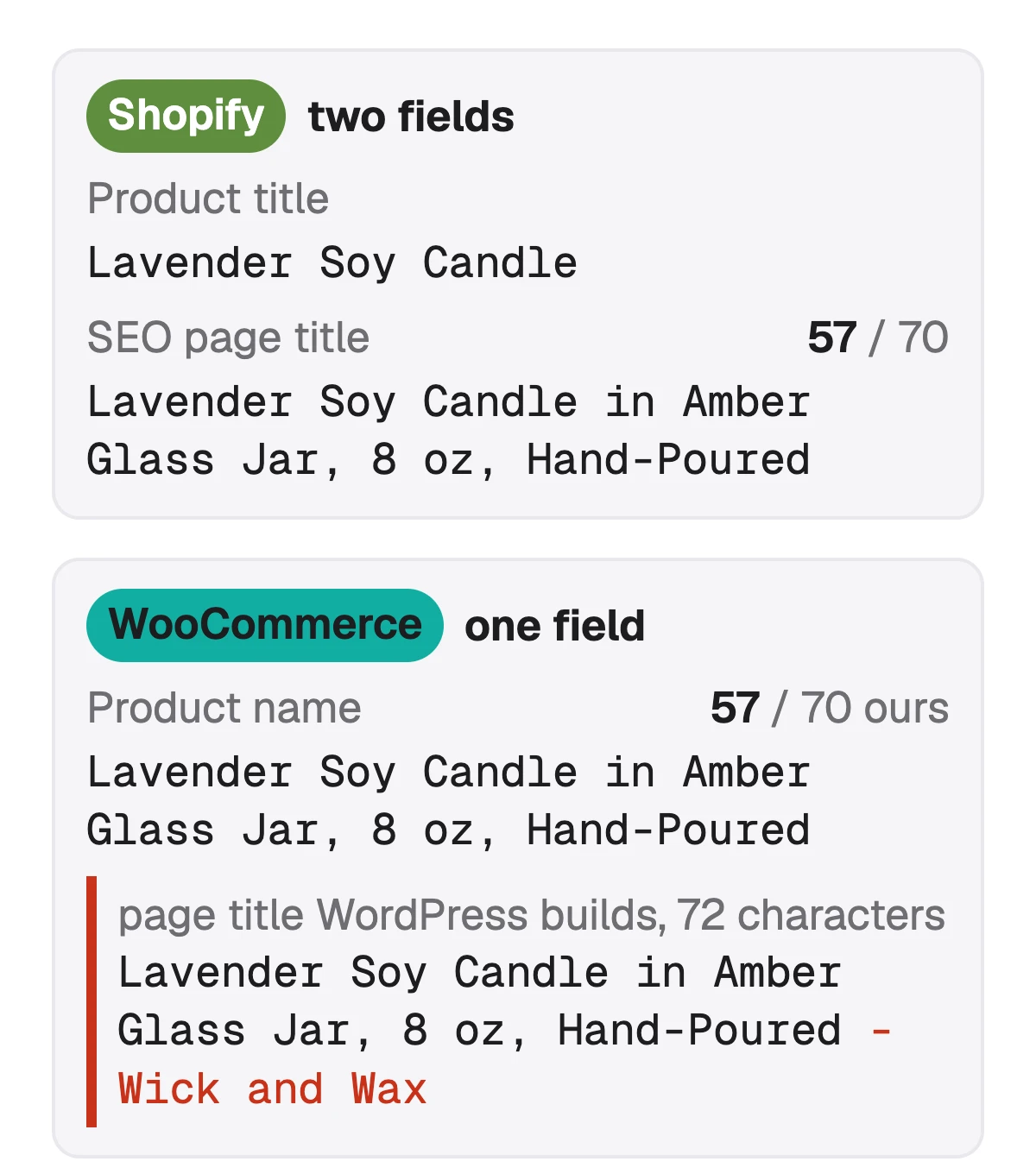
Neither platform ranks a product for you, but they hand Google different fields. Shopify gives every product its own search engine listing: a page title of up to 70 characters, with 60 or fewer recommended, and a meta description, with 160 characters recommended (Shopify Help, read 1 November 2026). WooCommerce core has neither field. WordPress makes the product name the page's title and adds your site name after it, and WooCommerce publishes no length for the name, so the 70 we write to there is ours.
- Shopify SEO page title
- 70
- Shopify's, with 60 or fewer recommended
- WooCommerce product name
- No length
- published, we write to 70 (ours)
- Shopify meta description
- 160
- recommended, Shopify's
- WooCommerce platform fee
- $0
- and 0% revenue share
Both write product markup for search engines without a plugin. Shopify says its themes include product schema automatically, and WooCommerce's own code fills the product's description in that markup from the short description. The larger differences are around the page: who hosts the store, what each takes per sale, and how much of the page you control. Below: the search fields side by side, the markup, tags, the costs, and how to write one product for both.
The search fields, side by side
On Shopify the product title and the line Google shows can be two different strings. Each product has a search engine listing with its own page title and meta description, and Shopify's help says the title you enter generates the H1 heading on the page. If you leave the page title empty, the theme builds it from the product title and the shop name.
On WooCommerce there is one string. The product name is the heading, and WordPress turns it into the page title as the name, a hyphen and the site name. WooCommerce core has no SEO title or meta description field. SEO plugins add both, and if you install one, the plugin's fields are what Google gets.
| Shopify | WooCommerce | |
|---|---|---|
| Line in Google's results | ShopifyThe SEO page title: up to 70 characters, 60 or fewer recommended (Shopify's numbers) | WooCommerceThe product name, a hyphen and the site name (WordPress core). No length published: our budget is 70 |
| If you leave it empty | ShopifyThe theme uses the product title and the shop name | WooCommerceNot applicable: the name is always used |
| Meta description | ShopifyIts own field, 160 characters recommended | WooCommerceNo field in WooCommerce core, SEO plugins add one |
| Heading on the page | ShopifyGenerated from the product title | WooCommerceThe product name, as your theme shows it |
From Shopify Help, WooCommerce's product editor documentation and the WordPress developer reference, all read 1 November 2026. Themes and SEO plugins can change any row.
Sources: Shopify Help: Adding keywords for SEO (page title up to 70 characters, 60 or fewer recommended, 160 for the meta description, the title generates the H1), checked 1 November 2026 · WooCommerce docs: Product editor settings (what the name accepts, the slug made at first save, the two descriptions), checked 1 November 2026 · WordPress developer reference: wp_get_document_title (post title, a separator that defaults to "-", site name), checked 1 November 2026
Structured data: built in on both, built differently
Structured data is the markup that tells search engines a page is a product, with a name, a price and a description. Shopify's SEO overview says its themes automatically include schema markup for products, which is what makes rich results possible. On WooCommerce the markup comes from WooCommerce's own code, not the theme.
That code, read on 1 November 2026, takes the product's name from the product name and its description from the short description, stripped of HTML, falling back to the long description only when the short one is empty. It writes no product markup at all for a product with no price, no reviews and no rating. So on WooCommerce the short description is a search field in its own right, and on Shopify there is only one description to write.
- Shopify: product schema from the theme, built from the product's own fields.
- WooCommerce: product markup from WooCommerce core, with the short description as the description.
- WooCommerce with no price, reviews or rating: no product markup.
- Either platform: an SEO plugin or app can add to the markup or replace it.
WooCommerce short description vs description: which one Google gets →
Source: Shopify Help: SEO overview (automatic canonical tags, sitemap.xml and robots.txt, product schema in themes, title tags with the store name), checked 1 November 2026
Canonical tags, sitemaps and the parts you don't touch
Shopify generates canonical tags, the sitemap.xml and the robots.txt file for every store, its SEO overview says. Its themes also generate title tags that include the store name. You don't set any of it up, and you can't break most of it.
On WooCommerce the same pieces come from WordPress, your theme and whichever SEO plugin you install, so you configure them yourself and you can change them freely. That is the real line between the two for SEO: Shopify decides more for you, and WooCommerce lets you decide more and leaves you responsible for it.
- Choose Shopify if you want canonical tags, the sitemap and the robots file handled with no work.
- Choose WooCommerce if you want control over every one of them and will look after it.
- On either one, the product name, the description and the photos are still yours to write.
Source: Shopify Help: SEO overview (automatic canonical tags, sitemap.xml and robots.txt, product schema in themes, title tags with the store name), checked 1 November 2026
What each one costs per sale
Shopify is a monthly plan. You pay the card rate on each payment through Shopify Payments, and Shopify's pricing page lists a transaction fee on top when you use another payment provider: 2% on Basic, read 1 November 2026. WooCommerce is free and lists 0% revenue share, and you pay for hosting, which it puts at $25 to $350 a month for most stores, plus the payment provider's fee, 2.90% + $0.30 for a US card on WooPayments.
Plan prices on Shopify's pricing page vary with the country it shows you, so we don't print them here. Run your own order through the Shopify calculator below for the per-order cost.
| Shopify | WooCommerce | |
|---|---|---|
| Platform | ShopifyMonthly plan | WooCommerce$0, 0% revenue share |
| Hosting | ShopifyIncluded in the plan | WooCommerce$25–$350 a month for most stores |
| Card payments | ShopifyThe plan's card rate, through Shopify Payments | WooCommerceYour provider's rate: WooPayments 2.90% + $0.30, US |
| Another payment provider | ShopifyShopify's transaction fee on top, 2% on Basic | WooCommerceNo extra fee from WooCommerce |
From Shopify's pricing page and WooCommerce's pricing and WooPayments fees pages, read 1 November 2026. Rates differ by country, plan and payment method.
Free Shopify fee calculator → · How to sell on WooCommerce: setup, costs and the first product →
Sources: Shopify pricing (monthly plans, card rates, a transaction fee when another payment provider is used), checked 1 November 2026 · WooCommerce pricing ($0 platform fee, 0% revenue share, hosting $25–$350 a month for most stores), checked 1 November 2026 · WooPayments: Fees (US cards 2.90% + $0.30), checked 1 November 2026
Which one fits your store
For product SEO alone, neither wins: both put the name in the page title, both write product markup, and both rank on what you write. Choose on everything around the page. Our read of both platforms' own pages:
| If you | Lean to | Why |
|---|---|---|
| Already run a WordPress site | Lean toWooCommerce | WhyThe store is a plugin on the site you have |
| Want canonical tags, sitemap and robots file handled for you | Lean toShopify | WhyIts SEO overview says it generates all three |
| Want a search title that differs from the heading without a plugin | Lean toShopify | WhyEach product has its own SEO page title |
| Want no share of the sale taken by the platform | Lean toWooCommerce | Why0% revenue share, you pay for hosting instead |
| Want tag pages Google can find | Lean toWooCommerce | WhyEach tag has a landing page, Shopify's tags aren't used by search engines |
Our read, not a rule, from each platform's own documentation and pricing, read 1 November 2026.
Writing one product for both stores
If you sell the same product on both, write the core once and fit it to each field. A product name of about 60 characters works as a WooCommerce name and as a Shopify page title. On Shopify you can make the product title shorter for the page and keep the searched words in the page title, and on WooCommerce the name has to do both.
Then split the text by where it goes. Shopify has one description and a meta description. WooCommerce has a short description that its markup gives search engines and a long one that Google for WooCommerce sends to Merchant Center, so the same paragraph pasted into both WooCommerce fields wastes one of them.
Check your own title
- Halte dein wichtigstes Keyword in den ersten 40 Zeichen — das sehen Käufer auf dem Handy zuerst.
- Name or page title: about 60 characters, the product first, no price or store name.
- Shopify meta description: about 160 characters, what the product is and who it is for.
- WooCommerce short description: a few lines that stand on their own.
- Long description on both: the details first, no price or shipping text if it goes to Google Shopping.
Shopify product SEO: the page title, tags and description → · WooCommerce SEO: the name, the two descriptions and the tags →
Source: Google for WooCommerce FAQ (the long description is sent to Merchant Center by default), checked 1 November 2026
What Sellura writes for each store, and what it doesn't
Pick Shopify and Sellura returns a page title inside Shopify's 70 characters, aimed at 60, a description whose first 160 characters read as the meta description, highlights for the description and a focused tag set. Pick WooCommerce and it returns a name of about 60 characters inside the 70 we allow, up to 5 short description points of up to 100 characters, a description inside 5,000 characters, Google Merchant Center's cap, and 10 product tags of up to 30 characters. It never adds a material, a measurement or a delivery time you didn't give.
Every generation comes back with a 0–100 score and the title or name preview, free and without a card, and the Shopify tag generator, the Shopify fee calculator and the WooCommerce name checker are free too. A credit unlocks the finished listing: Starter is $15 a month for 25 credits or $150 a year, and Pro is $24 a month for 65 credits plus bulk, or $240 a year. Sellura doesn't build or host a store, install on either platform, set your meta tags or track where a page ranks, has no research database or ads analysis, and is not affiliated with Shopify, WooCommerce or WordPress.
Write the WooCommerce product, with the score free → · Write the Shopify product, with the score free →
FAQ
Is WooCommerce or Shopify better for SEO?
Does Shopify have a product title character limit?
Does WooCommerce have an SEO title field?
Do tags help SEO on Shopify or WooCommerce?
Which is cheaper, WooCommerce or Shopify?
Do WooCommerce and Shopify add structured data for products?
Pick the platform on hosting, cost and control, not on SEO: both put the product name into the page title, both write product markup, and both rank on what you write. Then write to each one's fields. On Shopify, fill the SEO page title and the meta description for every product. On WooCommerce, make the name lead with the product, write a short description that stands on its own, and give every product a price so its markup is written. Sellura drafts either one to its own fields: the score and the title preview are free, and a credit buys the finished listing.
Öffnet den Generator für WooCommerce.