eBay Cassini: how eBay's search engine actually ranks your listing
By Oleksandr Shaniuk · founder of Sellura · Updated September 30, 2026
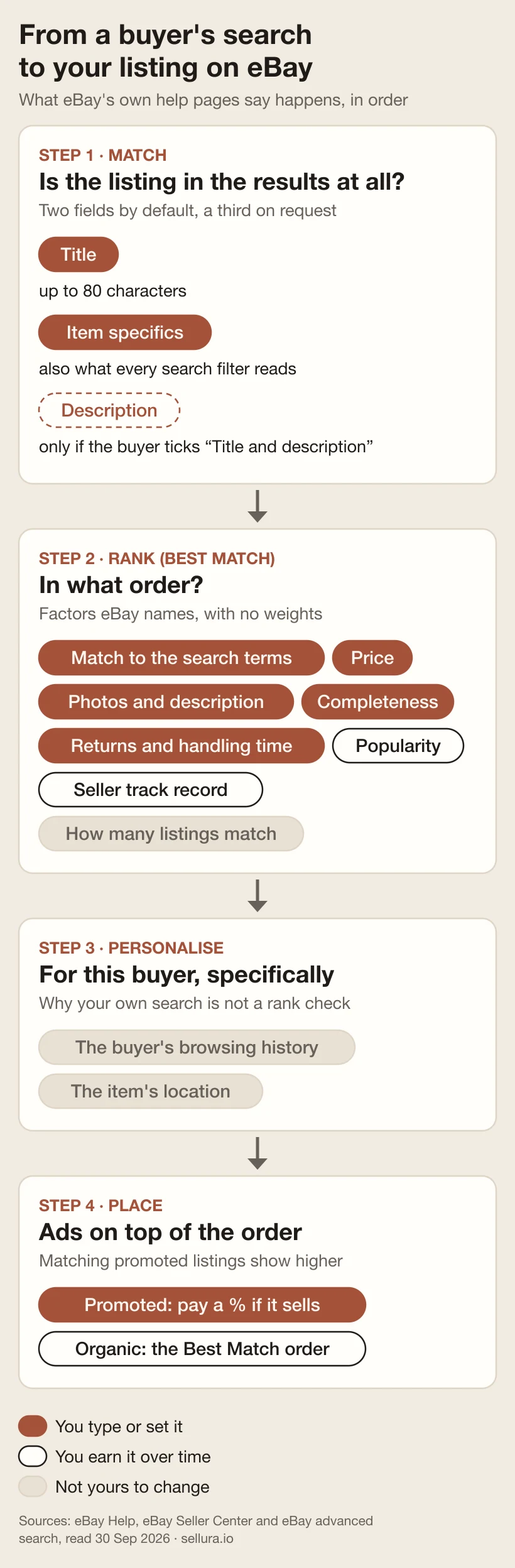
Cassini is eBay's name for its own internal search engine, and Best Match is the order it puts results in by default. eBay publishes what Best Match weighs, twice — once for buyers and once for sellers. Put together, the list is: how closely the listing matches the search terms, how popular the item is, its price, the quality of the listing (description and photos), how complete it is, its return policy and handling time, the seller's track record, how many listings match the query — and two things that belong to the buyer, not to you: their browsing history and the item's location. We read both pages on 30 September 2026; they are linked below.
What eBay does not publish is how much any of those factors weighs. Every "Cassini secret" you have read — sell-through rate as the master signal, a fresh-listing boost, ads lifting organic rank — comes from someone other than eBay. This page separates the two: what eBay has written down, what it has not, and the Seller Hub report that shows where your listing really appears, which searching your own title cannot.
Step one is a match — and your description is not in it by default
Nothing is ranked until it matches. eBay's Advanced search form lists "Title and description" as an option under Search including — a box the buyer has to tick. That tells you what the ordinary search bar reads without it: not your description. A keyword that lives only in the description reaches the few buyers who switch that box on, and nobody else.
The two fields that do the matching are the two you type. The title, which eBay's own guidance puts at no more than 80 characters. And item specifics, where eBay's Seller Center is blunt: buyers filter on them, and your item only appears in those filtered results if you have added the matching specific. Every blank specific is a filter you drop out of.
Check an eBay title against the 80-character limit, free → · Item specifics in depth: which ones buyers filter on →
Sources: eBay Advanced search ("Search including: Title and description"), checked 30 September 2026 · eBay Seller Center: Item specifics (filters, Required / Required soon / Recommended), checked 30 September 2026 · eBay Global Selling: How to optimize your listings (Cassini named as eBay's search engine), checked 30 September 2026
Step two: the Best Match factors eBay actually publishes
eBay describes Best Match in two help articles written for two audiences, and neither list is complete on its own. The buyer's page adds personal factors and the size of the field; the seller's page adds listing quality and the terms of sale. The table below merges them and marks which page names each factor.
Neither page gives a single weight. eBay also says it regularly updates the algorithm and that this can occasionally change how listings rank — which is the honest reason nobody outside eBay can sell you a formula.
| Factor | Named on | What you can do about it |
|---|---|---|
| How closely the listing matches the search terms | Named onBuyer and seller pages | What you can do about itTitle words buyers type; complete item specifics; the right category |
| How popular the item is | Named onBuyer and seller pages | What you can do about itNothing directly — it is earned, and it lives on the listing |
| Price | Named onBuyer and seller pages | What you can do about itPrice against what comparable items sold for |
| Listing quality: description, photos | Named onSeller page | What you can do about itUp to 24 photos, flaws shown; a description that answers questions |
| How complete the listing is | Named onBuyer and seller pages | What you can do about itEvery Required and Recommended item specific |
| Return policy and handling time | Named onSeller page | What you can do about itState both; shorter handling time where you can keep it |
| The seller's track record | Named onBuyer and seller pages | What you can do about itShip on time with tracking, describe accurately, avoid cancellations |
| How many listings match the query | Named onBuyer page | What you can do about itNothing — it is the size of the field you chose |
| The buyer's browsing history | Named onBuyer page | What you can do about itNothing — see below |
| The item's location | Named onBuyer page | What you can do about itOnly where you ship from |
Merged from eBay's buyer help page "How to use search" and its seller help page on optimising listings for Best Match, both read 30 September 2026. The right-hand column is our reading of what each factor leaves in the seller's hands; eBay publishes the factors, not the advice.
Sources: eBay Help: How to use search (Best Match factors, buyer side), checked 30 September 2026 · eBay Help: Optimising your listings for Best Match (seller side, 80-character title, 24 photos), checked 30 September 2026
What eBay never says — and the blogs say for it
The gap between that list and a formula is where most Cassini advice lives. None of the claims below appears on either eBay page. Not documented is not the same as false — it means nobody outside eBay can check it, so it is a poor reason to spend money or throw away a listing's history.
Here is how each popular claim compares with what eBay actually wrote on 30 September 2026:
- "Sell-through rate is the strongest signal." eBay names how popular the item is and gives no weight to it, or to anything else.
- "Ending and relisting gives you a fresh-listing boost." Listing age is on neither eBay list — and relisting discards the popularity history eBay does name.
- "Promoting a listing lifts its organic rank." eBay says promoted listings are shown higher; it says nothing about the organic order underneath.
- "Keywords in the description boost ranking." The description is only searched when the buyer ticks the box; eBay counts it towards listing quality, alongside photos.
- "Item specifics matter more than the title." eBay says specifics power filters and visibility; it does not rank one field over the other.
Before you end and relist: what a stuck eBay listing actually needs →
Why searching your own title is not a rank check
Two factors on eBay's buyer page belong to the buyer: their browsing history and the item's location. The order you see when you search for your own title is your order, shaped by what you have browsed and where you are. A buyer in another city, with another history, sees another one. eBay is also trialling eBay.ai, an AI search in its app for a limited number of buyers that takes requests in their own words — one more way real queries stop looking like your title.
The number that is not personalised is in Seller Hub, under Performance → Traffic. It counts impressions by placement — top 20 search spot, rest of search spot and non-search — split into organic and promoted, and gives a click-through rate of page views from eBay divided by impressions. That is eBay counting where your listing actually appeared.
- Top-20 search impressions rising after a change: the change helped you rank.
- Impressions steady but click-through falling: you are being shown and losing the click — look at the main photo and the price, not the keywords.
- Most impressions coming from non-search placements: buyers are reaching you some other way, and search is where the work is.
Sources: eBay Help: How to use search (browsing history, item location, eBay.ai trial), checked 30 September 2026 · eBay Global Selling: Monitoring your business in Seller Hub (Traffic: impressions by placement, CTR), checked 30 September 2026
Promoted listings sit on top of the order, not inside it
eBay's buyer page says promoted listings that match the search and the buyer's interests appear higher in results. Under the general strategy you choose an ad rate between 2 % and 100 % of the item's total sale amount, and you pay it only when a buyer clicks the ad and buys within 30 days of that click.
Two consequences follow. An ad still has to match the search, so it cannot rescue a listing whose title and specifics lack the buyer's words — fix step one first. And the ad rate comes off the same sale as eBay's own fees, so decide it from your margin, not from how badly you want the placement.
Work out what an eBay sale leaves you before you pick an ad rate →
Sources: eBay Global Selling: General campaign strategy (2–100 % ad rate, 30-day window), checked 30 September 2026 · eBay Help: How to use search (promoted listings shown higher), checked 30 September 2026
What to change, in the order eBay's own list suggests
Start where eBay's factors and your control overlap, and change one thing at a time so the Traffic report can tell you what worked. Give each change a couple of weeks before judging it.
- Title: the words a buyer would type — brand, item type, model, size, colour, material — spelled correctly and within eBay's 80 characters.
- Item specifics: every Required and Recommended one, using the values eBay suggests, so every filter can find you.
- Category: the most relevant one; eBay lets you add a second.
- Terms: a stated return policy and the shortest handling time you can reliably keep — both are named factors.
- Photos: several angles and any flaws shown; eBay allows up to 24.
- Price: in line with what comparable items actually sold for, not what they are listed at.
- Track record: on-time delivery with tracking, accurate descriptions, no cancellations from running out of stock.
Score a live eBay listing 0–100, free →
Source: eBay Help: Optimising your listings for Best Match (title, photos, category, terms, seller history), checked 30 September 2026
Where Sellura fits — and what it cannot see
Sellura works on the part of Cassini you type. Paste a public eBay item URL (ebay.com/itm/…) into the free Listing Grader and it returns a 0–100 score that is deterministic — the same listing always gets the same number, and every point traces to a weighted factor — with one concrete fix per weak factor, written against that listing — for a short title it reads: "Your title is 52/80 characters — add more searched phrases to use the space." Or describe the product once and Sellura writes the eBay version: a front-loaded title of about 75 characters, never over the 80 cap, search phrases for the title and specifics, and a core set of eight item specifics within eBay's 65-character value limit — plus the same product for Etsy, Amazon Handmade, Shopify, Depop and Walmart, each inside its own limits.
What it cannot see is everything Cassini earns: your Best Match position, your popularity, your seller record, your Traffic report and eBay's weights. It does not track rankings, keep a search-volume database or analyse ads. The score and title preview are free on every generation, no card needed; a credit unlocks the finished listing — title, keywords, item specifics, description and CSV. Starter is $15 a month for 25 credits, Pro $24 a month for 65 plus bulk generation, or $150 and $240 a year.
Grade your eBay listing free → · Write the eBay listing from a product description →
FAQ
What is Cassini on eBay?
Cassini is eBay's name for its internal search engine — the system that decides which listings appear for a buyer's search and in what order. The default order it produces is called Best Match. eBay's help pages describe Best Match by its factors (match to the search terms, popularity, price, listing quality and completeness, returns and handling time, seller track record) but do not publish how much each one weighs.
Does eBay search the item description?
Not by default. eBay's Advanced search offers "Title and description" as an option under Search including, which the buyer has to tick. Ordinary searches match your title and item specifics, so a keyword that appears only in your description reaches very few buyers. Put the words that matter in the title or an item specific.
Why is my listing on page one when I search, but buyers can't find it?
Because the order you see is personalised. eBay's own search help lists the buyer's browsing history and the item's location among the Best Match factors, so your results are not a buyer's results. The unbiased view is Seller Hub → Performance → Traffic, which counts your impressions in the top 20 search spots, the rest of search and non-search placements.
Do promoted listings improve organic ranking on eBay?
eBay does not say they do. Its help page says promoted listings that match a search are shown higher; it says nothing about the organic Best Match order underneath. A promoted listing still has to match the buyer's search, so it cannot make up for a title and item specifics that lack the buyer's words.
Does ending and relisting an item help it rank on eBay?
Listing age is not among the Best Match factors eBay publishes, and relisting throws away the popularity history — views, watchers, sales — that eBay does name. Fix the title, item specifics, category and terms on the existing listing first, and treat a relist as a last experiment rather than a first move.
Cassini is eBay's search engine and Best Match is its default order, and eBay has published what it weighs — just not how much. So work the factors you control, in order: a title of buyer words within 80 characters, every Required and Recommended item specific, the right category, stated returns and a short handling time, honest photos and a sold-comparable price. Then judge the result in Seller Hub's Traffic report, not by searching your own title. To start on Monday, paste a live eBay listing into the free Listing Grader for a 0–100 score with one fix per weak factor, or describe the product once and let Sellura write the eBay listing inside eBay's limits. The score and title preview cost nothing and need no card; a credit unlocks the finished listing, and plans start at $15 a month.