Etsy photo size guide: listing photos, thumbnails, banners and logos
By Oleksandr Shaniuk · founder of Sellura · Updated October 3, 2026
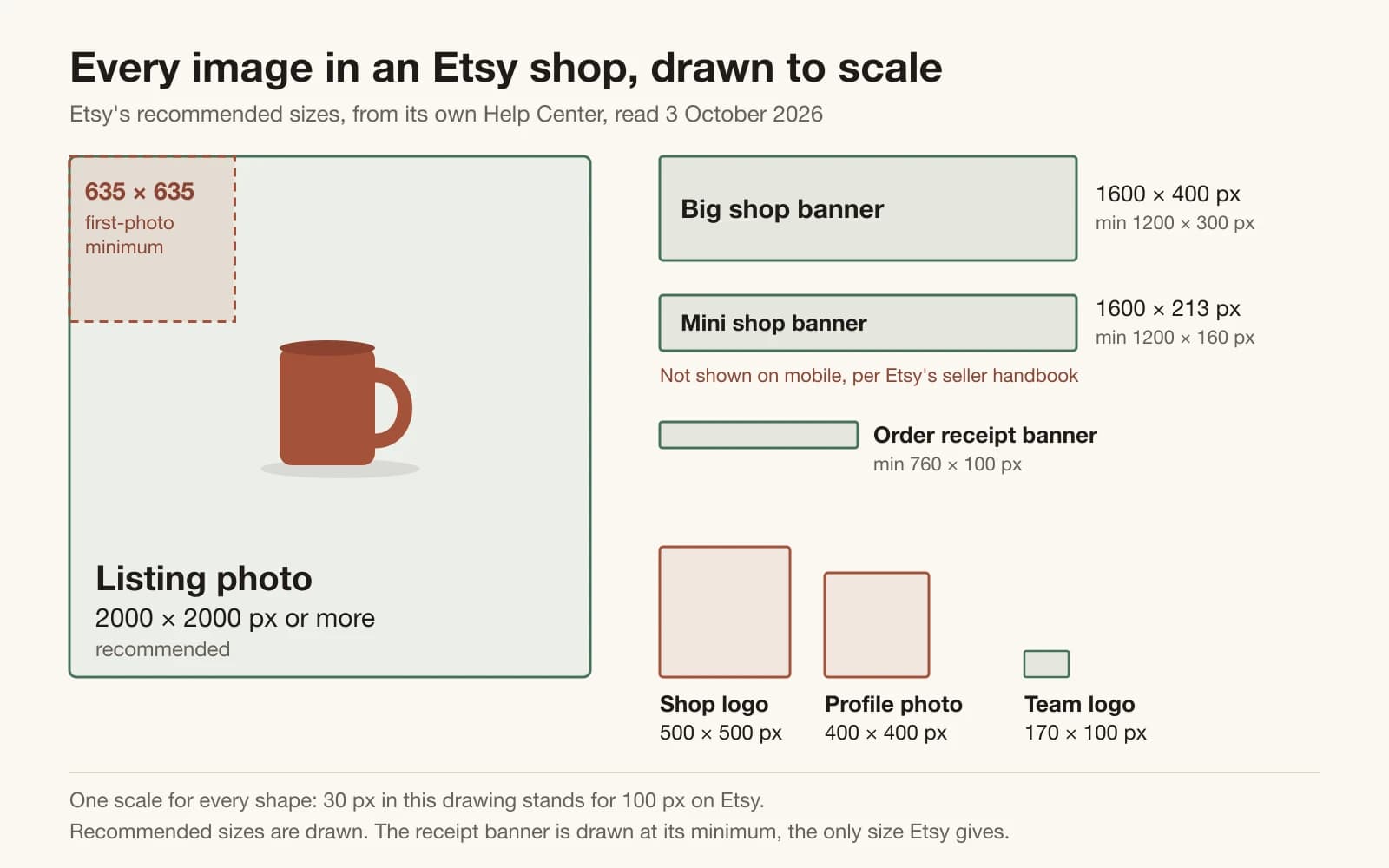
Etsy recommends listing photos at least 2000 pixels wide and 2000 pixels tall. Your first photo should be at least 635 × 635 pixels: smaller, Etsy says, and the listing may show up lower in search. Make that first photo landscape or square: Etsy turns it into the thumbnail and crops it to square, portrait and landscape views. That is Etsy's Help Center as we read it on 3 October 2026.
- Listing photos: width and height, recommended
- 2000 px
- Etsy Help, checked 3 Oct 2026
- First photo, minimum width and height
- 635 px
- Smaller may show up lower in search
- Big shop banner, recommended
- 1600 × 400
- Minimum 1200 × 300 px
- Shop logo, recommended
- 500 × 500
- Profile photo: 400 × 400 px
The rest of Etsy's numbers are in one chart below: shop banners, logo, profile photo, receipt banner and listing video, each read on Etsy's own pages and dated. The page also has a checker that measures your own photo against those rules in this browser, without uploading it, and covers the three mistakes that cost the most: a portrait first photo, a transparent PNG that Etsy shows as black, and a mini banner, which Etsy's own handbook says does not appear on mobile devices.
The Etsy image size chart
Etsy uses two kinds of number, and they mean different things. A minimum is the smallest size Etsy states as required for that image, or, for the first listing photo, the size below which Etsy says the listing may show lower in search. A recommended size is Etsy's advice for the best result. Where Etsy gives just one of the two, the other cell says so instead of guessing.
| Image | Where it's used | Etsy's minimum | Etsy recommends |
|---|---|---|---|
| Listing photo | Where it's usedYour listing page. The first photo is also the thumbnail across Etsy | Etsy's minimum635 × 635 px for the first photo | Etsy recommends2000 × 2000 px or more |
| Listing video | Where it's usedYour listing page, up to 2 per listing | Etsy's minimum500 px | Etsy recommends1080 px or more |
| Big shop banner | Where it's usedTop of your shop home | Etsy's minimum1200 × 300 px | Etsy recommends1600 × 400 px |
| Mini shop banner | Where it's usedTop of your shop home, desktop only | Etsy's minimum1200 × 160 px | Etsy recommends1600 × 213 px |
| Carousel banner (Etsy Plus) | Where it's usedTop of your shop home | Etsy's minimumNot stated | Etsy recommends1200 × 300 px |
| Collage banner (Etsy Plus) | Where it's usedTop of your shop home | Etsy's minimum600 × 300 px with 2 images, 400 × 300 px with 3, 300 × 300 px with 4 | Etsy recommendsNot stated |
| Shop logo | Where it's usedShop home, and much smaller in feeds, on receipts and in the Etsy app | Etsy's minimumNot stated | Etsy recommends500 × 500 px |
| Profile photo | Where it's usedTop of your shop home | Etsy's minimum400 × 400 px, square | Etsy recommends400 × 400 px |
| Order receipt banner | Where it's usedYour buyers' order receipts | Etsy's minimum760 × 100 px | Etsy recommendsNot stated |
| Team logo | Where it's usedEtsy Teams | Etsy's minimumNot stated | Etsy recommends170 × 100 px |
Every size from Etsy's Help Center and Seller Handbook, read 3 October 2026. “Not stated” means Etsy gives no number for that cell. One disagreement worth knowing: the handbook calls 3360 × 840 px optimal for a big banner, larger than the Help Center's 1600 × 400 but the same 4:1 shape.
Sources: Etsy Help: Requirements and Best Practices for Images in Your Etsy Shop, checked 3 October 2026 · Etsy Help: How to Add Listing Videos, checked 3 October 2026 · Etsy Help: Your Bio and Profile Picture, checked 3 October 2026 · Etsy Seller Handbook: Customizing the Look of Your Shop Home, checked 3 October 2026
Listing photo size: why Etsy asks for 2000 pixels
Etsy's two listing-photo numbers do different jobs. 635 × 635 pixels is about search: it is the floor for your first photo, and Etsy ties it to where the listing shows up. 2000 pixels wide and tall is about quality, and Etsy says photos that size give buyers better images. Upload narrower photos and Etsy shows the message “Listings look best with photos at least 2000 pixels wide”, which its help calls only a suggestion: the listing still publishes. Each listing takes up to 20 photos and 2 videos.
Shoot bigger than 2000 anyway, for two reasons Etsy gives itself. The thumbnail is a crop of your first photo, so part of the picture is thrown away before a shopper sees it, and Etsy compresses uploaded images, which can make them look less sharp than the file you sent. Enlarging does not rescue a small photo: Etsy says shrinking an image keeps its resolution, but enlarging it can cause pixelation.
Sources: Etsy Help: Requirements and Best Practices for Images in Your Etsy Shop, checked 3 October 2026 · Etsy Help: How to Create a Listing, checked 3 October 2026
Etsy thumbnail size: three crops, no published ratio
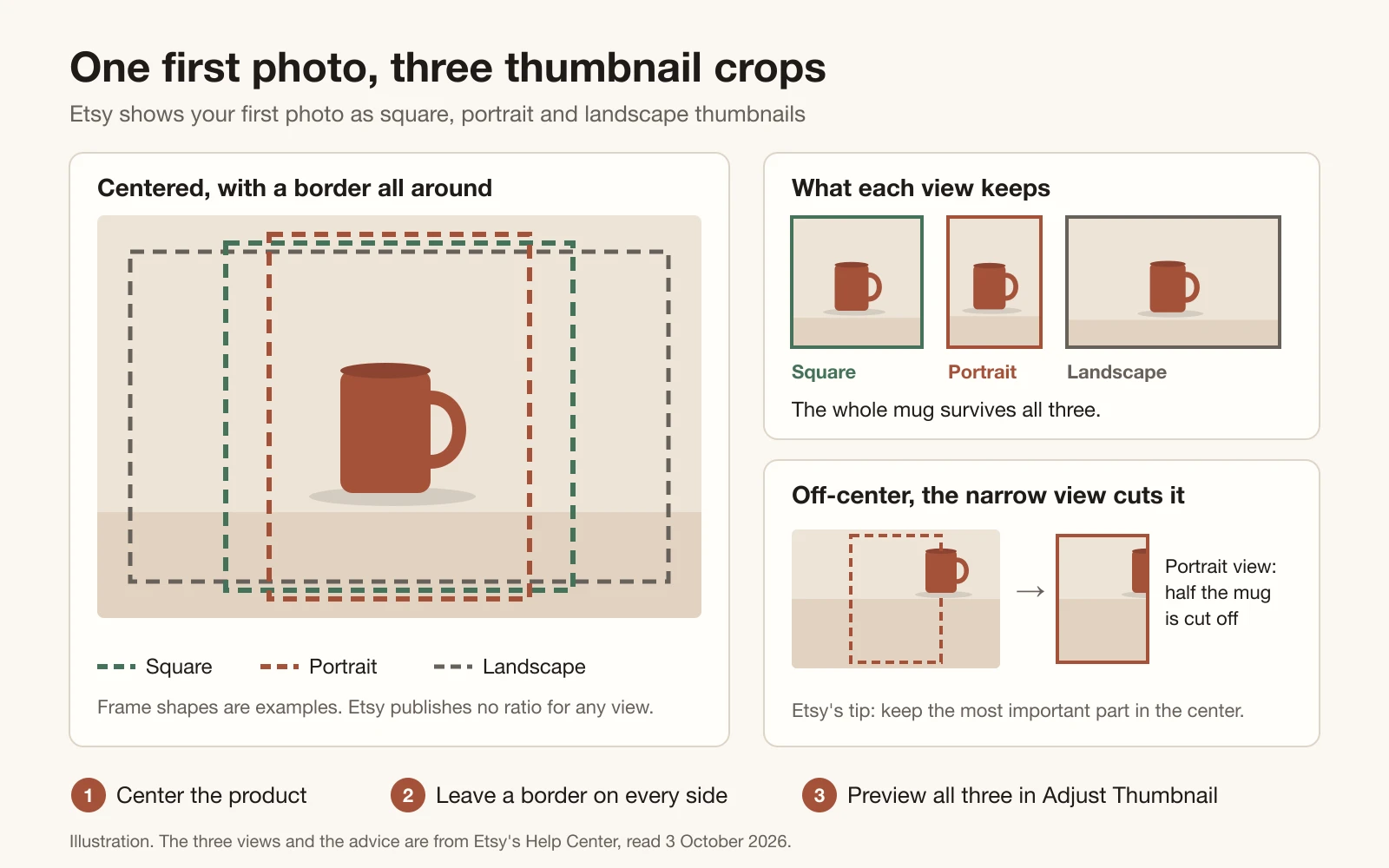
There is no single Etsy thumbnail size to design for. The thumbnail is your first photo, cropped: Etsy describes it as a cropped version of your primary listing photo that appears in different places across the site, in three shapes: square, portrait and landscape. Its help pages give no pixel size and no ratio for any of the three.
So follow the rule Etsy does give. Shoot from further back than you think you need, keep the most important part of the item in the center, and leave enough border that all three crops keep the whole product. A landscape first photo helps: Etsy says a horizontal picture uses more of the thumbnail frame, while a vertical one loses more to cropping. Its thumbnail tips even say to avoid square crops, which is stricter than its own rule that the first photo be landscape or square.
Open the listing
In Shop Manager, choose Listings, then edit the listing or create a new one.
Crop first, if at all
Cropping changes how the thumbnail looks, so Etsy says to crop before you adjust it. A saved crop can't be undone: you would have to upload the original again.
Choose Adjust Thumbnail
Slide the circular button left and right to zoom in and out.
Check all three views, then Apply
Position the photo so the product is clear in the square, portrait and landscape views Etsy uses.
Sources: Etsy Help: How to Edit Your Listing Photos, checked 3 October 2026 · Etsy Help: Requirements and Best Practices for Images in Your Etsy Shop, checked 3 October 2026
Check your own photo against Etsy's rules
Choose what the image is for and pick a file. The checker measures it against the numbers Etsy publishes: the minimum and recommended size, the file type, transparency and the 1 MB upload caution, plus whether a listing photo is landscape, square or portrait. For a listing photo it also draws the centered square over your image. That is the one thumbnail crop whose shape is certain, so if the product spills outside it, the square view will cut it.
Your photo is read in this browser and never uploaded. A browser that cannot open .heic files gets a shorter check, file type and weight only.
Check your own photo
| Image | Minimum | Recommended |
|---|---|---|
| Listing photo | 635 × 635 px | 2000 × 2000 px |
| Big shop banner | 1200 × 300 px | 1600 × 400 px |
| Mini shop banner | 1200 × 160 px | 1600 × 213 px |
| Shop logo | — | 500 × 500 px |
| Profile photo | — | 400 × 400 px |
| Order receipt banner | 760 × 100 px | — |
First photo at least 635 px wide and tall; 2000 px or more recommended; landscape or square. Your photo is checked in this browser and never uploaded.
Source: Etsy Help: Requirements and Best Practices for Images in Your Etsy Shop, checked 3 October 2026
Your first photo does most of the work
The first photo is where every rule above lands at once. It carries the 635-pixel floor, it becomes the thumbnail, and Etsy says it sets the shape of the photos after it, so a gallery shot in one shape looks more consistent. Etsy is also direct about quality: a main image that is too dark, blurry or part of a photo collage may push your listing lower in Etsy search.
To see whether Etsy has flagged any of yours, open the Etsy Search visibility page in Shop Manager. It lists listings whose images may be hurting their visibility, with a recommendation for each, and Etsy says the insight usually disappears within 24 hours of a fix. Etsy's rules are only half of it, though: the first photo is also what wins or loses the click in search.
Shown in search but never clicked? How a weak thumbnail costs you views → · Grade the title and description beside your photo, free to try →
Sources: Etsy Help: How to Edit Your Listing Photos, checked 3 October 2026 · Etsy Help: Requirements and Best Practices for Images in Your Etsy Shop, checked 3 October 2026
Etsy shop logo and profile photo size
Etsy recommends a 500 × 500 pixel shop logo. It shows at that size on your shop home, but the handbook notes it appears much smaller in activity feeds, on receipts and in the Etsy app, so keep it to simple graphics and short text. Etsy's own checklist for a logo: it should look good big and small, and avoid long words and busy backgrounds.
The profile photo is the shop owner picture at the top of your shop home. Etsy recommends 400 × 400 pixels, and its profile help sets the hard edges: at least 400 × 400, smaller than 10 MB, a .jpg, .png or .gif, and square to begin with, or Etsy will distort it. The handbook's rule of thumb is to crop tight, with your face filling about 70% of the frame, or to use a brand graphic if you'd rather stay out of the picture.
- Order receipt banner: at least 760 × 100 pixels, added in Shop Manager under Settings, then Info & Appearance.
- Team logo: 170 × 100 pixels recommended.
Sources: Etsy Help: Requirements and Best Practices for Images in Your Etsy Shop, checked 3 October 2026 · Etsy Help: How to Customize Your Shop's Appearance, checked 3 October 2026 · Etsy Help: Your Bio and Profile Picture, checked 3 October 2026 · Etsy Seller Handbook: Customizing the Look of Your Shop Home, checked 3 October 2026
File types, transparent PNGs and color
Etsy accepts five image file types: .jpg, .gif, .png, .svg and .heic, and its help calls them the only ones it supports. WebP, TIFF and AVIF are not on that list, so convert them before uploading. Animated GIFs are not supported, and neither are transparent PNGs.
Color is the quieter problem. Etsy converts images to the sRGB color profile and notes that CMYK is for print only, so a photo saved in another profile can look different on the site than on your screen. Convert to sRGB before you upload and shoppers see the colors you saw.
- Uploads that stall: Etsy's image help says files over 1 MB may not finish uploading on a slow connection, and its listing help puts the line at 300 KB. Lower the JPEG quality a little before you cut the pixel size below 2000.
- Sideways photos: Etsy rotates images using the orientation your camera stores in the file. If one still uploads sideways, rotate it in an editor or retake it with the camera held the same way as the product.
Sources: Etsy Help: Requirements and Best Practices for Images in Your Etsy Shop, checked 3 October 2026 · Etsy Help: How to Create a Listing, checked 3 October 2026
Selling on Amazon or eBay too? The photo rules change
The same product photo meets three different rulebooks. Etsy's photo help is about size, file type and the crop, and sets no background rule. Amazon's main image has to sit on pure white, RGB 255, 255, 255, with the product filling 85% of the frame. eBay's picture policy bans added borders, text and watermarks. Each column below comes from that marketplace's own help pages, read on 3 October 2026.
| Rule | Etsy | Amazon | eBay |
|---|---|---|---|
| Smallest size | Etsy635 × 635 px for the first photo, or it may show lower in search | Amazon500 px on the longest side. Smaller images can't be uploaded | eBay500 px on the longest side |
| Recommended | Etsy2000 × 2000 px or more | Amazon1,000 px or more on the longest side, which turns on zoom | eBayAbout 1600 × 1600 px |
| Main photo background | EtsyNo rule. Transparent areas show black | AmazonPure white, product filling 85% of the frame | eBayWhite advised, not required. No added borders, text or watermarks |
| File types | EtsyJPG, GIF, PNG, SVG, HEIC | AmazonJPEG (recommended), TIFF, PNG, non-animated GIF | eBayJPEG, PNG, GIF, TIFF, BMP, WEBP, HEIC, AVIF |
| Photos per listing | EtsyUp to 20, plus 2 videos | Amazon1 main image, and at least 6 more recommended | eBayUp to 24 |
Read on each marketplace's own pages on 3 October 2026. One file clears every size line here: a square JPEG of 2000 pixels or more on a filled background. Only Amazon requires the background to be white.
Product photos on a filled white background, 2048 px square → · The text limits for the same marketplaces: titles, tags, descriptions →
Sources: Etsy Help: Requirements and Best Practices for Images in Your Etsy Shop, checked 3 October 2026 · Etsy Help: How to Create a Listing, checked 3 October 2026 · Amazon Seller Central: Product image guide (G1881), checked 3 October 2026 · eBay Help: Picture policy, checked 3 October 2026 · eBay Help: Adding pictures to your listings, checked 3 October 2026
What Sellura does for your photos, and what it doesn't
Sellura's product-photo tool starts from one photo you took of the item and re-renders it with AI on a filled white studio background, or in a lifestyle scene, as a 2048 × 2048 JPEG: square, past Etsy's 2000-pixel recommendation, and never transparent, so it cannot turn black on Etsy. Every render is compared against your photo before it is saved, and one that has drifted from your product is thrown away without using a credit. Your first image is free, one white-background render per account. After that, product images are part of the Pro plan at 1 credit each, lifestyle scenes included.
What it does not do: design your banner or logo, resize images to Etsy's banner sizes, or upload anything to Etsy. Nothing is posted to your shop. On Etsy, mind the policy too: its Listing Image Requirements ask for original photos of the actual item, “not renderings or stock photos”, so lead with your own photograph and keep any generated scene for the later slots.
- Free, with no card: the title preview and the 0–100 score on every listing generation for Etsy, Amazon Handmade, eBay, Shopify, Depop and Walmart, plus the Listing Grader (free to try), the fee calculators and the listing-limits reference.
- One credit unlocks a finished listing. Starter is $15 a month for 25 credits, or $150 a year.
- Pro is $24 a month for 65 credits plus bulk, or $240 a year, and it is the plan that makes product images, at 1 credit each.
Sources: Etsy Listing Image Requirements policy, checked 3 October 2026 · Etsy Help: Requirements and Best Practices for Images in Your Etsy Shop, checked 3 October 2026
FAQ
What size should Etsy listing photos be?
Etsy recommends at least 2000 pixels wide and 2000 pixels tall. Your first photo should be at least 635 × 635 pixels and landscape or square: smaller, Etsy says, and the listing may show up lower in search. Smaller photos still publish, because Etsy's under-2000 warning is only a suggestion, but Etsy says 2000 pixels and up gives buyers better quality images. Checked on Etsy's Help Center on 3 October 2026.
What is the Etsy thumbnail size?
Etsy doesn't publish one. The thumbnail is a crop of your first photo, and Etsy shows it in three shapes, square, portrait and landscape, without giving a pixel size or a ratio for any of them. Keep the product centered with a border on every side, use a landscape or square first photo, and preview all three crops with Adjust Thumbnail in Shop Manager.
What size is an Etsy banner?
A big banner needs at least 1200 × 300 pixels, and Etsy's Help Center recommends 1600 × 400. Its seller handbook calls 3360 × 840 optimal, at the same 4:1 shape. A mini banner needs at least 1200 × 160 and Etsy recommends 1600 × 213, but the handbook says mini banners don't appear on mobile devices. Etsy Plus adds a carousel banner, 1200 × 300 recommended, and a collage.
Can Etsy listing photos be square?
Yes. Etsy says the first photo should be landscape or square, so square is allowed. Its thumbnail tips lean landscape, though: a horizontal picture uses more of the thumbnail frame, and a vertical one loses more to cropping. Whichever you choose, Etsy says the first photo sets the shape of the ones after it, so keep the gallery in one shape.
Why do my Etsy photos look blurry?
Usually one of three things. The file was enlarged from a smaller original, which Etsy says can cause pixelation. Etsy compresses uploaded images, so they can look less sharp afterwards. Or the thumbnail is zoomed into a small part of the photo. Start from at least 2000 pixels on both sides, never upscale a small file, and check the crop in Adjust Thumbnail. Etsy also says a blurry main image may push the listing lower in search.
Why does a transparent PNG turn black on Etsy?
Because Etsy doesn't support transparency: its help says the transparent parts of an image appear black. A cut-out saved on a transparent background shows up as your product on a black block. Flatten it onto a solid background, white or any color, and upload a JPG or a PNG with no transparent pixels.
What size should an Etsy shop logo and profile picture be?
Etsy recommends 500 × 500 pixels for the shop logo and 400 × 400 for the profile photo. The profile picture must be at least 400 × 400, under 10 MB, square, and a .jpg, .png or .gif. Keep the logo simple, because Etsy shows it much smaller in feeds, on receipts and in its app.
Monday morning: open your first photo's details and check that both sides reach 2000 pixels, and replace it first if either side is under 635. Re-shoot a portrait first photo as landscape with the product centered and a border all around, flatten any transparent PNG onto a solid background, then preview all three crops in Adjust Thumbnail. Banner and logo come after that: 1600 × 400 for a big banner, 500 × 500 for the logo, text large and central. If you need a clean white version of the product to start from, your first one is free.