How to sell on Depop: from your first listing to your first sale
By Oleksandr Shaniuk · founder of Sellura · Updated October 3, 2026
To sell on Depop, open an account (Depop's Terms let anyone aged 13 or over use it), set up Depop Payments (PayPal outside the US, UK and Australia), then tap Sell and fill in one listing: up to four photos and a video in the app or eight photos on the web, a description that opens with the words a buyer would search for, up to five hashtags, and the category, brand, size and condition fields. Price it against similar items that sold, ship before Depop's deadline once it sells, and the money lands in your Depop Balance after the buyer receives it.
- Minimum age to buy and sell on Depop
- 13+
- Under 18, a parent or guardian verifies for you
- Selling fee in the US and UK
- 0%
- Processing: 3.3% + $0.45 per US sale
- The first line of your description is the title
- No title
- Depop's tip: open with words buyers search
- Hashtags per listing, at most
- 5
- Typed into the description itself
In the US and UK, Depop charges no selling fee, only payment processing: 3.3% + $0.45 per sale in the US and 2.9% + £0.30 in the UK, charged on the item plus shipping and any tax (Depop's help centre, read 3 October 2026). Two rules catch new sellers out. There is no title field, so the first line of your description does that job, and the dropdowns are search filters, so a blank size or brand hides your listing from everyone who filters by it. Below, each step in order, with the Depop page every rule comes from.
What you need before you can sell on Depop
Depop asks for three things before you can sell: an account, a payment account and, before any money leaves your Depop Balance, a bank account with an identity check. In the US, UK and Australia the payment account is Depop Payments, and without it you can't post a listing at all.
| To… | You need |
|---|---|
| Open an account | You needTo be 13 or over |
| Post a listing in the US, UK or Australia | You needDepop Payments set up |
| Post a listing anywhere else | You needA verified PayPal account linked to Depop |
| Get paid out to your bank | You needA valid bank account and an ID check (required in the UK, possible in the US) |
| Sell while under 18 | You needA parent or guardian who verifies their details for you |
From Depop's Terms of Service (effective 2 September 2026) and its help-centre pages on date of birth, listing an item and getting paid in the US and UK, all read 3 October 2026.
Sources: Depop Terms of Service, effective 2 September 2026 (sections 4 and 8), checked 3 October 2026 · Depop Help Centre: Why does Depop need my date of birth?, checked 3 October 2026 · Depop Help Centre: How old do I have to be to use Depop?, checked 3 October 2026 · Depop Help Centre: How to list an item (Depop Payments required to list), checked 3 October 2026 · Depop Help Centre: How do I get paid? (US), checked 3 October 2026 · Depop Help Centre: How do I get paid? (UK), checked 3 October 2026
What you can sell on Depop, and what gets removed
Depop's Terms call it a fashion marketplace, and its selling guide starts with turning your clothes into cash. Before you list anything else, read its prohibited-items list, because several entries surprise first-time sellers.
- Most electronics are prohibited: phones, headphones, consoles, laptops, tablets, smartwatches, even hair stylers. Cameras and lenses, phone and laptop cases, and ordinary wristwatches are allowed.
- No drop-shipping. You may only sell items in your possession, with two exceptions: handcrafted pieces and print-on-demand items you designed yourself.
- Second-hand clothing must be declared as used and cleaned according to the manufacturer's instructions.
- Tickets, gift cards and vouchers, digital downloads, used or tester perfume and make-up, and mystery boxes are all on the list.
- Photos must be your own. Depop says a listing that uses stock images will be removed.
Sources: Depop Terms of Service, effective 2 September 2026 (sections 1 and 7), checked 3 October 2026 · Depop Help Centre: List of prohibited and restricted items, checked 3 October 2026 · Depop Help Centre: Selling on Depop (stock images are removed), checked 3 October 2026
How to list an item on Depop, field by field
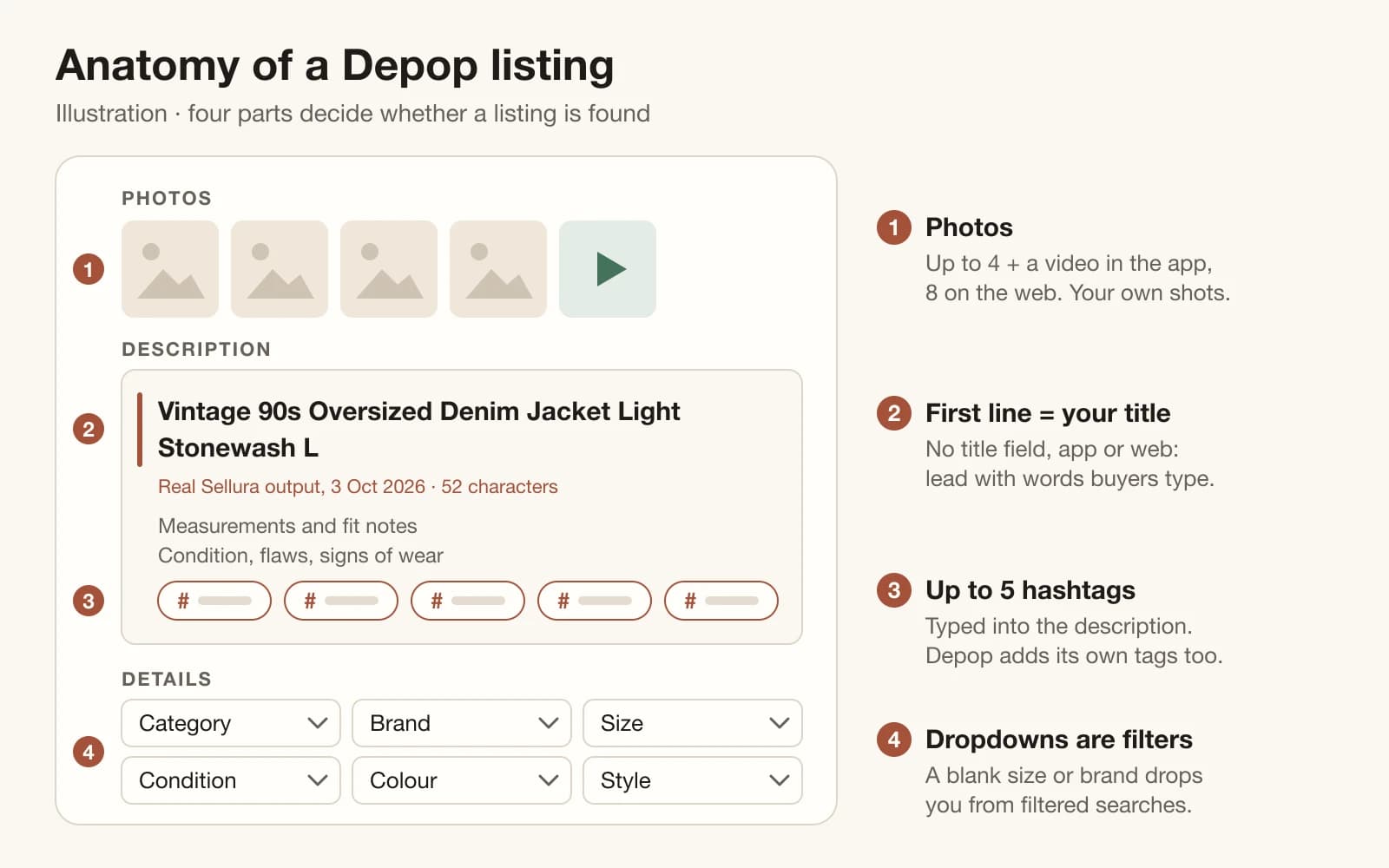
In the app, tap Sell. On a laptop, click Sell now on Depop.com, where the form takes more photos and drafts sync with the app. The fields come in roughly this order.
Photos, and one video
Up to four photos and a video in the app, or eight photos on the web. Your own, showing labels, tags and any flaws.
The first line, which is your title
There is no title field. Depop's tip is to start the description with a title made of words you would search for as a buyer.
The rest of the description
Measurements and fit notes, the condition with any flaws or signs of wear, then shipping or bundle details. Depop says unrelated words, like a brand you aren't selling, can hurt your exposure.
Up to five hashtags
Depop also generates tags and keywords for your listing, which you can keep or replace. Spend your five on searches the first line doesn't already cover.
Category, brand, size, condition, colour and style
Fill every one that fits, with up to two colours. Buyers' filters only show listings whose details match, so a blank size or brand drops you out of those searches.
Price
Depop may suggest a range from similar sold items, sometimes as three options: Likely to sell, Balanced and Less likely. Any price is allowed.
Shipping, then post
Set the shipping price and method, either Depop Shipping or your own tracked service, then tap Post listing.
Sources: Depop Help Centre: How to list an item (photos, five hashtags, fields), checked 3 October 2026 · Depop Help Centre: Tips for describing your item (start with a title), checked 3 October 2026 · Depop Help Centre: Improving the search ranking of your items, checked 3 October 2026 · Depop Help Centre: How to price your item, checked 3 October 2026 · Depop Help Centre: Selling on Depop, checked 3 October 2026
How to write the first line (Depop has no title field)
The opening words do two jobs. Depop's search compares what a buyer typed against your description, brand, category, colour and more, and a shopper decides from the line whether to keep scrolling. Depop publishes no character count for the description or its first line, so there is no cap to hit. The job is order, and our rule is: era or brand first, then the item, then fit, colour or wash, then size.
The line in the checker below is real Sellura output, 3 October 2026, written for a vintage oversized denim jacket in size L. It runs 52 characters, and its first 40, which the checker shows back as the phone lead, already carry the era, the fit and the garment. Paste your own line over it. The 65-character target the checker counts against is Sellura's, not Depop's.
Check your own title
- Depop search reads your first line like a title: lead with brand + item + the descriptors buyers filter by (era, size, colour, style).
- Keep hashtags OUT of the name — Depop gives you up to 5 hashtags and they work anywhere in the description.
- Keep your most important keyword inside the first 40 characters — that’s what shoppers see first on mobile.
Check any Depop first line, free → · Generate 5 Depop hashtags from one keyword →
Sources: Depop Help Centre: How Depop ranks search results and recommends listings, checked 3 October 2026 · Depop Help Centre: Tips for describing your item (no length published), checked 3 October 2026 · Depop Help Centre: How to list an item (no length published), checked 3 October 2026 · Depop newsroom: Generate Description, listing from one photo (12 September 2024), checked 3 October 2026 · Depop Terms of Service, effective 2 September 2026 (section 6.6), checked 3 October 2026
How much Depop takes from a sale
In the US and UK there is no selling fee. What Depop does take from every sale is payment processing: 3.3% + $0.45 in the US and 2.9% + £0.30 in the UK, charged on the item price plus shipping and any applicable taxes, so the shipping you charge carries the fee too. Sellers outside the UK, US and Australia pay a 10% selling fee plus PayPal's own charges. The Marketplace fee you may notice at checkout, up to 5% plus up to £/$1, is paid by buyers in the UK and US and doesn't come out of your payout.
Depop's price suggestions come from what similar items sold for, read from details such as brand, condition and category. Treat them as the market's opinion, then check what you keep. In the table, the shipping charged exactly covers the label, so you keep the item price minus processing.
| Item + shipping charged | Selling fee | Processing fee | You keep, label paid |
|---|---|---|---|
| $15 + $6 (US) | Selling fee$0 | Processing fee$1.14 | You keep, label paid$13.86 |
| $40 + $6 (US) | Selling fee$0 | Processing fee$1.97 | You keep, label paid$38.03 |
| $100 + $6 (US) | Selling fee$0 | Processing fee$3.95 | You keep, label paid$96.05 |
| £40 + £4 (UK) | Selling fee£0 | Processing fee£1.58 | You keep, label paid£38.42 |
Our calculation from Depop's published rates, read 3 October 2026. Processing is charged on the item plus shipping, and on any applicable tax (not shown). $6 and £4 are example shipping charges, not Depop rates. The buyer also pays Depop's Marketplace fee and any tax at checkout, and neither comes out of your payout.
Run your own numbers in the Depop fee calculator →
Sources: Depop Help Centre: Seller fees and charges, checked 3 October 2026 · Depop Help Centre: What is the Marketplace fee?, checked 3 October 2026 · Depop Help Centre: How to price your item, checked 3 October 2026
Shipping and getting paid: Depop's deadlines
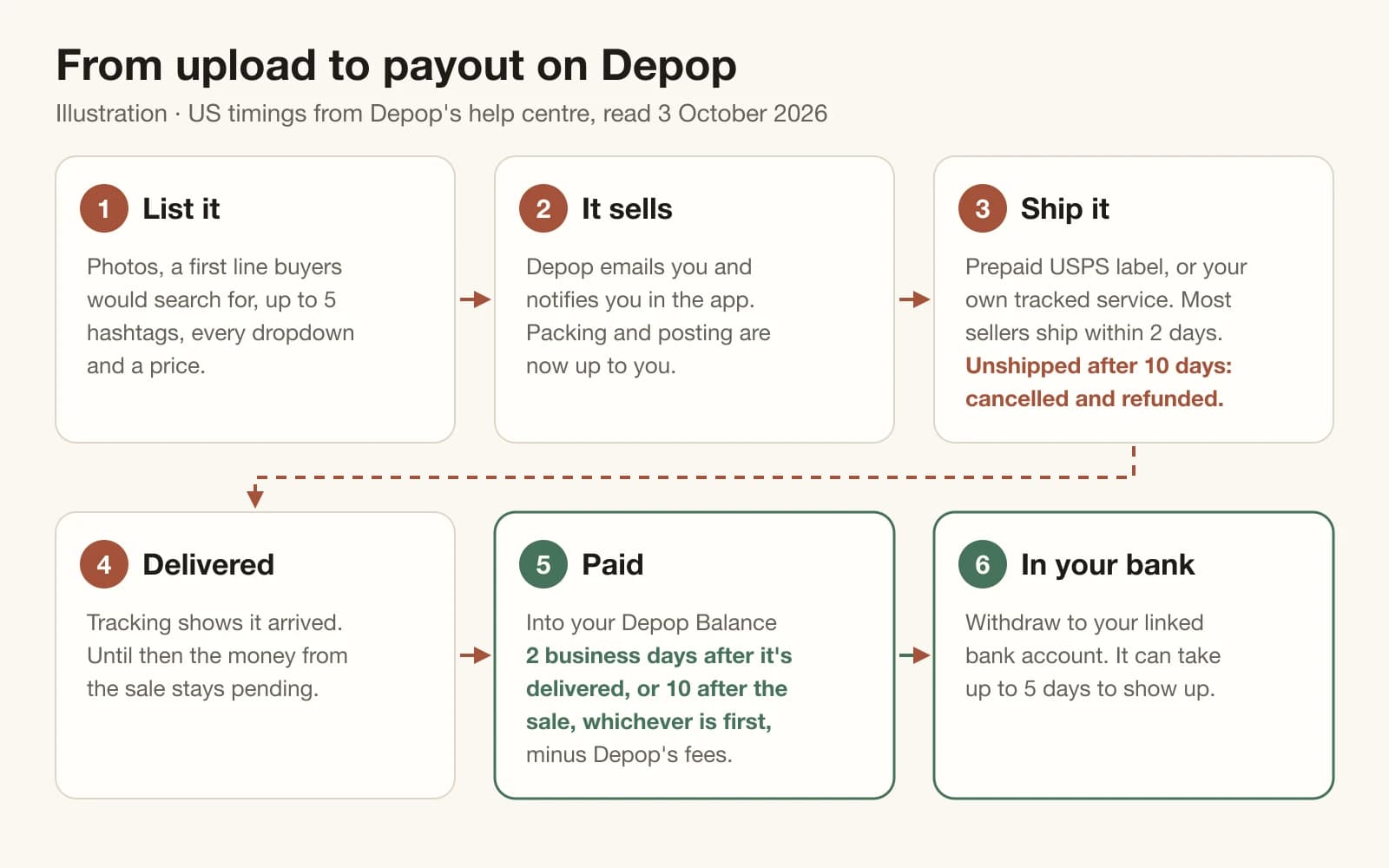
When something sells, Depop tells you by email and in the app, and packing and posting are up to you. Depop Shipping gives you a prepaid, tracked label (USPS in the US, Evri in the UK) as a QR code for a drop-off point or a label to print. Ship your own way and you must use a tracked service and add the tracking to the order. In the US, an order not shipped within 10 days of purchase is cancelled and refunded automatically. Depop says most sellers ship within 2 days.
Money follows delivery, not the sale. In the US, Depop pays your Depop Balance 2 business days after the item shows as delivered or 10 business days after the sale, whichever comes first, and a withdrawal can take up to 5 days to reach your bank. In the UK the same rule applies with Depop Shipping, but manual shipping pays out 10 business days after delivery.
Depop shipping for sellers: who pays, what a label costs, what you keep →
Sources: Depop Help Centre: Selling on Depop (what to do once you've sold), checked 3 October 2026 · Depop Help Centre: How to ship (US), checked 3 October 2026 · Depop Help Centre: How to ship (UK), checked 3 October 2026 · Depop Help Centre: How do I get paid? (US), checked 3 October 2026 · Depop Help Centre: How do I get paid? (UK), checked 3 October 2026
How Depop decides who sees your listing
Depop publishes its search factors. With results sorted by relevance, it weighs how well a listing matches the buyer's words, how popular it is in views, likes and adds to bag, the seller's location, the buyer's own habits, how recently it was listed, the seller's sales and views, whether it is boosted, and whether listing and seller follow its policies. Recency counts for much less than relevance, Depop says, and Top Seller status has no effect at all.
Its own shortlist of what makes the biggest difference is plainer: price it well against similar items, write a clear and accurate description with measurements and signs of wear, and photograph every angle, flaws included. Views, clicks and why relisting is a weak lever are covered in the guide below.
No views on Depop? What views and clicks mean before you relist → · Depop SEO: the first line, hashtags and filters →
Sources: Depop Help Centre: How Depop ranks search results and recommends listings, checked 3 October 2026 · Depop Help Centre: Improving the search ranking of your items, checked 3 October 2026
Is Depop boosting worth 12%?
Boosted Listings adds an extra, labelled placement in search and Suggested for you. For listings from 23 March 2026 the fee is 12% for sellers in the UK and US and 8% outside them. It is charged on the item sale price excluding taxes, and on the shipping only if you didn't use a Depop Shipping label. You pay it only when a buyer viewed, clicked or liked the boosted listing and then bought within 28 days, and that window outlives unboosting: a buyer who saw the boosted tile before you switched it off can still trigger the fee.
Boosting buys placement, not relevance. Depop still orders boosted listings by how relevant they are to the search, so fix the first line, the dropdowns and the price first, then boost what already gets likes. On the $40 example above, sent with a Depop Shipping label, a boosted sale costs another $4.80, which leaves $33.23. Depop says boosting also unlocks two stats worth studying: Total views and Total clicks.
What boosting can and can't fix, from the Depop views guide →
Sources: Depop Help Centre: Boosted Listings, checked 3 October 2026 · Depop Help Centre: Seller fees and charges (boosting fee), checked 3 October 2026 · Depop Help Centre: How Depop ranks search results and recommends listings, checked 3 October 2026
Is selling on Depop worth it?
It is when your stock and habits fit rules Depop publishes, and you can check those before you list a thing. Treat any list of what sells best on Depop that doesn't cite Depop's own data as a guess.
| Works well when | Harder going when | |
|---|---|---|
| What you sell | Works well whenFashion you have in hand, or pieces you designed yourself | Harder going whenPhones, consoles, laptops and most other electronics, which are prohibited |
| Where you're based | Works well whenUS, UK or Australia: no selling fee, processing only | Harder going whenElsewhere: a 10% selling fee plus PayPal's charges |
| Shipping | Works well whenYou post within a couple of days, as Depop says most sellers do | Harder going whenYou can't ship within 10 days, after which a US order cancels and refunds |
| Getting paid | Works well whenYou can wait until the item is delivered | Harder going whenYou need the money the day the item sells |
| Photos | Works well whenYour own, with labels and flaws shown | Harder going whenStock images, which get the listing removed |
From Depop's Terms of Service, Seller fees and charges, its prohibited-items list, How to ship (US), How do I get paid (US and UK) and Selling on Depop, all read 3 October 2026.
Depop vs Poshmark: what each keeps from the same sale →
Sources: Depop Terms of Service, effective 2 September 2026, checked 3 October 2026 · Depop Help Centre: Seller fees and charges, checked 3 October 2026 · Depop Help Centre: List of prohibited and restricted items, checked 3 October 2026 · Depop Help Centre: How to ship (US), checked 3 October 2026 · Depop Help Centre: How do I get paid? (US), checked 3 October 2026 · Depop Help Centre: Selling on Depop, checked 3 October 2026
What Sellura does, and what it doesn't
Sellura writes the findable part of a Depop listing: the first line, the five hashtags and a description in Depop's one-box format, budgeted together so they don't repeat each other. It scores the result from 0 to 100 with fixed, weighted checks, so the same listing always gets the same number, and each weak factor comes with a concrete fix. The score and the first line are free on every generation with no card (15 free previews), and the line in the checker above came back at 98/100 on 3 October 2026. A credit unlocks one full listing: Starter is $15 a month for 25 credits ($150 a year), and Pro is $24 a month for 65 credits plus bulk ($240 a year).
The Depop hashtag generator, the first-line checker and the fee calculator are free with no account, and the Listing Grader gives 2 free checks on a public Depop listing. What Sellura doesn't do: take your photos, post to Depop for you, ship anything, or see your sales, views and search position, so it never reports them. It writes for Etsy, Amazon Handmade, eBay, Shopify, Depop and Walmart, and it is not affiliated with Depop.
FAQ
How old do you have to be to sell on Depop?
13. Depop's Terms let anyone aged 13 or over use Depop, and its date-of-birth page calls 13 the minimum age to buy and sell. Under 18, Depop's US and UK getting-paid pages say a parent or guardian has to verify their details on your behalf for you to sell and get paid.
How much does it cost to sell on Depop?
Depop's fee page lists no fee for listing, and in the US and UK there is no selling fee. Each sale pays processing of 3.3% + $0.45 (US) or 2.9% + £0.30 (UK) on the item plus shipping and any applicable taxes: $3.75 on a $100 item with no shipping or tax. Boosting is optional: 12% of the item price for UK and US listings from 23 March 2026, plus the shipping if you didn't use a Depop Shipping label. Outside the UK, US and Australia there is a 10% selling fee plus PayPal's charges.
How does selling on Depop work?
You list from the app or Depop.com: photos, a description that opens like a title, up to five hashtags, and the category, brand, size and condition fields. When it sells, Depop tells you by email and in the app, you ship with a prepaid Depop Shipping label or your own tracked service, and the money reaches your Depop Balance after delivery.
What can you sell on Depop?
Depop calls itself a fashion marketplace, and you may only sell items you have in hand, except handcrafted or print-on-demand pieces you designed yourself. Its prohibited list rules out most electronics (phones, headphones, consoles, laptops, smartwatches), tickets, gift cards, digital goods, used cosmetics and mystery boxes.
Is selling on Depop worth it?
It is if you sell fashion you own, are based in the US, UK or Australia (no selling fee), can ship within a couple of days and can wait until delivery to be paid. It is harder going if you sell electronics, most of which are prohibited, live elsewhere (a 10% selling fee) or need the money the day an item sells.
How do I get more sales on Depop?
Start with Depop's own shortlist: price well against similar items, write a clear, accurate description with measurements and signs of wear, and photograph every angle including flaws. Then make sure you can be found: a first line with the words buyers type, every dropdown filled, and five hashtags that add searches your text doesn't cover. Boost only listings that already get likes.
Do I need PayPal to sell on Depop?
Not in the US, UK or Australia. There you sell through Depop Payments, which Depop requires before you can post a listing. PayPal is only used outside those three countries, where you need a verified PayPal account linked to your Depop account.
Selling on Depop comes down to five habits: set up Depop Payments before you photograph anything, open the description with the words a buyer would search for, fill every dropdown so filters keep you in, price against similar sold items knowing US processing is 3.3% + $0.45 on item and shipping, and ship well inside Depop's deadline so the payout follows delivery. Start with the first line. Check yours free, or let Sellura write the whole listing and show you its score before you spend anything.